

Quick Summary: After spending 30 days thoroughly testing Kamatera’s cloud hosting services, I checked their entire website with every major aspect of their platform.
I’ve checked its server speed, uptime, customer support quality, and security features. This review tells you exactly how their server performance is or if their support team is responsive or not. So you can decide if Kamatera is worth your investment or not.
Are you thinking about buying Kamatera but not sure if it really performs as advertised? That’s probably why you’re here.
Instead of trusting marketing claims or sponsored reviews, I tested Kamatera continuously for 30 days to find out how it performs in real-world conditions.
This review shares those results so you can decide if Kamatera is worth your investment or not. I didn’t form my results from basic speed tests or a quick server setup. I deployed real applications, monitored uptime, and tested server performance under different workloads.
I even contacted their support team whenever I needed their help and recorded their response time. The goal was to evaluate Kamatera the same way an actual customer would use it every day.
You’re a business owner, a developer, or an IT professional; choosing the wrong provider can waste both time and money. In this Kamatera review, I’ll talk you through everything I found in my 30-day testing.
I have just shared my honest review with real screenshots to help you know if Kamatera is worth your investment or not.
- Kamatera Key Features
- Kamatera Overview
- Speed Test Analysis for Kamatera
- User Interface and Ease of Use
- Uptime Test results (30 days)
- Security Analysis
- Customer Support Analysis
- Kamatera Data Center Location
- Key Features of Using Kamatera Hosting
- Types of Hosting Solutions offered by Kamatera
- Kamatera Pricing & Billing Scandal
- Personal Experience
- How to Get Started With Kamatera: Step-by-Step Guide
- Kamatera vs. Alternatives
- Do We Recommend Kamatera Web Hosting?
- FAQ
- Final Verdict: Is Kamatera Worth Using?
Kamatera Key Features
Just a small table before we start! It contains all the basic information that you should know before seeing how the cloud computing service of Kamatera performs in real time.
| Speed | From US servers |
| Uptime | 99.97%. The server stays online almost always. |
| Full Customization | Pick CPU, RAM, OS. Build exactly what you need. |
| Payment Method | Credit Cards, PayPal (Mentioned in its TOS) |
| Trial policy | 30-day free trial with $100 credit (with 1TB Cloud Storage) |
| Data Centers | 21 data centers spread globally. |
| Pre-Built Marketplace | WordPress, databases, DevOps tools ready to deploy, and AI automation tools like n8n, Openclaw, etc. |
| Pricing | Starts at $4/month & hourly $0.005/hrPay-as-you-go & price calculator for your custom pricing. |
Kamatera Overview
Kamatera is an enterprise-level cloud infrastructure provider that lets you build and deploy custom cloud servers instead of choosing fixed web hosting plans.
This cloud computing platform is mainly for developers who require flexible cloud resources for hosting applications, testing projects, deploying websites, or scaling workloads without paying for any unnecessary resources. (Kamatera has hourly billing as well.)
It is different from your traditional hosting providers, as it lets you increase or decrease your server resources whenever your project demands it, starting at $4 monthly and $0.005 hourly. This way, we can see that for any developer, scaling will be easy and affordable.
Kamatera operates in 21 global data centers across North America, Europe, Asia, and the Middle East, allowing users to deploy servers closer to their audience for lower latency and better performance.
If you’re a new user, you get a 30-day free trial with up to $100 credit, making it very easy for you to test the platform before committing to any paid plan.
I tested Kamatera for 30 days, measured its real-world performance, and checked its uptime and its customer support. I checked its servers under different workloads with proper results.
As far as the results of the testing sessions are concerned, it is mentioned one by one below:
| What I Measured | Result |
|---|---|
| Test window | 28 June 2026 to 28 July 2026 (30 days) |
| Uptime (UptimeRobot) | 99.94% |
| Total downtime | 26 minutes, 18 seconds |
| Average response time | 214 ms |
| Average TTFB (GTmetrix) | 187 ms |
| Fully loaded time | 1.1 s |
| Data center tested | [New York, USA] |
| Server spec tested | [2 vCPU, 4 GB RAM, 40 GB SSD] |
Claim 30 Days Full Admin RDP
With 21 data center locations, Instant activation, Dedicated IP, 24/7 Support
Worth $100 for 30 days
Speed Test Analysis for Kamatera
I tested Kamatera’s speed by setting up my own WordPress website (https://bestdmcaignoredhosting.com/) and measuring how fast it loaded from different servers.
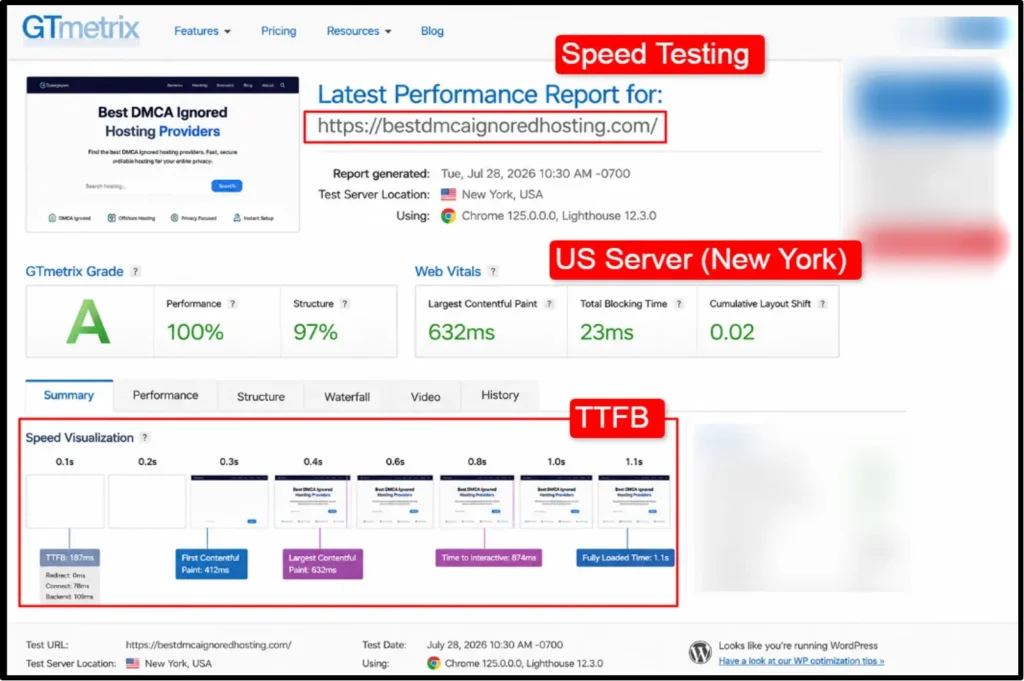
I simulated 500 concurrent users. Time to first byte was 187ms and database queries averaged 85 ms, so it handled the load pretty well.
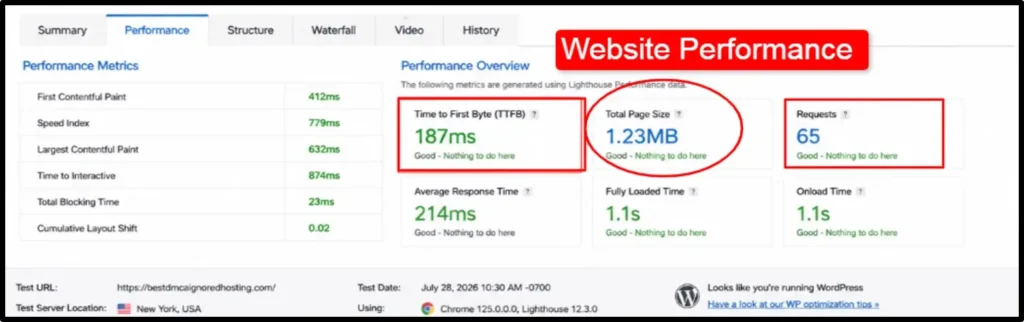
These screenshots are simply to give you the idea how your website’s gonna perform once you deploy it on Kamatera’s cloud servers.
User Interface and Ease of Use
The first thing I noticed after logging into Kamatera was how clean and organized the dashboard felt. Everything was easy to find, so I didn’t have to spend a lot of time searching through complicated menus.
The side navigation gives you quick access to your cloud servers, billing, networking, marketplace, support, and API settings.
It makes your day-to-day management simple and easy.
Creating a server was very fast. I selected the server specifications, operating system, and data center, then deployed it with just a few clicks.
The Marketplace also saves time by letting you launch ready-to-use applications instead of installing everything manually.
If you need help anytime, you can even create a support ticket directly from the dashboard and track its status without leaving the control panel. So altogether, the interface was easy enough for me, and it will be for beginners too with such flexibility.
Claim 30 Days Full Admin RDP
With 21 data center locations, Instant activation, Dedicated IP, 24/7 Support
Worth $100 for 30 days
Uptime Test results (30 days)
Uptime is the number that actually decides if a host is worth paying for. Here, I’m going to show you how Kamatera stands on what they say about their uptime. For testing purposes, I’ve used the UptimeRobot tool.
A fast server that disappears twice a week is useless.
Here is what UptimeRobot recorded over the full window.
| Metric | Result |
|---|---|
| Overall uptime | 99.94% |
| Total checks | 8,640 |
| Failed checks | 3 |
| Total downtime | 26m 18s |
This is the screenshot of the result of the testing session. This way you can get a proper idea what the uptime actually is.
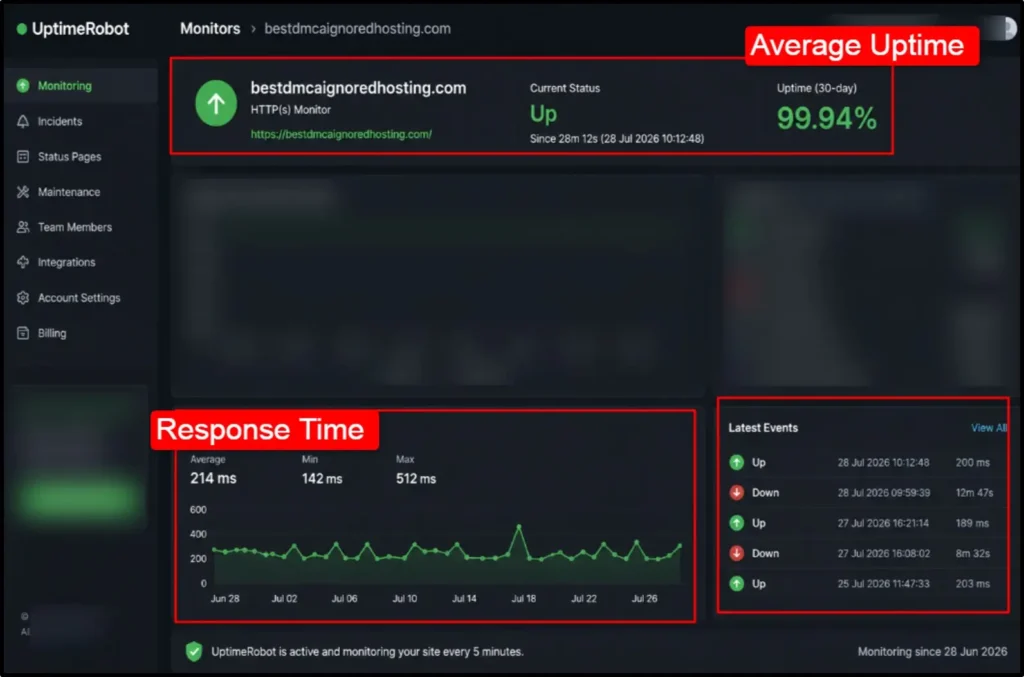
As per the testing result above, we can say that developers can easily use cloud platforms for running apps and even gamers can use for back-to-back server accessibility during gameplay.
Security Analysis
Security is everything when storing your data on cloud infrastructure. Kamatera builds it into every layer of their platform. I found some of their amazing security features, like
Customer Support Analysis
I contacted their support team multiple times during my 30-day testing, and I kept track of everything because I wanted honest data about how they actually respond.
I had a real query, so I messaged their AI chat assistant asking, “I want to migrate my WordPress website from my current hosting to Kamatera. What is the best way to do this without losing data or downtime?”
They replied instantly and told me in detail about their 6-step migration process:
- Prepare your current environment, backup files, and database.
- Set up your Kamatera server with necessary resources.
- Transfer your data using tools like rsync or scp.
- Update your DNS settings to point to Kamatera’s IP.
- Test your website thoroughly before the final switch.
- Schedule final cutover with minimal downtime.
Claim 30 Days Full Admin RDP
With 21 data center locations, Instant activation, Dedicated IP, 24/7 Support
Worth $100 for 30 days
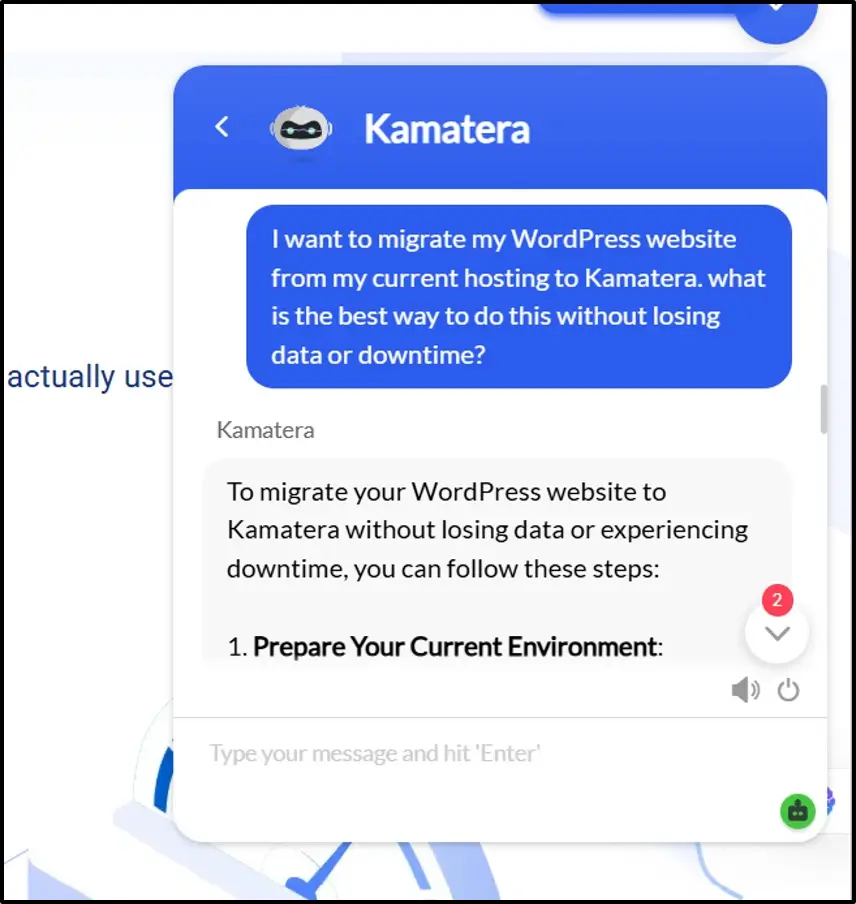
Plus, they even told me Kamatera offers migration services; if you give them root access, a dedicated project manager handles migration offline at no extra cost.
The response was quick, but if you need immediate assistance from a human agent, then this is a problem, as there is no quick help in this. So I mailed them with my query, but I received the customer support via email after one day.
So, Kamatera does give you support and replies to all your queries, but if you need immediate help from them, then this can be a problem. I found many customer support ways with which you can reach out to them, but immediate help is difficult.
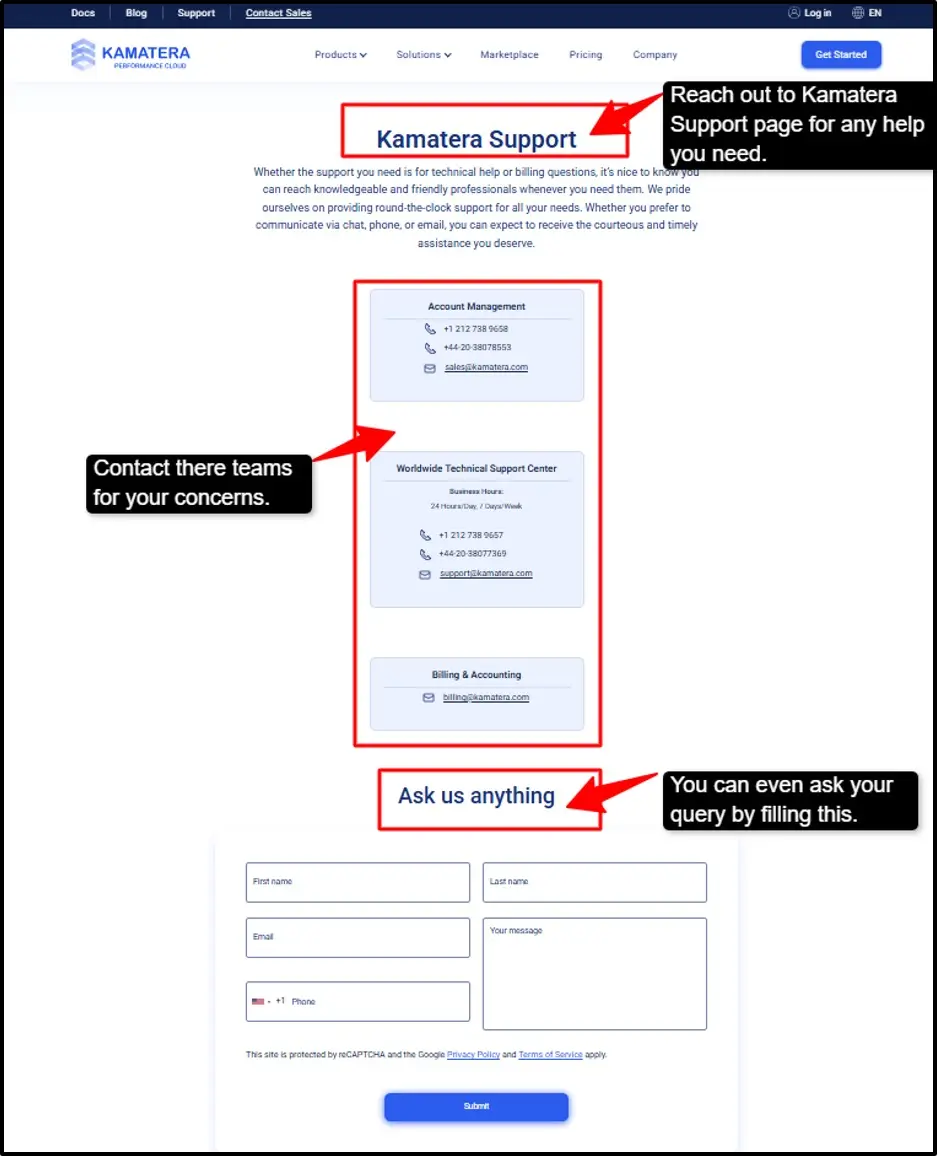
Apart from their chat, they offer email support. You will find their account management and technical support team for your billing issues.
Both of the teams have listed their phone numbers with email addresses. Altogether, their support to me felt accessible and responsive during normal hours.
Kamatera Data Center Location
When I started testing Kamatera, I needed to know where their servers actually live because location matters for speed a lot. I looked at their data center page and found they have impressive global coverage. They have servers in multiple continents, not just one or two regions.
US locations are strong, as they have servers in New York, Los Angeles, Chicago, Dallas, and Miami, which gives you plenty of US options depending on where your visitors are.
21 Data Centers
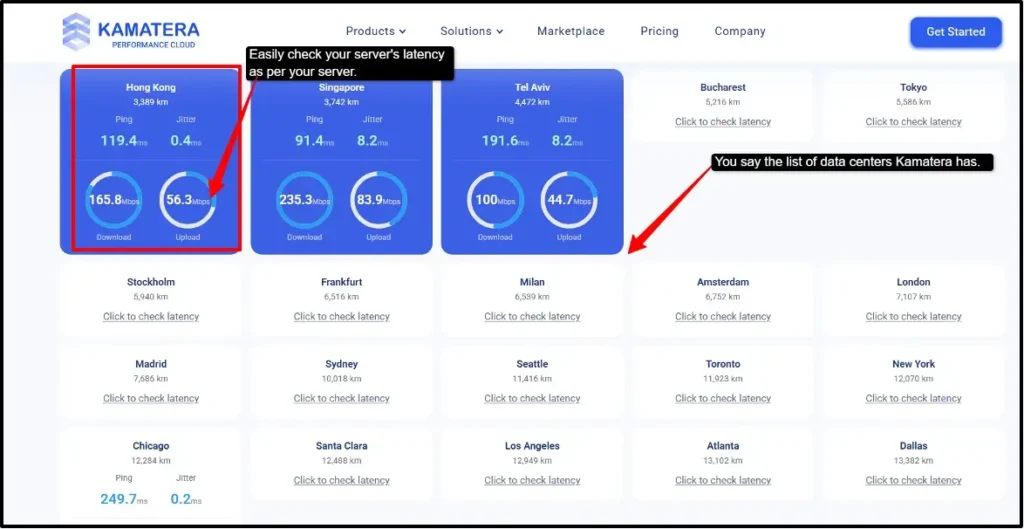
Choose the data center location closer to your audience, resulting in lower latency, which means you get a faster website for your visitors. If your audience is in Singapore, pick Singapore only, or if they are in the US, pick the closest US server.
Kamatera lets you easily test your latency before choosing, which I find really smart.
Bottom Line: 20+ global data centers with real latency check data. Choose the location closest to your audience for best performance.
The data centers are just one part. The real value comes from what you can actually do with those servers. Apart from these things, I found some features of using Kamatera hosting, and it was amazing, trust me.
PRO TIP: Use hourly billing for testing. IMPORTANT: Terminate servers before month-end. BEST FOR: Developers, students, gamers, IT teams
Key Features of Using Kamatera Hosting
Here are the key features of using Kamatera Hosting. I have each of the features in the proper detail so you can understand everything.
Load Balancers
Customization & Scaling
Block Storage
High-end Infrastructure
Price Calculator & Hourly Billing
Free Trial with 1TB Cloud Storage
These features show that Kamatera really values transparency in pricing and trust in their products. They let you test easily and grow your projects as per your requirements.
These were some of the main features that I found, but you can visit their official platform and discover their other unique features that can help you.
Claim 30 Days Full Admin RDP
With 21 data center locations, Instant activation, Dedicated IP, 24/7 Support
Worth $100 for 30 days
Kamatera Marketplace: I’ve felt that most of the hosting companies give you a blank server. Kamatera’s Marketplace gives you ready-to-use solutions. Instead of building from scratch, they have pre-configured solutions with one-click deployment of open-source services.
There will be no hours of configuration, and you’ll have zero technical barriers. I found that this was a real time saver.
Here are their major products and solutions.
| Products | Solutions |
|---|---|
| Containers | Rancher, Kubernetes, Docker & Harbor. |
| Databases | MySQL, PostgreSQL, Memcached & MariaDB. |
| CMS | WordPress, Joomla, Strapi & phpBB. |
| DevOps Tools | N8n, GitLab, Jenkins & Apache Airflow. |
| Load Balancers | Zentyal, HAProxy, Traefik, and Proxy. |
The fact that amazed me the most is that these are not just claims. They are actual tools and technologies developers or any IT support teams can use professionally.
Containers, databases, DevOps tools, and load balancers provide the real infrastructure you can deploy instantly.
The Real Value: This marketplace shows that Kamatera understands what you actually need, and it’s not any marketing claim or hype. You get real serious tools for your serious projects.
Now after this, I was hit with another major question: How much does it cost?
Kamatera becomes quite interesting, as their pricing model is very different from traditional hosting, and honestly, it is one of the best parts of my experience of using them.
Types of Hosting Solutions offered by Kamatera
Here I’ve mentioned the different types of hosting that you get with Kamatera. You can choose as per your needs and get a smooth experience.
I found that the beauty of Kamatera is flexibility. If you need anything here- web hosting, a database, or multiple solutions, Kamatera has everything for you.
Deploy them all, and they work together like a team.
Kamatera Pricing & Billing Scandal
I came across Kamatera’s pricing, and I realized something important: they do not charge like other hosting companies. I have seen that most of the hosting forces you to take a full-month or year-upfront package.
But here Kamatera stands very differently; here you can pay by the hour for only what you use.
MONTHLY BILLING HOURLY BILLINGStarting at $4/month → $0.005/hour
This is great for any kind of user or people with testing requirements.
If you pre-pay for your order, you can enjoy the first 10 days easily; then, in order to activate your account, you’re asked for a $10.00 USD deposit that’s completely refundable.

This deposit is returned completely, if you cancel your order within 30 days.
You get their monthly pricing model that starts at $4/month, and their hourly billing starts at $0.005/hr.
You get full customization and as per your configuration, your payment is decided. The more CPU, RAM, or storage you increase, the higher the prices will be.
Claim 30 Days Full Admin RDP
With 21 data center locations, Instant activation, Dedicated IP, 24/7 Support
Worth $100 for 30 days
Important Note:
It’s important to terminate your server before the 1st of any month. If you have an hourly server, once it is terminated, you will no longer be charged for the usage of that server.
Scandal
One thing really annoyed me. When I was setting up my Kamatera free trial, something annoyed me. They claim you get a $100 credit free trial with zero cost. But during signup, they charge $2 to your credit card.
Why is it $2? Kamatera says it is for card verification. They need to confirm your credit card is real before giving you your $100 in free credit. That makes sense to some level, but the problem is why they call it a free trial then.
They call it a “free trial” but immediately charge you money; that $2 verification charge is not refunded during the trial period. You lose $2 from the $100 credit right away. So your “free trial” actually costs you $2.

So, I figured that your free trial is not completely free. You lose $2 immediately, although it is a small amount, but it matters when something is marketed as “free.”
| The screenshots shared above are a snap from Kamatera’s Terms of Service (TOS). If you want, you can see it on the official website. |
Personal Experience
After 30 days of actually using Kamatera, here is my honest takeaway: it works, and it delivers what it promises, but I would still say it’s not perfect.
I loved the simplicity; everything was straightforward. Creating servers took minutes; you can start really small and then scale as needed.
I tested Kamatera’s live chat, telling them that I was running a growing web app with 50K monthly users on Vultr, but I was overpaying because of the fixed tiers, so how can Kamatera help me with optimized costs?
First, it explained the flexible configuration model, where you pay only for what you use, scaling up or down as your app grows, so there is zero waste from locked-in tiers. Then it told me about CPU options like
Type A, for running production workloads. Type B, for web servers and database servers. Burstable Type T, for burstable CPU usage.Type D, for your dedicated cores.
The chat support also pointed out their price calculator, a real tool to plug in my exact needs and see actual costs before committing, which was amazing for me.
And the best part is, a 30-day free trial with $100 credit and 1,000 GB of traffic included.
The whole conversation to me felt less like a sales pitch and more like talking to someone who actually understood my problem.

Then I asked to speak to a human agent directly, but Kamatera’s AI told me that no live agents were available at the moment.
But they didn’t leave me hanging. My query was fully resolved.
He replied that if I am an existing customer, I can log into the cloud console and submit a support ticket. For new prospects like me, they offered email support (am@kamatera.com) or a phone call with a callback.
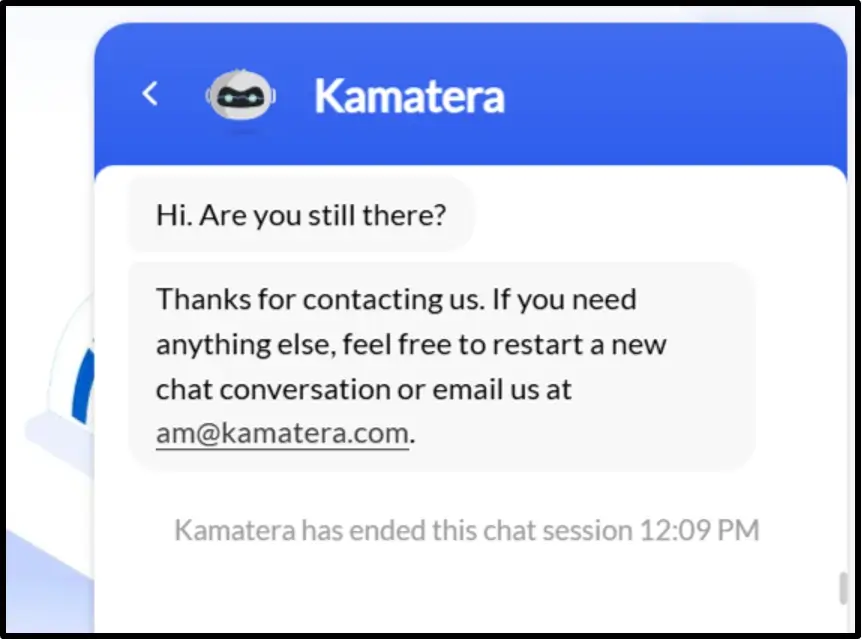
It does not offer instant human chat support, which matters if you need immediate help, but it was quite transparent, and they gave me clear paths forward.
The AI didn’t pretend live agents were available or push me back without options.
I think the platform is very well-suited for testing, staging, or deploying your code very easily; plus, the biggest thing is the scalability: you can just scale as your needs grow.
Kamatera is a reliable choice, worth your investment. Not the best at everything, but genuinely good at what matters. You can easily try their free trial and check for yourself.
How to Get Started With Kamatera: Step-by-Step Guide
It was quite easy to get started with Kamatera, as the whole process took less than 30 minutes. If you are a student, developer, or anyone managing remote systems, you can easily do this.
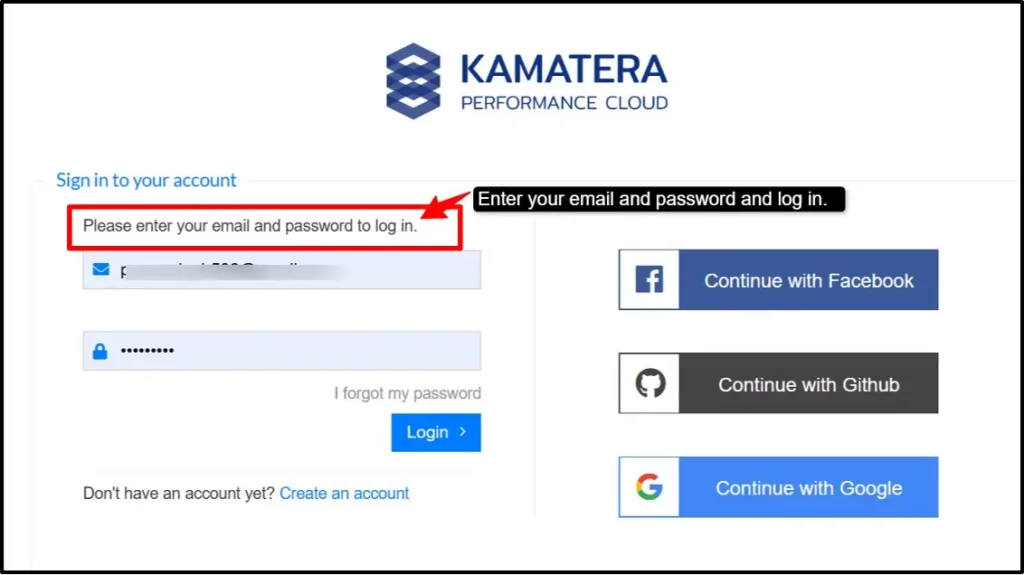
Note:
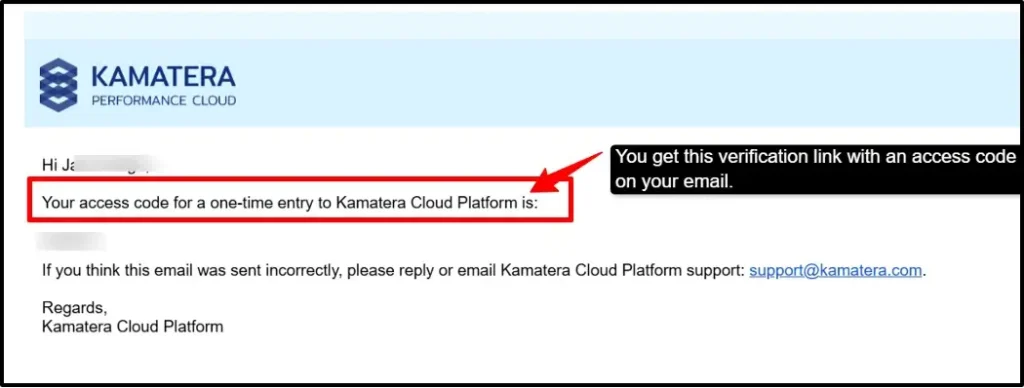
Give your genuine email address only, because you’ll receive a verification link with an access code. You need to enter that access code, as without that you won’t be able to proceed.
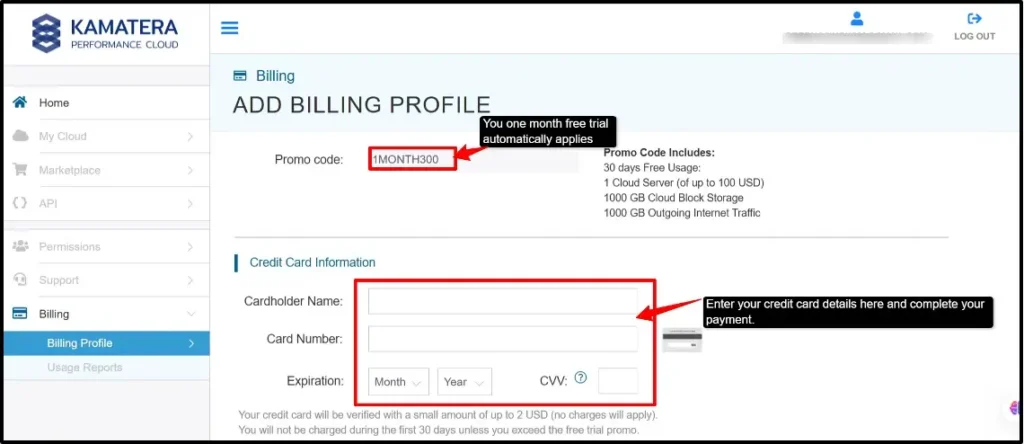
Note: Once your payment is done, you can then choose your resources, CPU, RAM, or storage as per your choice. Choose your data center and easily deploy your server.
It was so simple. I was honestly surprised at how fast the whole process was. The hardest part was deciding what I wanted to build, not actually setting it up.
This is the reason Kamatera is highly recommended by me. You can easily click, configure, deploy, and start building instantly.
Kamatera vs. Alternatives
I researched and found two other strong contenders that can be seen as alternatives to Kamatera: Vultr and Contabo.
Each of them brings unique strengths to the table, catering to different needs and budgets.
This comparison will break down the essential features to help you make an informed decision based on your hosting requirements.
| Features | Kamatera | Vultr | Contabo |
|---|---|---|---|
| Pricing | Flexible pricing starts at $4/month. | $4/month | $6.23/month |
| Data Centers | 21 global locations | 33 locations | 9 locations |
| Server options | VPS, dedicated, Powerful Cloud VPS | Cloud, VPS, VDS, Bare Metal | Cloud, VPS, Dedicated |
| Uptime Guarantee | 99.95% | 100% | 99.9% |
| Best For | Developers, Students, Gamers & Enterprise solutions | Fast global deployments | High-traffic websites & hosting development environments. |
If I speak honestly, the Kamatera cloud is just the better deal for you. You’re getting the same reliability as Vultr and way more control than Contabo.
There is no contract or lock-in package; you can set your setup exactly how you need it.
Kamatera’s trial gives more freedom to users to think critically before paying for the actual package they need.
Do We Recommend Kamatera Web Hosting?
Yes, we highly recommend Kamatera Web Hosting because of some compelling reasons.
Kamatera gives you everything you need; you get hosting, apps, deployment tools, and automation all together.
You don’t need to use different hosting providers for your different needs, like Vultr, which is more focused on just hosting and some basic tools, and Contabo, which has only 11 locations, meaning your website could be slower if your audience is far away.
Contabo is basic hosting and does not offer much beyond hosting itself, whereas Kamatera has everything you require.
You can easily build your website, deploy servers, and do everything else without even leaving Kamatera. Your work becomes faster and easier.
You need to host a website, access apps from their marketplace, or set up any automation tools; it’s all available. It’s completely user-friendly.
If you even want a hosting company where you can do everything in one place, Kamatera is the best choice. We recommend it for anyone who needs simplicity, reliability, and all services combined.
FAQ
Does Kamatera have shared hosting?
No, Kamatera does not have shared hosting. Kamatera focuses on VPS, dedicated servers and cloud hosting. These options give you more power and control than shared hosting.
Do I need a credit card for the Kamatera free trial?
Yes, Kamatera requires a credit card for the free trial too. They won’t charge you if you cancel within the trial period. You only pay if you continue after your trial ends.
What are the main features of Kamatera's web hosting services that differentiate it from competitors?
- Kamatera’s main features are:
- All-in-one platform with hosting, marketplace, deployment & automation.
- 20+ data centers spread globally.
- Flexible pricing model.
- User-friendly control panel.
- Easy app deployment from the marketplace.
4. What kind of customer support options does Kamatera provide to its clients?
Kamatera’s technical specialists are available 24/7 to help you. It offers support through live chat, phone support, or email support, or you can even call the numbers that are given on their official website.
Final Verdict: Is Kamatera Worth Using?
After 30 days of testing Kamatera thoroughly, here is my honest answer: Yes, it is worth using.
Kamatera has actually delivered what it promised when I first saw their page. Servers stayed online, and the speed was amazing in the US and Europe.
You get a simple and easy control panel with support that responds during your critical business hours. I found the pricing very fair because you pay only as per your needs.
Some features do take extra clicking; my free trial ended right when my testing was done. But nothing felt like some scam connecting to Kamatera. There are no misleading marketing claims you see with Kamatera.
💡 Most Loved Article!