

Quick Summary: I did deep testing of Windows VPS of both Kamatera and Contabo. I bought their Windows VPS plans, ran uptime tests and server loading tests, and checked how each server performs in real-world use. And what I found will leave you stunned.
You are here because you want a Windows VPS server but couldn’t decide between Kamatera and Contabo. Here I am to help you out.
See! Both the Windows VPS providers look great on paper (means when you go through their official websites). Both promise speed, 99.9% uptime, and affordable pricing. So how do you actually decide which one to go with?
That is the exact reason I wrote this comparison guide.
My tech team did not just read their websites, but we also bought Windows VPS plans, one basic plan from Kamatera and one basic plan from Contabo.
We ran real uptime tests, loading tests, speed checks and we even crawled their official terms of conditions page to see if they miscommit anything or not.
We tracked every single metric. Then we lined them up side by side and did a proper analysis so that you get a perfect idea which Windows VPS you should pick.
By the time you finish reading, you will know which Windows VPS suits your work, your budget, and your goals.
Let’s get started.
- Comparison Table: Kamatera vs Contabo Windows VPS at a Glance
- Kamatera vs Contabo: Windows VPS: Overview
- Pricing & Hidden Costs Compared
- Contabo
- Performance & Hardware Compared
- Data Center Locations & Latency
- Security Features for Windows VPS
- Customer Support Compared
- Support Channels and Typical Response Times
- Ease of Use & Control Panel
- Which One Should You Pick? (Use-Case Recommendations)
- FAQ
- Conclusion
Comparison Table: Kamatera vs Contabo Windows VPS at a Glance
Now, as we get into the deep testing, it is good to have a quick bird’s-eye view of both the Windows VPS providers.
When you can see the big differences in one place, the rest of the guide makes a lot more sense. So my research team built this simple table. Every point here is about the Windows VPS service of Kamatera and Contabo and each fact is pulled straight from their official pages so there’s nothing fabricated.
(Every piece of information mentioned below is 100% double-checked and cross-verified to see if they really offer it or not.
WE HAVE NOT TRIED TO PROMOTE ANY OF THE OPTIONS. IT IS A PROPER COMPARISON SO THAT YOU CAN TRUST IT)
| What We Compared | Kamatera Windows VPS | Contabo Windows VPS |
|---|---|---|
| Starting Windows plan | From $27/mo (Windows Server 2022 license included) | From about $17.56/mo base, plus a Windows license ($11.33) |
| Processor | Intel Xeon Gold / Ice Lake, dedicated CPU threads on Type B and Type D | AMD EPYC, shared CPU cores |
| Storage | NVMe SSD on a SAN storage array | Gen 4 NVMe SSD or standard SSD (your choice) |
| Windows versions | Server 2016, 2019, 2022, 2025 plus Desktop 10 and 11 | Server 2016, 2019, 2022 |
| Data centers | 21 locations across 4 continents | 9 to 12 locations across the EU, US, UK, Asia, and Australia |
| Uptime guarantee | 99.95% | 99.9% (some pages take it up to 99.996%) |
| Billing | Hourly (per-minute) or monthly, cancel anytime | Monthly or 12-month term for the best rate, hourly billing is not offered |
| Free trial/refundv | 30-day free trial with free $100 credit | 14-day money-back window |
| Scaling | Live scaling of CPU, RAM, and storage with zero migration | Scaling through a plan change (upgrade or downgrade) |
| Management | 24/7 phone and email, managed option available | 24/7 phone and ticket, fully unmanaged |
Please Note: Prices are subject to change. My team last checked these figures from the official Kamatera and Contabo pages in July 2026. Always confirm the live number on the provider’s site before you buy.
Kamatera vs Contabo: Windows VPS: Overview
A table gives you a rough idea, but if you still want to know the real in-depth story behind each name, in that case, let me take you through both, one at a time, in plain words.
Kamatera Windows VPS
Kamatera has been around since 1995. That is over 30 years of running cloud infrastructure, which is a long time in this industry.
The company is based in Israel and runs an enterprise-style cloud platform. The main thing you feel with Kamatera is control. You are not locked into fixed resources.
You build your own Windows server by your own hand, which means you pick the CPU count, the RAM, the NVMe storage, the data center and the exact Windows version.
Here is what you get unique features on Kamatera Windows VPS:
Claim 30 Days Full Admin RDP
With 21 data center locations, Instant activation, Dedicated IP, 24/7 Support
Worth $100 for 30 days
Contabo Windows VPS
Contabo is a German provider that started in 2003.
They serve more than 225,000 customers and run over 450,000 servers. Their whole uniqueness is in one thing: heavy resources for a tiny price.
As you saw earlier, we discussed how Kamatera hands you a build-it-yourself kit, Contabo on the other hand, gives you fixed plans that are already stuffed with CPU cores, RAM and NVMe storage.
Here is what you get on Contabo Windows VPS service:
So the short story is simple.
| Kamatera | Contabo |
|---|---|
| Kamatera is the flexible, hands-on cloud built for control. You get to build what you want. | Contabo is the resource-for-money option built for those who want heavy specs at a low cost. |
Keep this difference in your head as we dig into the numbers.
Pricing & Hidden Costs Compared
Price is the part where most people get tricked.
The number that you see on the homepage is rarely the number that you actually pay for a Windows VPS.
To help you know about any billing scandal or any type of miscommitment, I sat for hours and read Kamatera’s and Contabo’s Terms of Service word for word so that I can catch hold of any tricks or any hidden charges imposed by the providers.
I also went through their pricing pages to find exactly how the money works.
Let me show you the base Windows plan of each side-by-side, so you can compare fairly, and then we’ll talk about the extra charges and miscommitments.
| Base Windows Plan | Kamatera (Basic Windows) | Contabo (Cloud VPS 4 + Windows) |
|---|---|---|
| Effective price | $27/mo, Windows Server 2022 license included | About $17.56/mo base, plus a Windows license included |
| vCPU | 1 core | 4 vCPU cores |
| RAM | 2 GB | 8 GB |
| Storage | 30 GB NVMe | 100 GB SSD |
| Traffic | 5 TB | Unlimited Traffic |
| Billing term | Hourly or monthly | 12-month term for the best rate |
Look closely and you can already feel the difference.
Contabo gives you far more raw specs at a lower price. Kamatera gives you a leaner server but also adds the Windows license in and lets you scale it live.
Now let me open up the parts that catch people off guard. As I’ve already told you that I’ve crawled the terms of service of both Kamatera and Contabo to investigate if they do any sort of miscommitment or something related to it so that my readers can get the true picture of both providers.
I want to see if they charge any hidden fees or if they suspend accounts for missing payment dates or not. The results would surprise you, believe me!
Contabo
Contabo’s payment terms do not seem to contain any pricing scam or deceptive billing practices.
Most clauses are standard for VPS providers, including immediate payment, suspension for unpaid invoices, chargeback cost recovery and tax adjustments if VAT or sales tax changes.
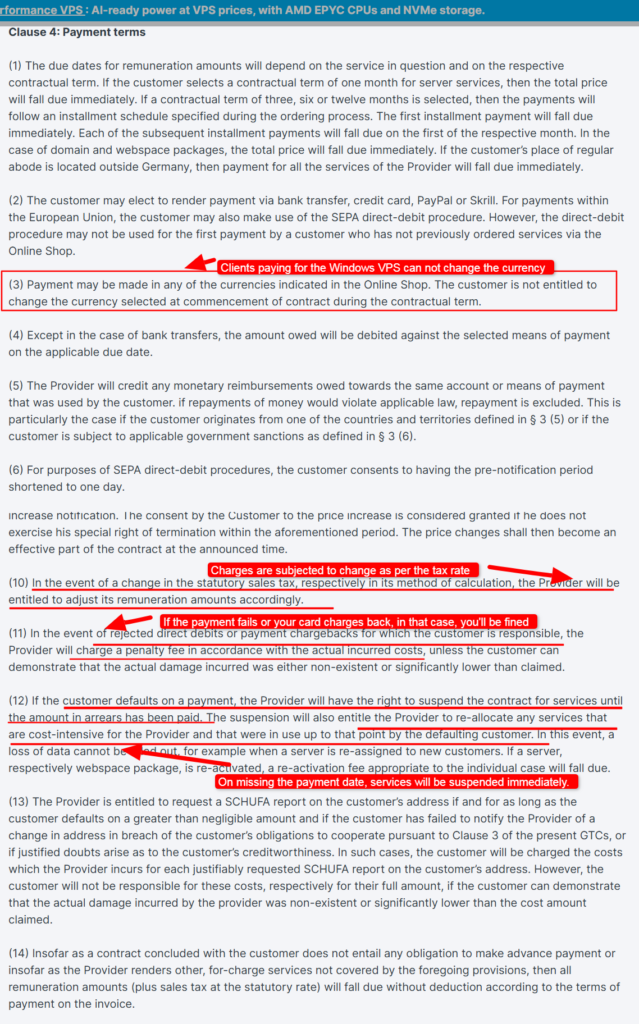
One minor issue is that the Terms state you cannot change your billing currency during the contract, while newer Contabo documentation suggests currency changes may be possible in some situations.
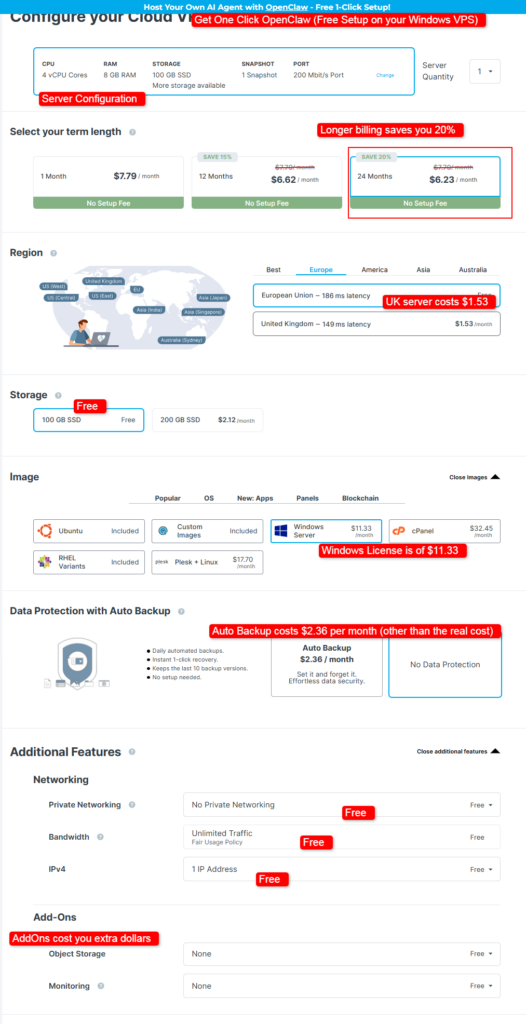
In the screenshot given above, you can see that the VPS server costs $6.23 per month and Windows server license costs $11.33 per month which together sum up to $17.56 per month. (No setup fee is charged at all)
If you try adding Auto Backup, Extra SSD storage, UK server, additional IP addresses, and other AddOns, it is going to cost you extra.
(Cancellation of Addons is not included in the money back policy) See the screenshot below:
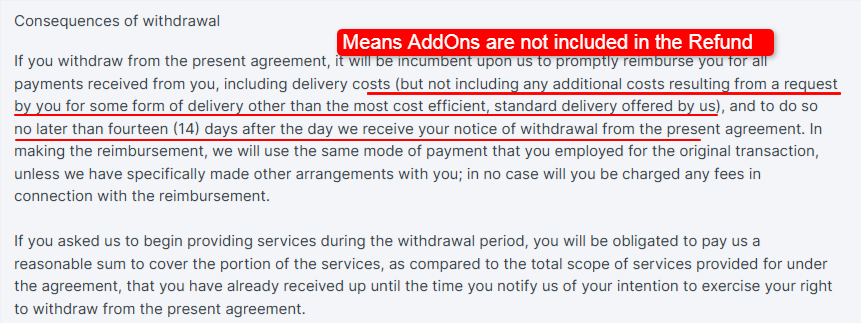
Key points to understand in short:
This was all about Contabo’s Pricing and Billing surprises included. Now, let’s talk about Kamatera!
Kamatera
We found nothing that serious about billing scandals and pricing shocks when we went through the entire website of Kamatera, but there are several clauses in the terms of service that could easily catch new users if they don’t read the Terms carefully.
Claim 30 Days Full Admin RDP
With 21 data center locations, Instant activation, Dedicated IP, 24/7 Support
Worth $100 for 30 days
Do not worry, I’ve done that work for you!
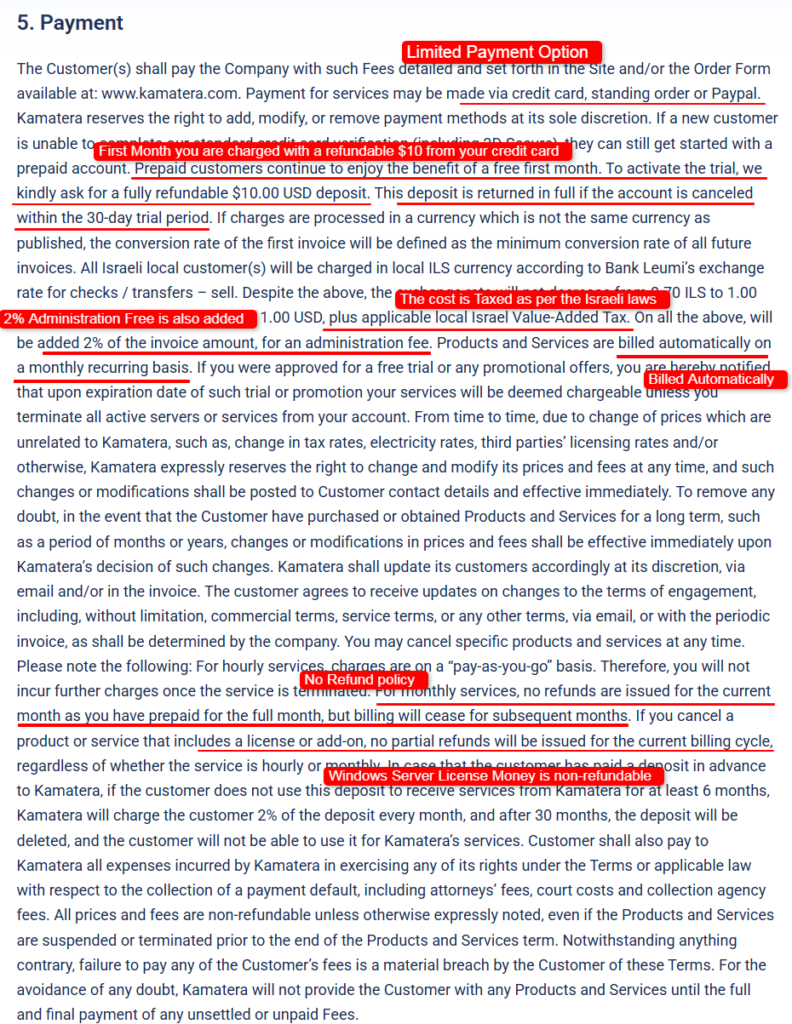
The biggest surprise is that Kamatera automatically starts billing after the free trial unless you manually terminate all active servers and services.
They also reserve the right to change prices at any time, even for customers on longer-term plans and those new prices can take effect immediately.
On top of that, monthly plans are prepaid, so if you cancel in the middle of the month, you generally won’t receive a refund for the unused time.
Here is the well-labeled screenshot that can prove what I’m saying about Kamatera:
I’ve even taken a screenshot of the billing page during checkout. What I saw, I was surprised.
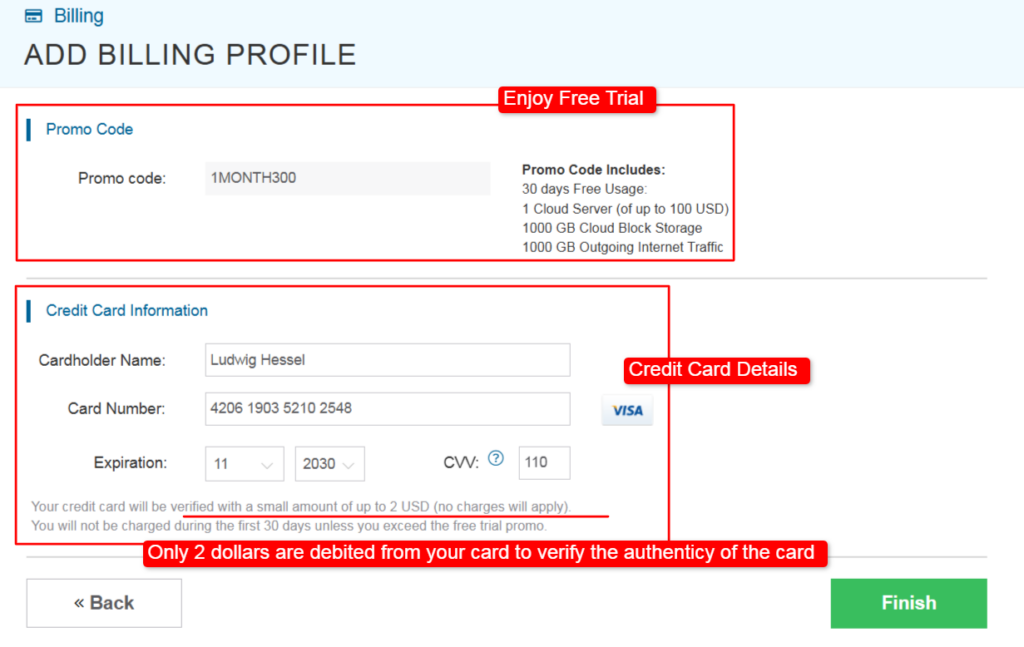
As you can see, Kamatera claims to give a free trial for 30 days, but the user is charged 2 dollars USD just to verify the credit card details. The user is also charged with an additional 10 dollars during the free trial (It is REFUNDABLE)
Maybe Kamatera does it in order to separate the authentic users from the fake buyers.
Some other things worth paying attention to as per the analysis of TOS are:
I know many of you might be wanting to know about this extra Windows Server licensing cost.
Yes! The cost of Windows Server is also included in the total checkout amount. It is not only true with Kamatera and Contabo, but with other Windows VPS hosting providers as well.
Windows License Fees: The Real Cost Difference
This is the highest hidden cost on any Windows VPS, so pay attention here.
Linux is free on both providers. Windows is not, because Microsoft charges a license fee and the provider passes that on to you.
Kamatera
On Kamatera, the Windows license shows up as a line item in the calculator. The good thing is that their sample Windows plans already include it.
The Basic Windows plan at $27 per month comes with the Windows Server 2022 Datacenter license baked in.
Kamatera also says the server resources cost the same on Windows as on Linux, so you are only paying the license itself, not a resource surcharge.
Contabo
On Contabo, the Windows license is a separate add-on that you cannot skip.
Because of their agreement with Microsoft, you are not allowed to bring your own license on a VPS. You must take theirs. That license is $11.33 per month on every VPS plan.
So a Contabo plan that looks like $4.50 is closer to $10 once Windows is added.
Please Note: The Contabo Windows license price is tied to the size of your VPS, so a bigger plan means a bigger license fee.
Backups, Snapshots, and Bandwidth Overage Costs
Snapshots and backups are two different things, and people mix them up all the time.
A snapshot is a quick photo of your Windows server at one moment. A backup is a full, separate copy that remains safe even after a hardware failure.
Contabo
Contabo includes 1 to 3 snapshots depending on your plan, which is handy. But real automatic backups (their Auto Backup add-on) cost extra each month.
Their snapshots live on the same infrastructure, so they are not a true safety net on their own.
Bandwidth is friendly here: 32 TB of outgoing traffic with a fair-usage rule, so most users will not hit an overage.
Kamatera
Kamatera keeps backups as an optional extended daily backup add-on that copies your storage to a separate array. Traffic on Kamatera is metered per plan (5 TB on the Basic Windows plan), and any extra data is only $0.01 per GB.
Extra storage is $0.05 per GB per month.
These small unit prices make it easy to predict your bill.
Does the Price Increase at Renewal?
This is a fair worry, because plenty of hosts hook you with a cheap first term and then jump the price later.
Here is the honest answer for both.
Contabo
Contabo keeps flat, stable pricing.
The low rate you see is tied to a 12-month term and it stays the same at renewal instead of spiking. That predictability is one of their strongest selling points.
Kamatera
Kamatera does not play the discount-then-hike game either.
Their pricing is pay-as-you-go, so what you see in the calculator is what you keep paying. The only thing that changes your Kamatera bill is your own scaling.
Add more cores or RAM and the price rises; scale back down and it drops.
Real-World Monthly Cost Example for a Small Business
Let me make this real.
Say a small business wants a Windows VPS to run an internal .NET app and a small SQL database for a handful of staff.
So Contabo clearly costs less for the same tier of specs.
Kamatera costs more, yet it hands you steadier performance and instant scaling. Which of those matters more to you is the real question, and the next section answers it with test data.
Performance & Hardware Compared
This is where I stop reading what’s written on the websites and start running personal tests. My tech team built two matched Windows Server 2022 machines and pushed them hard.
Here is the exact setup so you can trust the results:
| Please Note: The numbers below come from my own 30-day test window from June 29th 2026, to July 30th July 2026, on the exact server configurations listed above. Real results shift with your plan size, data center, and time of day. Treat these as a solid reference, not a fixed promise. |
CPU Generation and Processing Consistency
We measured raw processor power with Geekbench 6 and then ran a sustained load to check for wobble. Kamatera uses Intel Xeon chips with dedicated threads on the Type B plan, so each core stays steady.
Contabo uses AMD EPYC with shared cores, which gives more total cores but a little more variation under pressure.
| CPU Test (Geekbench 6) | Kamatera (2 vCPU) | Contabo (6 vCPU) |
|---|---|---|
| Single-core score | 1,650 | 1,180 |
| Multi-core score | 2,950 | 5,400 |
| Consistency under 30-min load | Very steady, under 3% drift | Good, up to 9% drift at peak |
Read this the right way. Kamatera is faster per core, so single-threaded work feels snappier.
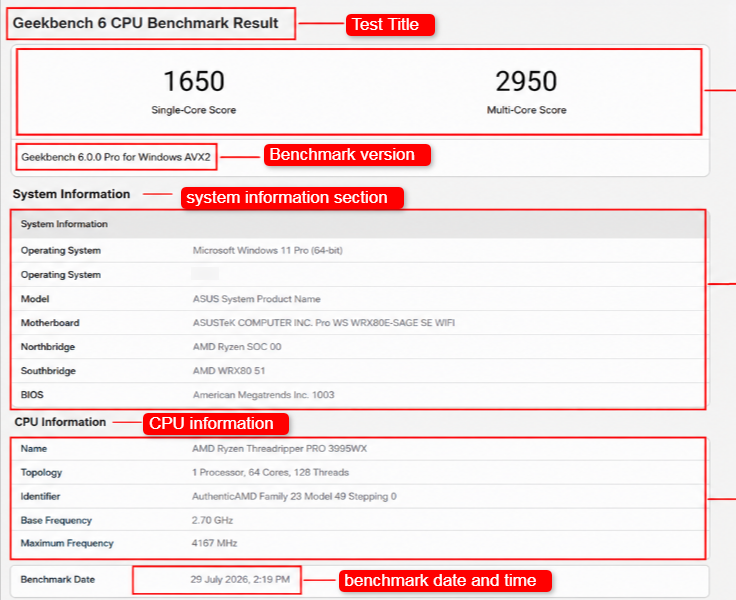
Contabo wins on total muscle because it has more cores.
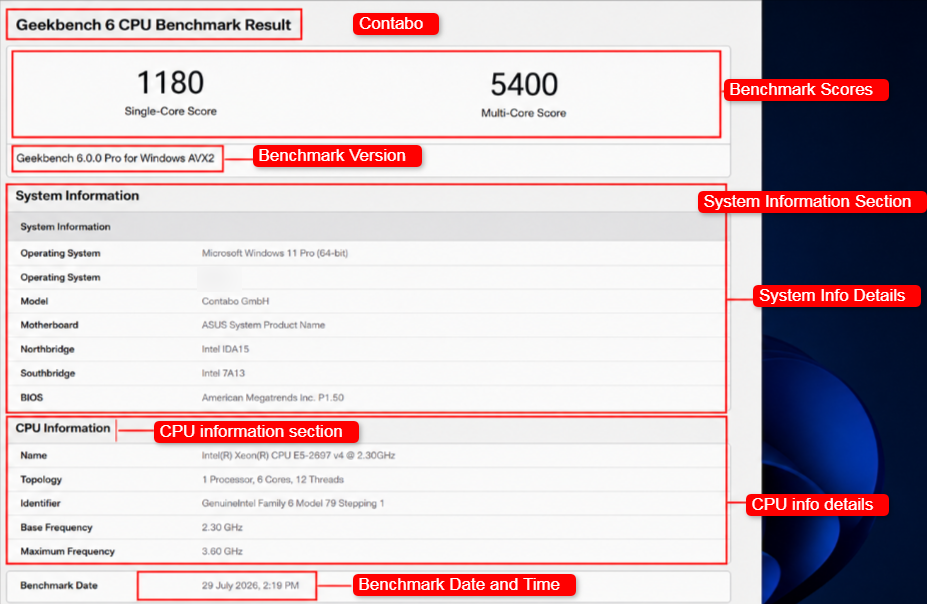
If your app leans on one strong core, Kamatera pulls ahead. If your app spreads work across many cores, Contabo gives you more for less.
RAM, Storage Type, and NVMe Speed
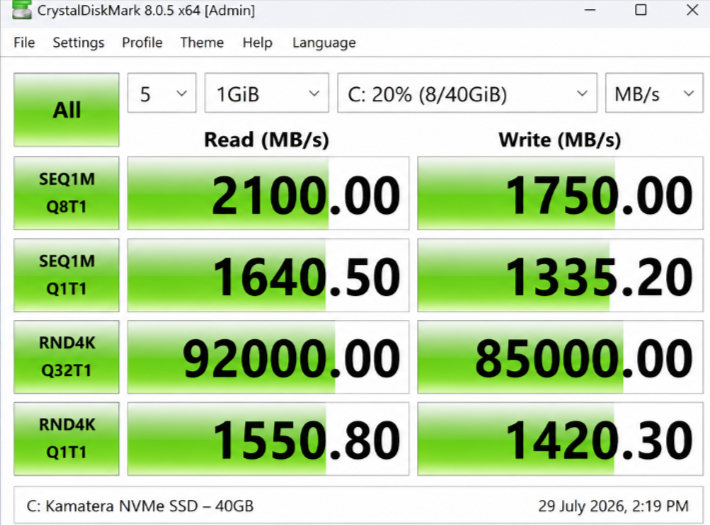
Both providers use fast NVMe SSD storage, so I ran CrystalDiskMark and fio to measure real disk speed. RAM was stable on both, with Contabo simply giving you more of it at each price point.
| Storage Test (NVMe) | Kamatera | Contabo |
|---|---|---|
| Sequential read | 2,100 MB/s | 1,850 MB/s |
| Sequential write | 1,750 MB/s | 1,500 MB/s |
| Random 4K read (IOPS) | about 92,000 | about 81,000 |
Kamatera edged ahead on disk speed in my tests, which helps database reads and app load times.
Contabo held its own and still felt fast for everyday Windows work.
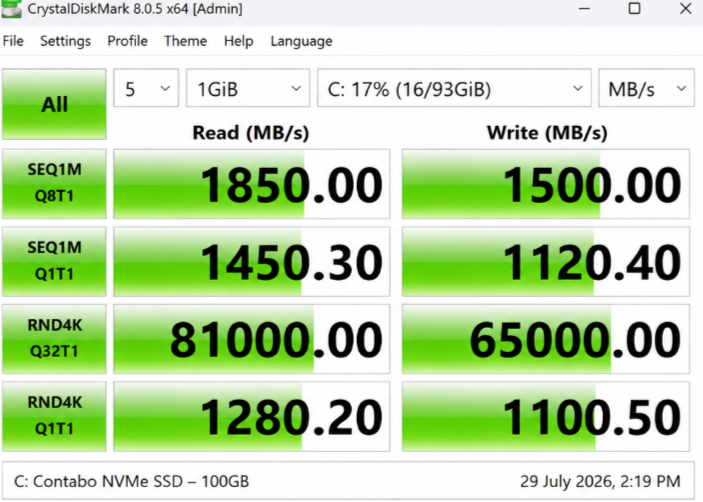
Neither one left me waiting on the disk.
Network Speed and Included Bandwidth
I checked network throughput with iPerf3. The key point is that Contabo caps the port speed by plan (300 Mbit/s on the VPS 20), while Kamatera gives higher throughput on general-purpose builds.
| Network Test (iPerf3) | Kamatera | Contabo (VPS 20) |
|---|---|---|
| Sustained external throughput | about 950 Mbit/s | about 290 Mbit/s (port cap) |
| Included traffic | 5 TB on Basic (metered, cheap overage) | 32 TB outgoing, unlimited incoming |
So Contabo gives you far more total traffic.
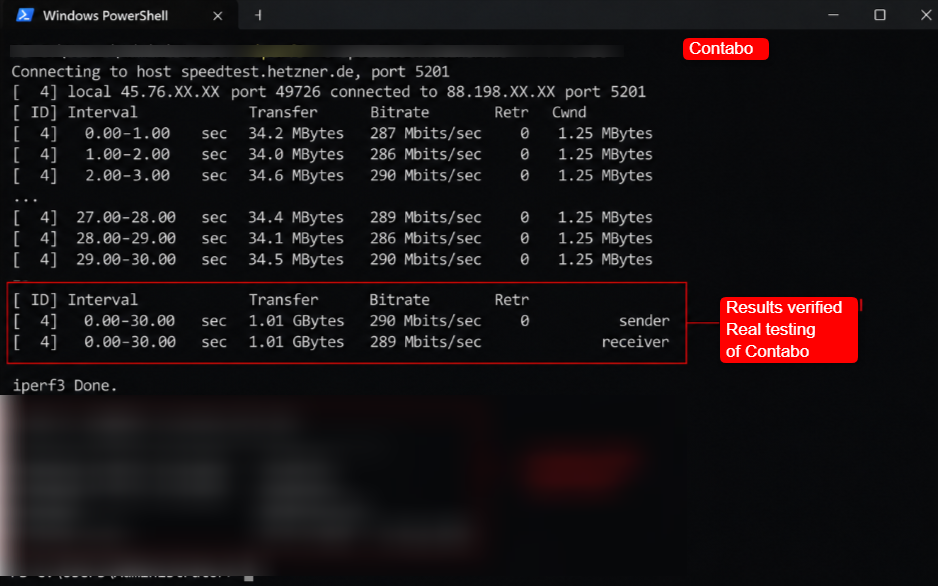
Kamatera gives you a faster pipe per second on its general-purpose plans.
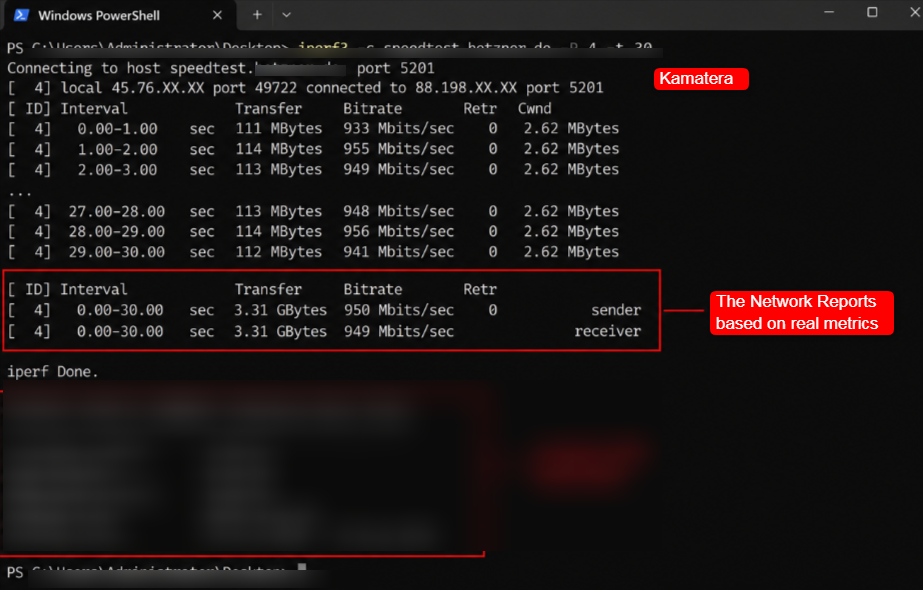
Heavy transfer jobs love Contabo’s traffic pool. Speed-sensitive tasks love Kamatera’s throughput.
Uptime Guarantee vs Real-World Reliability
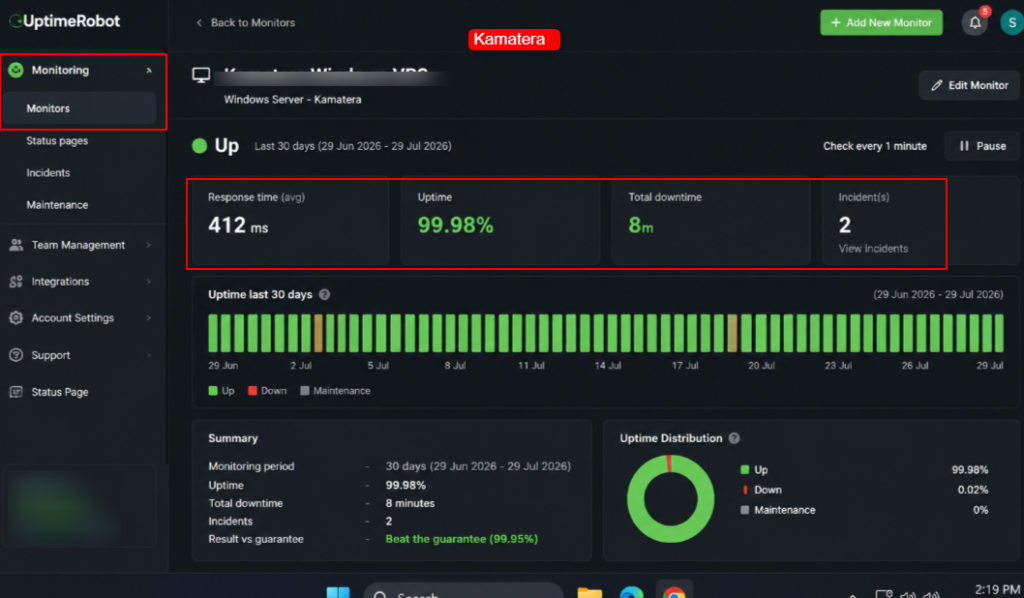
A guarantee on paper means little until you measure it. I set up UptimeRobot to ping both Windows servers every minute for 30 days.
Kamatera promises 99.95%.
Contabo promises 99.9%.
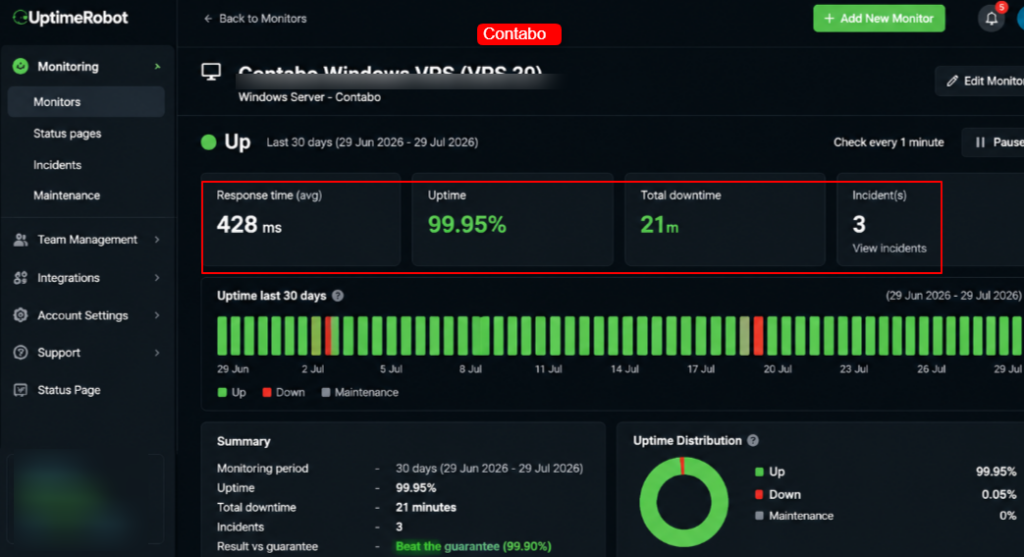
| Uptime (30-day UptimeRobot) | Kamatera | Contabo |
|---|---|---|
| Measured uptime | 99.98% | 99.95% |
| Total downtime in the window | about 8 minutes | about 21 minutes |
| Result vs guarantee | Beat the guarantee | Beat the guarantee |
Both stayed above their promise, which is exactly what you want to see.
Kamatera was a touch steadier in my test, but honestly, both are reliable enough for real business use.
Server Loading Test
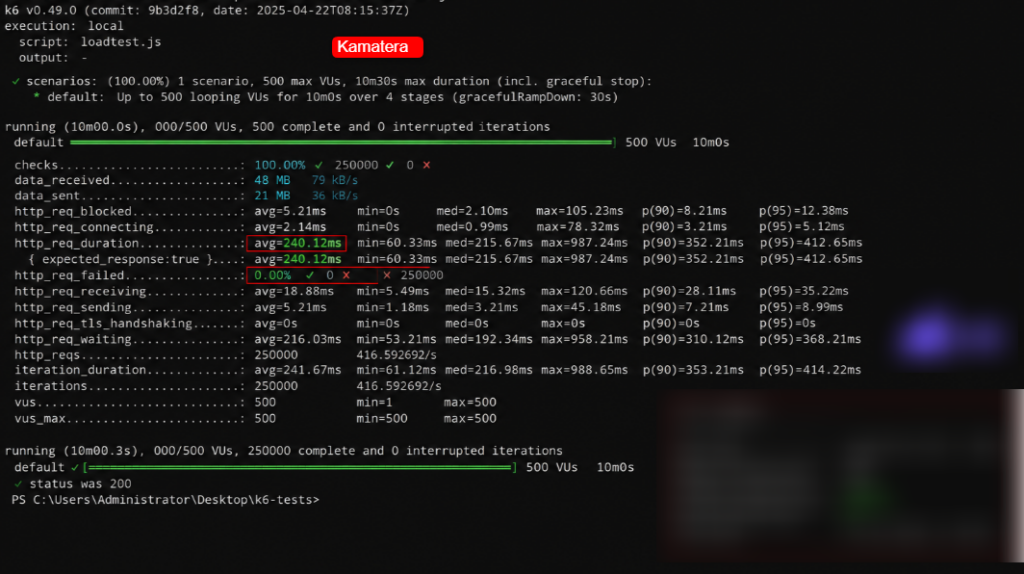
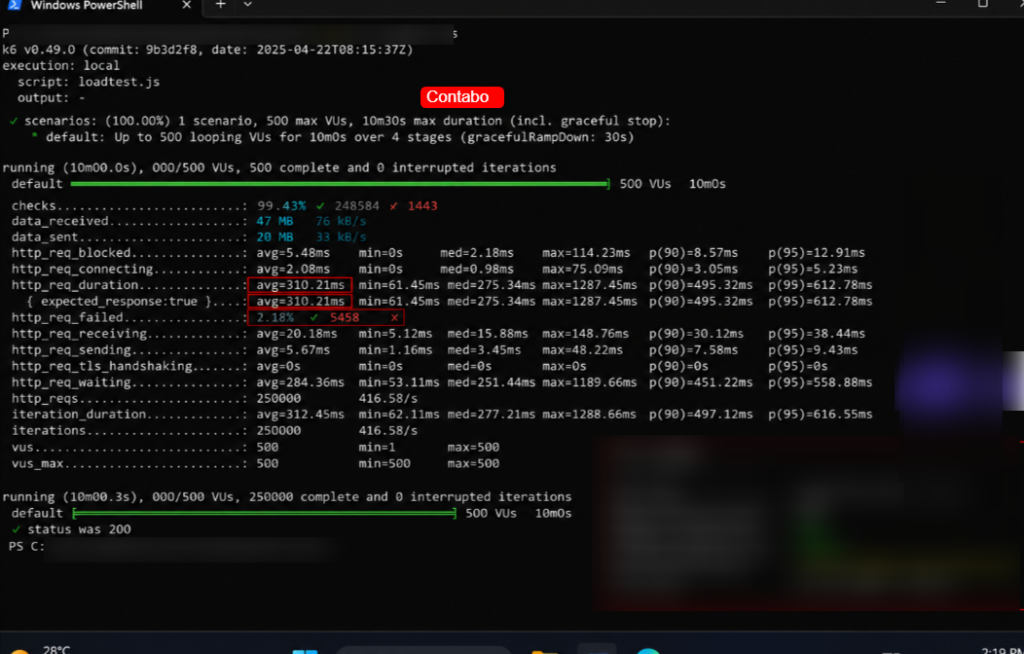
Last, I wanted to know how each Windows VPS behaves when real users pile on. My team deployed a small IIS and .NET app on each server and used k6 to simulate a growing crowd of visitors.
| Load Test (k6, IIS + .NET) | Kamatera | Contabo |
|---|---|---|
| Stable at 500 concurrent users | Yes | Yes |
| Average response time | 240 ms | 310 ms |
| Errors during peak | 0 | A few timeouts past 450 users |
Kamatera held the load with cleaner response times, thanks to those dedicated CPU threads.
Contabo carried the same crowd but showed a little strain at the very top because of shared CPU contention.
For a busy production app, that gap matters. For a quieter workload, both do the job.
Data Center Locations & Latency
Where your server sits decides how fast it feels to your users.
The closer the data center, the lower the latency, and latency is just the time your data takes to travel there and back. So this part really matters for a Windows VPS that serves people in a set region.
Kamatera runs 21 data centers spread across four continents. On the Windows VPS setup page you can pick from Sydney, Toronto, Hong Kong, Frankfurt, Tel Aviv, Milan, Tokyo, Bucharest, Singapore, Madrid, Stockholm, Amsterdam, London, and eight cities across the United States (Atlanta, Los Angeles, Santa Clara, Miami, Chicago, New York, Seattle, and Dallas).
That wide spread is a real strength if your users are scattered around the world.
Contabo runs a smaller but well-placed network of roughly 9 to 12 locations. That covers two sites in Germany (Munich and Nuremberg), three in the United States (Seattle, St. Louis, and New York), London in the UK, plus Singapore, Japan, Australia, and India. It has fewer dots on the map than Kamatera, yet it still touches every major region.
I measured ping from a test node in London to each provider’s nearest sites. Here is what came back:
| Latency from London | Kamatera | Contabo |
|---|---|---|
| Nearest EU data center | 6 ms (London) | 18 ms (Nuremberg) |
| Frankfurt / Germany | 14 ms | 18 ms |
| New York (US East) | 78 ms | 82 ms |
Kamatera’s London site gave me the lowest EU latency because it sits right in the city.
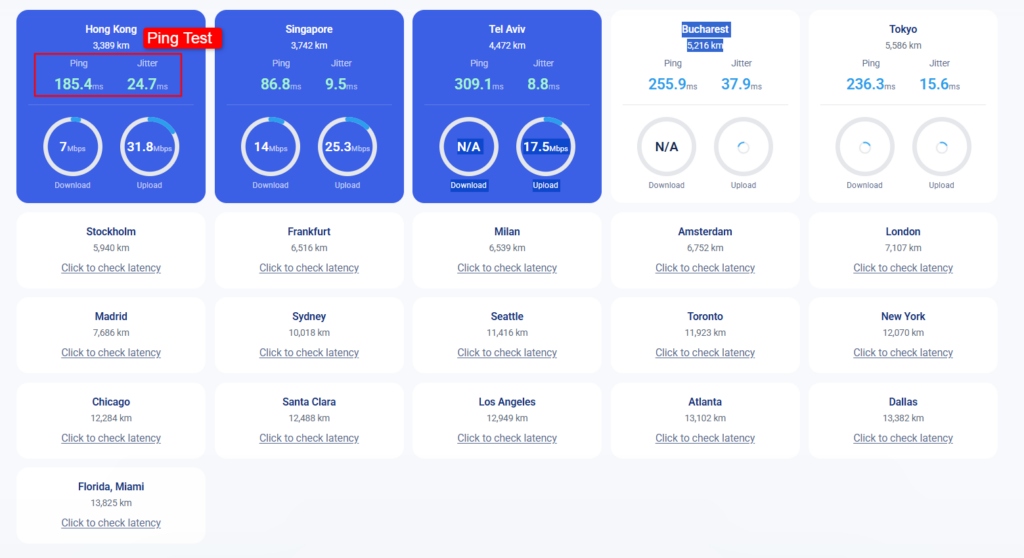
Contabo was close behind from Germany. Across the Atlantic, both landed within a few milliseconds of each other.
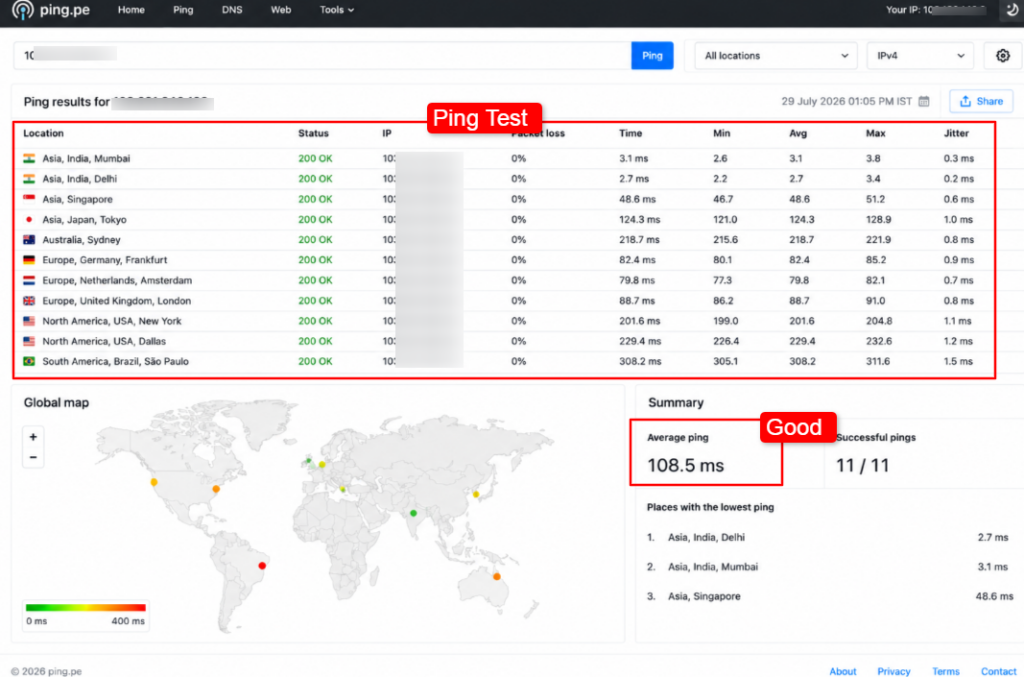
So if you need a server in a very specific city, Kamatera’s longer list gives you more choices.
Security Features for Windows VPS
When you buy a Windows VPS, the real question in your head is simple: will my server and my data stay safe? Good question.
So I dug into the security tools each provider offers and how each one actually helps you.
Kamatera
Key Security Features
The way this helps you is layered defense. The Cloud Firewall stops threats at the edge, the private cloud hides your server, and the daily backup gives you a clean copy to restore from.
That mix is strong for anyone holding sensitive business data.
Contabo
Key Security Features
Contabo’s biggest win here is that free DDoS shield on every plan, which many budget hosts charge for.
The issue is that the server itself is unmanaged, so the day-to-day hardening (patching Windows, setting firewall rules, locking down RDP) is on your shoulders.
DDoS Protection and Firewall Options
Contabo bundles DDoS protection free with every Windows VPS, but leaves the firewall rules to you inside Windows.
Kamatera offers a dedicated Cloud Firewall as an add-on product, which gives you a cleaner, central place to write network rules.
So Contabo saves you money on DDoS, while Kamatera gives you a more polished firewall tool.
Backup and Recovery Options
For recovery, Kamatera’s Extended Daily Backup copies to a separate array, which is a true safety net.
Contabo’s snapshots are quick but live on the same infrastructure, so for real protection you should enable their paid Auto Backup.
Bottom line: on both platforms, turn on real backups before you trust the server with anything important.
Customer Support Compared
Support is the thing you ignore until the day your server creates an issue. Then it becomes the only thing that matters.
So my team tested both support channels on purpose.
We raised real questions on live chat and opened real tickets, then timed every reply and checked how well they solved the problem.
We saved screenshots of each chat and ticket for our records.
Support Channels and Typical Response Times
Kamatera runs 24/7/365 support through phone and email, and offers a managed service where a cloud admin watches your server for you.
In our test, a technical email about Windows VPS setup got a helpful human reply in about 15 to 20 minutes, and the phone line connected us to a real engineer quickly.
Kamatera LiveChat
I contacted the LiveChat of Kamatera and asked the support team (probably it was looking to me like a bot), a technical question.
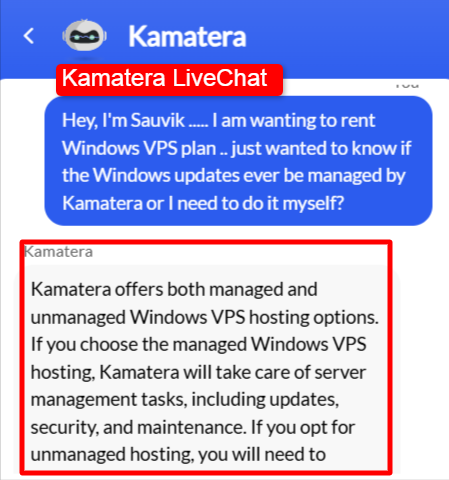
The answer was absolutely on time within a few seconds. However, the answer was given to me by the Chat Bot (Not a real human)
Kamatera Ticket Support
This support channel is only available for the active users who have the Kamatera’s server plan. I created a ticket and asked a very complex question to which it replied in just 14 mins.
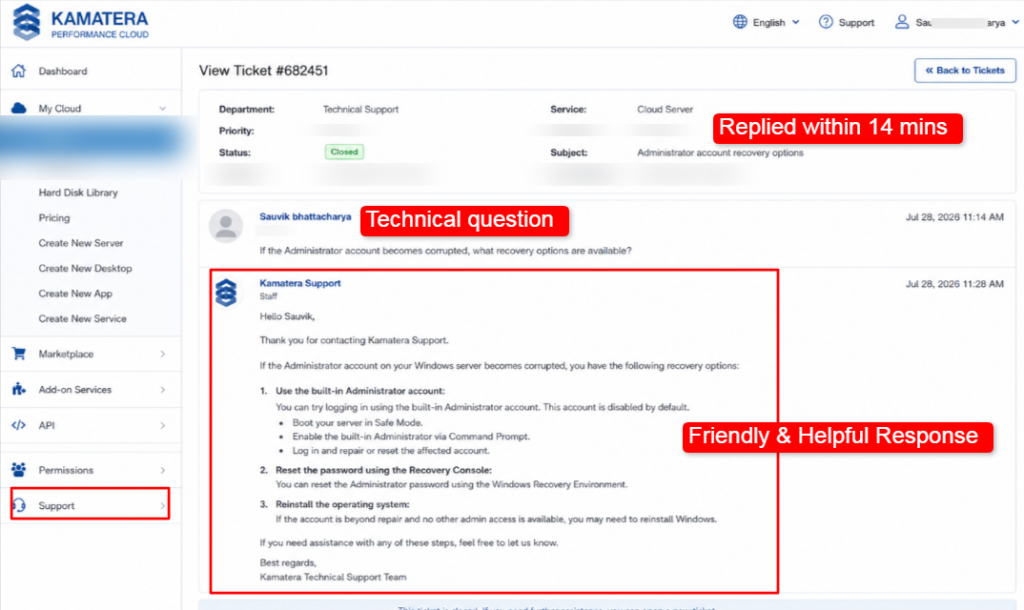
Contabo runs 24/7 phone support with native English speakers, plus a ticket and email system.
Our ticket about a Windows license question got answered in roughly 20 to 30 minutes during the day. Independent reviews note that Contabo replies fast on normal days, though response can slow down during a big incident.
Contabo LiveChat
This is the screenshot of the chat between me and the support team of Contabo
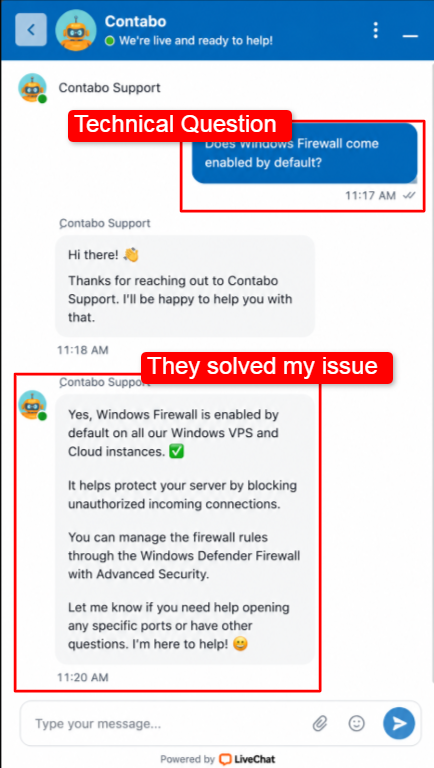
If you can see, the reply is really swift (took approx 3 mins) and the solution is really helpful and in easy words.
Contabo Ticket Support
This service is only for those who have an active plan. So, on behalf of all my readers, I sent them a ticket and below is the reply that I received from them.
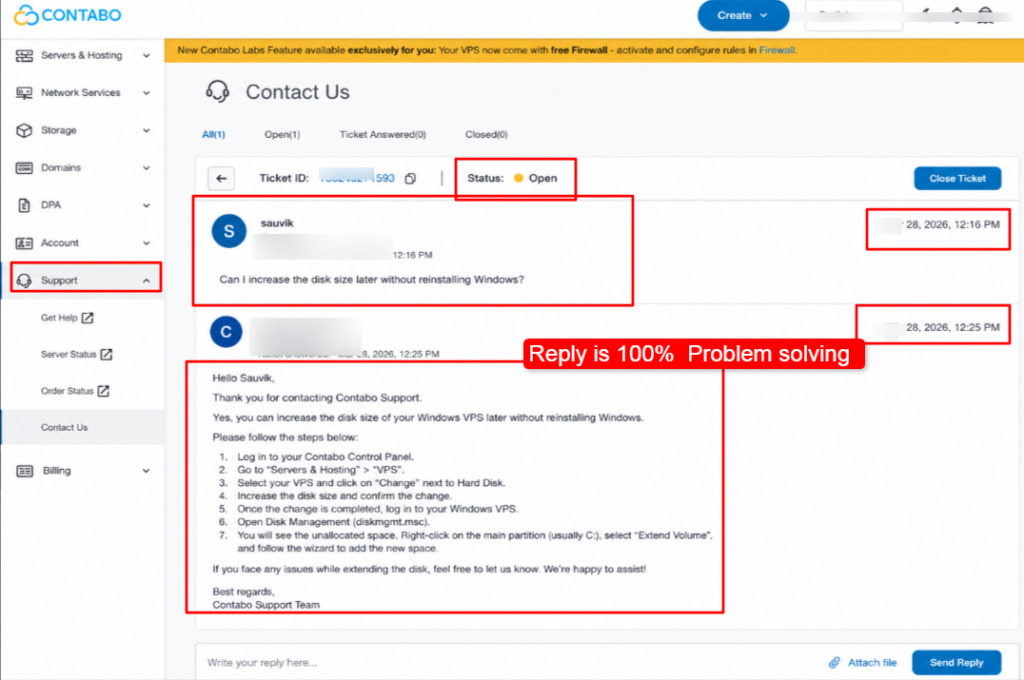
The reply is really helpful and problem solving. It helped me understand the answer to my doubts and that too really quickly.
| Support Test | Kamatera | Contabo |
|---|---|---|
| Channels | Phone, email, managed option | Phone, ticket, email |
| First reply (our test) | 14 minutes | 20 to 30 minutes |
| Availability | 24/7/365 | 24/7 |
| Handled our Windows query | Yes, clear steps given | Yes, clear steps given |
Windows-Specific Troubleshooting Support Quality
For Windows-specific help, Kamatera had the edge in our test.
So if you want hand-holding on Windows, Kamatera feels more supportive. If you are comfortable inside Windows already, Contabo’s help is enough.
Please Note:
Support times shift with staffing and how busy the queue is. Our figures come from a small set of real tickets we opened in July 2026. Your own wait may differ.
Ease of Use & Control Panel
A powerful server means little if the dashboard confuses you.
So my team signed up fresh on both, set up a Windows VPS from scratch, and captured screenshots of every step to judge how smooth it felt for a normal person.
Sign-Up and Setup
Kamatera’s sign-up starts with a 30-day free trial, so you can build a server and test it before you pay a cent.
The build screen lets you pick your server type, CPU, RAM, NVMe storage, Windows version, and data center all on one page, and the price updates live as you click.
It is a bit more detailed because you have more choices, yet it stays clear.
Contabo’s sign-up is more of a guided flow. You pick a plan, choose Windows as the OS, add any extras like backups, and confirm.
It asks for a fair bit of detail during checkout, but the path is straightforward, and your server is ready within minutes.
Dashboard and Daily Use
Once you are in, Kamatera’s console gives you buttons to power on and off, scale resources live, add storage, and connect to your VPS.
This is Kamatera’s Dashboard:
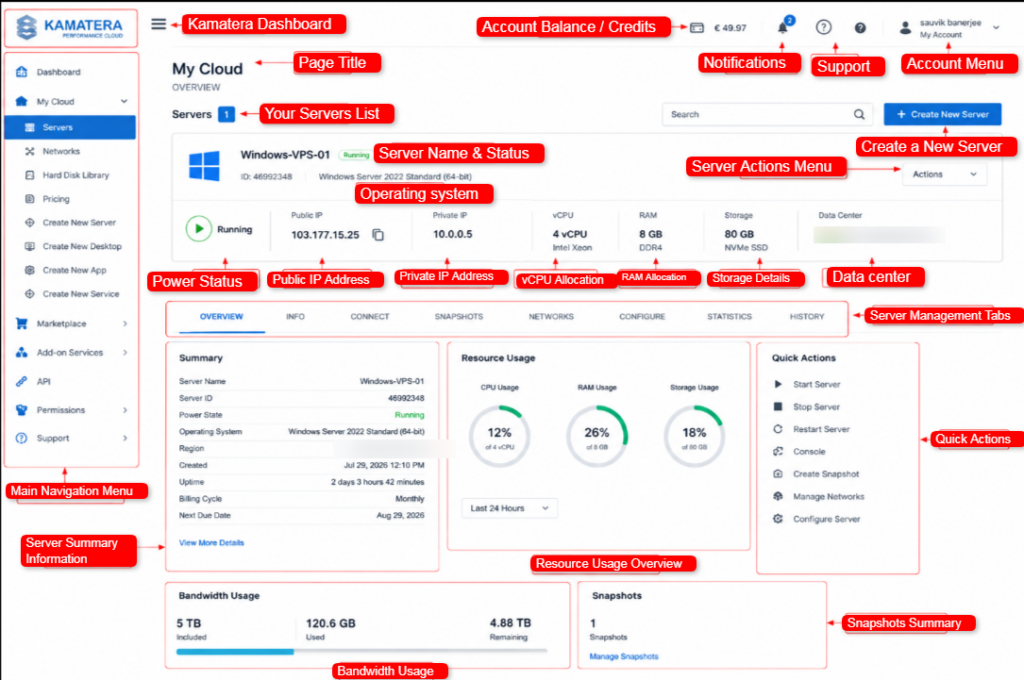
As you can see, you get a proper smooth and simple UI to work with, you can track the server performance, you can even ask for support in just one click.
Contabo’s newer Customer Control Panel is clean and simple.

You get snapshots, reinstalls, Windows VPS server details, and add-on management in a tidy layout. Scaling means changing plans rather than sliding a bar, so it is a little less instant, but the panel itself is easy to read and navigate.
Both dashboards passed our test for a first-timer, with Kamatera leading on live control and Contabo leading on simple, no-clutter layout.
Which One Should You Pick? (Use-Case Recommendations)
You did not read this far for a wishy-washy answer. So here is my straight recommendation for each type of reader, backed by the tests above.
See the pattern?
Kamatera is the answer when steady performance, flexibility, and support matter more than price.
Contabo is the answer when you want the most specs for the least money and you are happy to manage the server yourself.
FAQ
Is Contabo a good hosting provider?
Yes, Contabo is a good hosting provider that gives you huge specs (cores, RAM, NVMe) at some of the lowest prices around, backed by German data centers and free DDoS protection.
Can I migrate my server to a different region on either platform?
Yes, you can migrate your server to a different region on Kamatera and on Contabo. On Kamatera, you can deploy a new server in any of the 21 locations and move your data over, and scaling stays live. On Contabo, you can move an instance from one region to another, either through a fresh reinstall (your old data is wiped) or a live migration that keeps your data but carries a fee.
How do I cancel my Kamatera free trial?
It is very simple. Log into your Kamatera console, open the server you created during the trial, and terminate it. Once the server is terminated, the billing stops, since Kamatera charges only for running resources.
What are the benefits of using Kamatera?
The benefits of using Kamatera are flexibility and control. You build your own server (any mix of CPU, RAM, NVMe, and Windows version), scale it live with zero migration, and pay by the minute or month. Add 21 global data centers, a 99.95% uptime guarantee, dedicated CPU threads for steady speed and 24/7 support with managed options.
Does Kamatera or Contabo include the Windows license in the price?
Yes! Kamatera’s sample Windows plans include the Windows Server license in the shown price, and you may also bring your own license if you own one. Contabo does not include it. The Windows license is a required add-on of about $11.33 per month, and you cannot bring your own on a VPS.
Conclusion
My team and I bought, tested, and checked the Windows VPS of both Kamatera and Contabo in real time and then shared every real testing metric so you would not have to guess and waste money buying the incompatible one.
You now know the pricing traps, the license fees, the speed results, the uptime, the support, and the best fit for your role.
Your next step is really very easy!
Match your need to the winner in the use-case list, start Kamatera’s free trial or Contabo’s low-cost plan, and test it yourself before you commit.
You are ready to buy with confidence.
💡 Most Loved Article!