Remember those days when you had to spend hours just to make a single PowerPoint presentation?
Even writing research papers and creating posters used to be very tiring. But modern AI tools have reduced this manual labour.
Genspark AI is one such AI tool, which is known for its all-in-one workspace.
The users say that it’s really helpful for creating PPT slides, YouTube thumbnails, movie posters, AI scripts, mood boards, social media posts, card invites, and even Gen Z’s favourite memes.
That’s why I decided to try this AI app myself and spent a few days on it so that I could give you a 100% authentic review.
I’ve put all my experience in this Genspark AI review blog so you don’t have to shift to another tool during deadlines.
You’ll learn about Genspark’s features, like AI designer, Download For Me, meeting notes, AI music, developer, AI Docs, and AI slides, and how you can use them to save time.
For your convenience, I’ve also put some real screenshots with pricing, compared it to other similar tools, and also visited some trustworthy sites to learn about user’s experiences so you can make a final decision yourself.
But before that, I’m gonna tell you the simple definition of Genspark AI.
What is Genspark AI?
Genspark AI is a tool that uses machine learning to help users create PowerPoint presentations for meetings, AI podcasts for content creators, resumes for job interviews, logos and marketing campaigns for businesses, and write entire source code for software development.
It also supports integration with other handy software like Google Drive, Gmail, Calendar, Outlook, Slack, Microsoft Teams, GitHub, and Salesforce.
Being an AI tool, it also offers 13 agents that can automate multiple tasks. This means if you don’t want to design a movie poster or a pitch deck, just give it a prompt, and Genspark will generate it within a few minutes.
Genspark AI provides 3 pricing options, such as free, Plus, and Pro, that we’ll discuss later in this blog, but before that, we’ll learn some of the advanced features of this tool
Advanced Features
I spent a lot of time writing this Genspark AI review, and now I’m going to share my experience with you. To help you understand all the key features of this tool, I’ve also attached some screenshots.
Here you go:
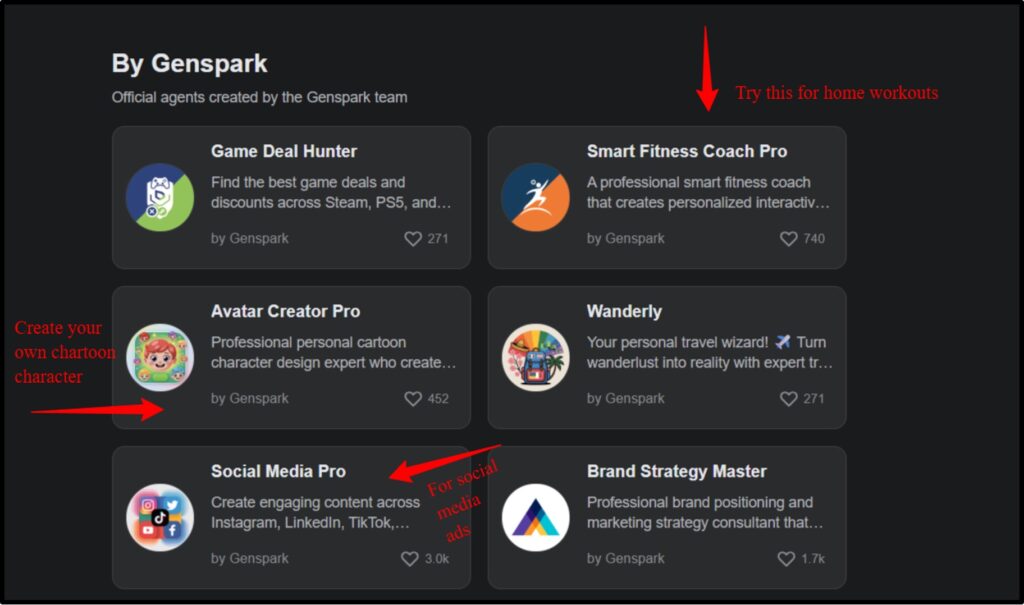
Custom Agents
Just like other AI tools, Genspark AI also provides different AI agents for analyzing data, planning trips, writing content, and creating engaging social media posts.
You can even ask these agents to work on your behalf, and they won’t disappoint you. But most of these agents are paid, which makes it uneasy for students.
Also, who’s going to spend $24 for just research? We already have ChatGPT and many free AI tools for that.
Genspark AI Slides
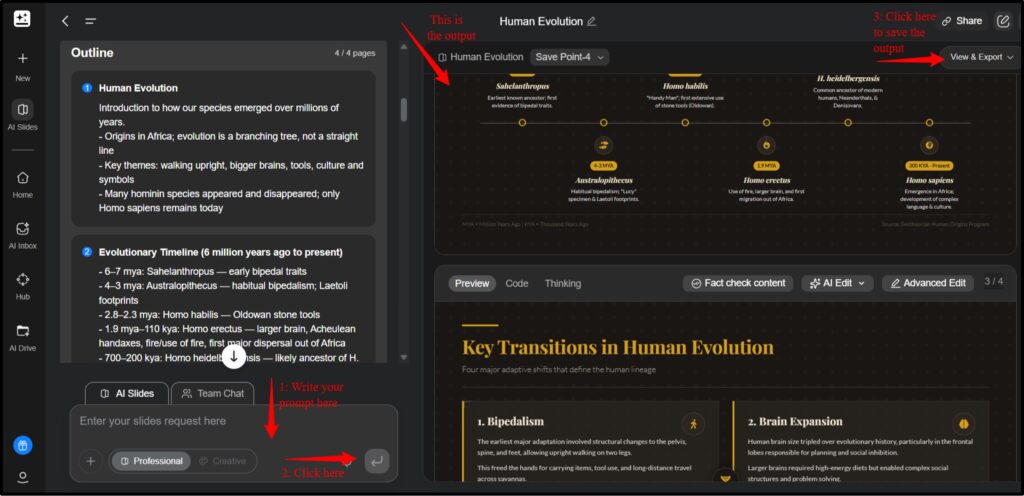
So I found AI Slides really very impressive because it created a presentation within 20 seconds. And this feature also comes with some editing tools so users can change the font colour, size, and fix the layout.
It’s really handy for business meetings. However, you can’t export and save these slides until you subscribe to its Plus or Pro plan.
You can also copy the entire code and thinking process used to build these slides.
AI developer
Non-coders will definitely love Genspark AI developer as it helps in building websites and even a native app quickly.
If you’re planning to build an online store, you can try the Shopify manager so you can manage and optimize Shopify themes and templates.
These agents work great for ordinary self-employed people who don’t want to hire anybody else.
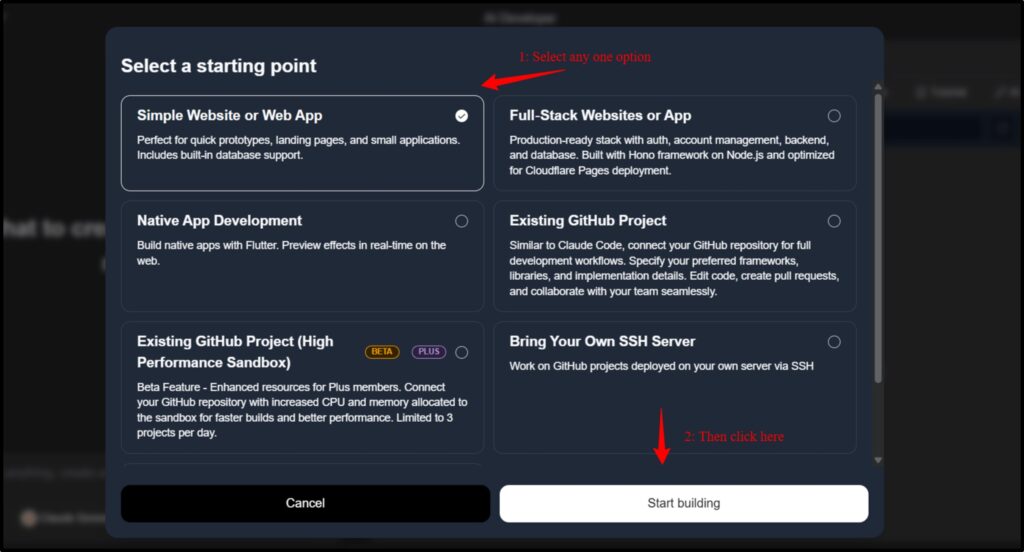
AI designer
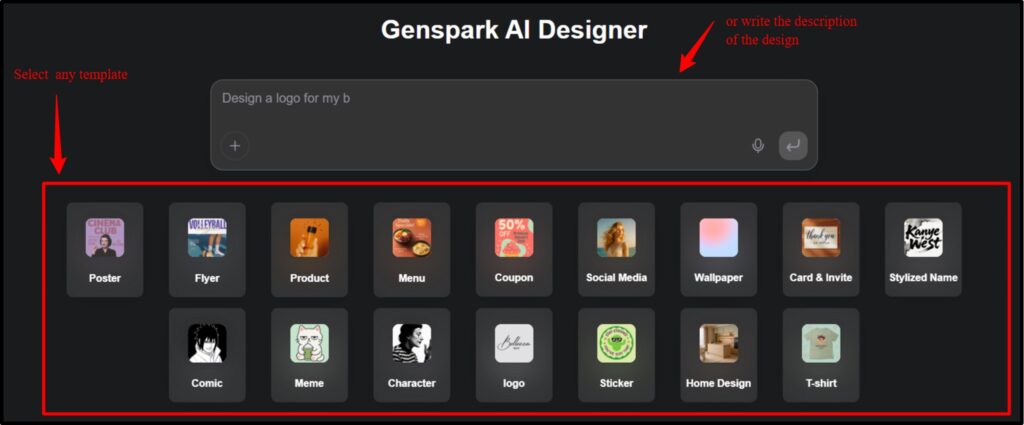
Gen Z, memers, and even noobs in designing can try out this amazing Genspark AI
designer. You can easily design flyers, brochures, posters, and logos for your social media pages.
Just think how easy it would be to create a full pitch deck before going into a seminar. So if you are thinking of launching a startup, then you can definitely use this digital designer.
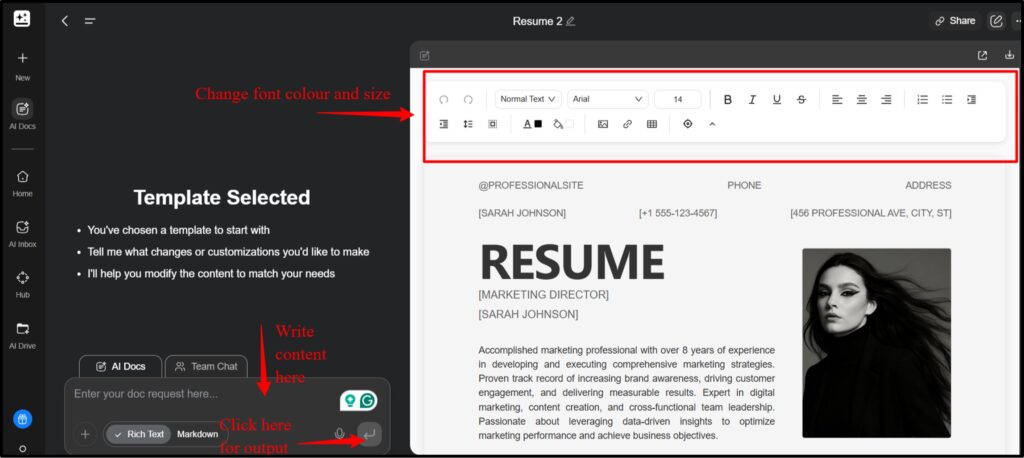
AI docs
I was kinda amazed using this feature because I used to create my own resume, that too for free.
So, it comes with many ready-made templates that you can use to create different reports, like marketing campaigns and event planning, which will make your work easier without much effort.
And surprisingly, every template is free, so you get pop-up texts asking to buy the premium plan when you hit download.
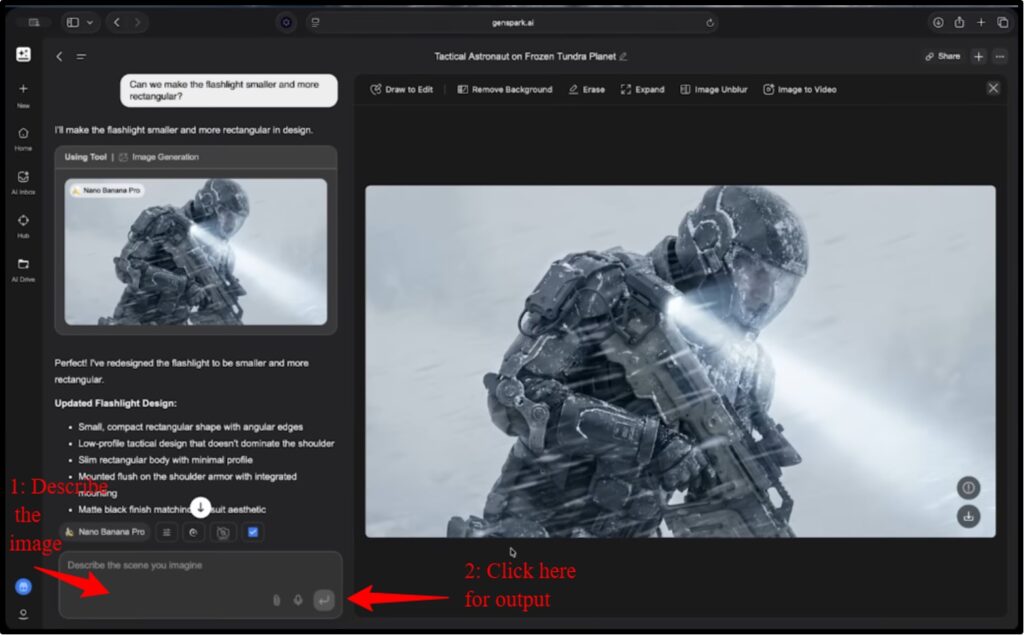
AI Image
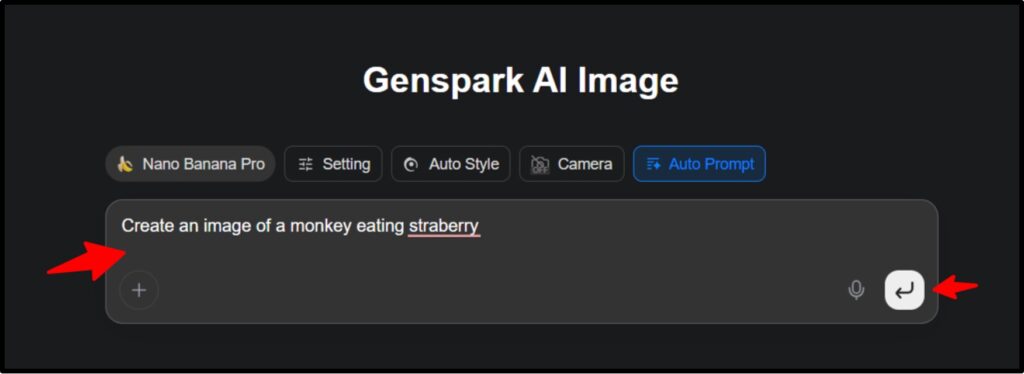
The best thing is that this AI image generator is completely free, meaning you can create unlimited images within a day.
But when I was using it, it took a long time to generate a simple image of a monkey eating strawberries.
Maybe the Nano Banana Pro model is a bit slow.
.
AI Video
I jumped into the video feature as well to test how fast it creates a video, but unfortunately, it gave an error message saying that I’ve insufficient credits.
That’s why I spoke to some YouTube content creators and filmmakers who have been making videos with the Genspark AI video generator.
And surprisingly, most of them praised this feature as it helps create professional shots quickly. It also has an AI Pods feature that lets you create podcasts for your channel and embed them into the generated videos.
OK, so I’m done sharing my experience with these features. And now I’m going to tell you about Genspark AI pricing.
But there’s one more thing that I want to tell you.
Genspark has a “Download for me” feature that lets you download multiple images to your device at once. It saves a lot of time, as you don’t have to search and save every image individually.
Pricing & Billing Scandals
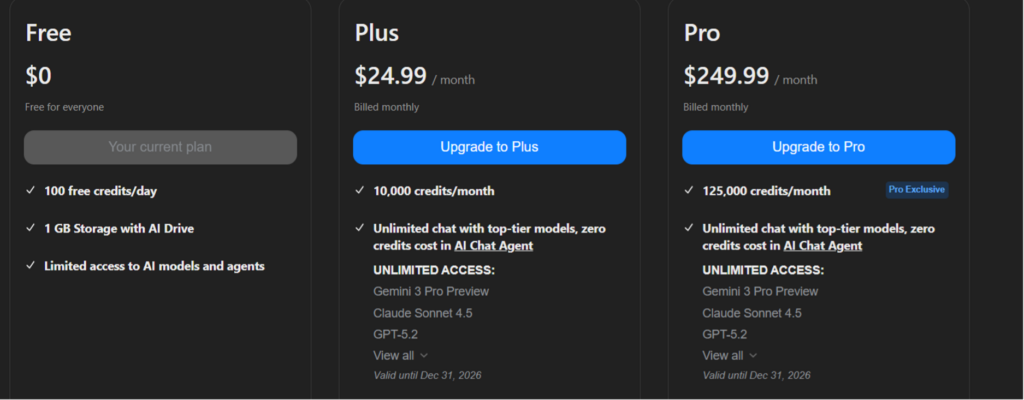
Now, I’m going to explain the pricing plans of Genspark AI and how other users feel about it. Although it’s obvious from the screenshot attached below, you should still have a clear idea so that you don’t deal with any surprises in the future.
Free
Plus
Pro
In my opinion, the free plan is best for those who only need to use the image feature, while the Plus plan is better for businesses with more extensive needs.
The Pro plan seems a bit overpriced to me, as it offers the same features as Plus with some advanced AI models.
However, I’ve seen other experienced users unhappy with its pricing plans. Some users on Trustpilot say it doesn’t offer unlimited chats and sometimes fails to perform even basic tasks.
User Experience
Although I’ve used Genspark AI for many days, I still wanted to know the opinion of other experienced users who’ve been using it for a long time. So I visited multiple sites like Trustpilot, X, and YouTube and found these reviews:
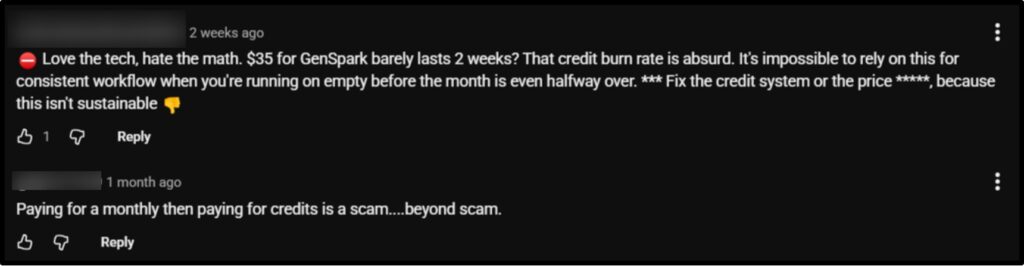

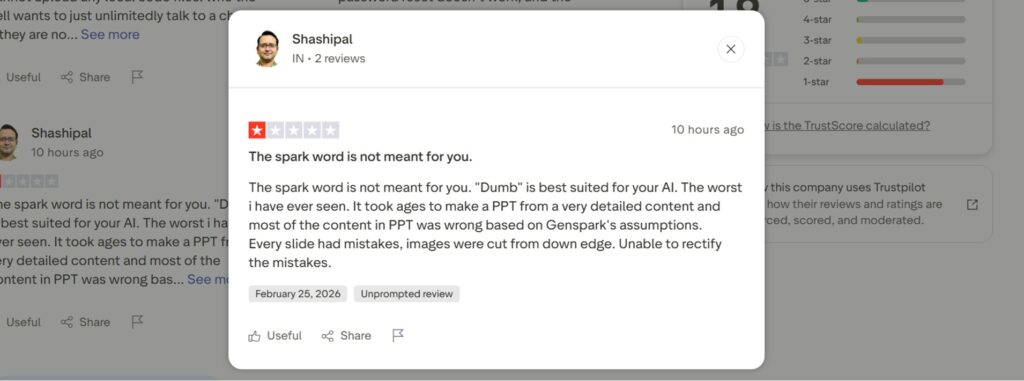

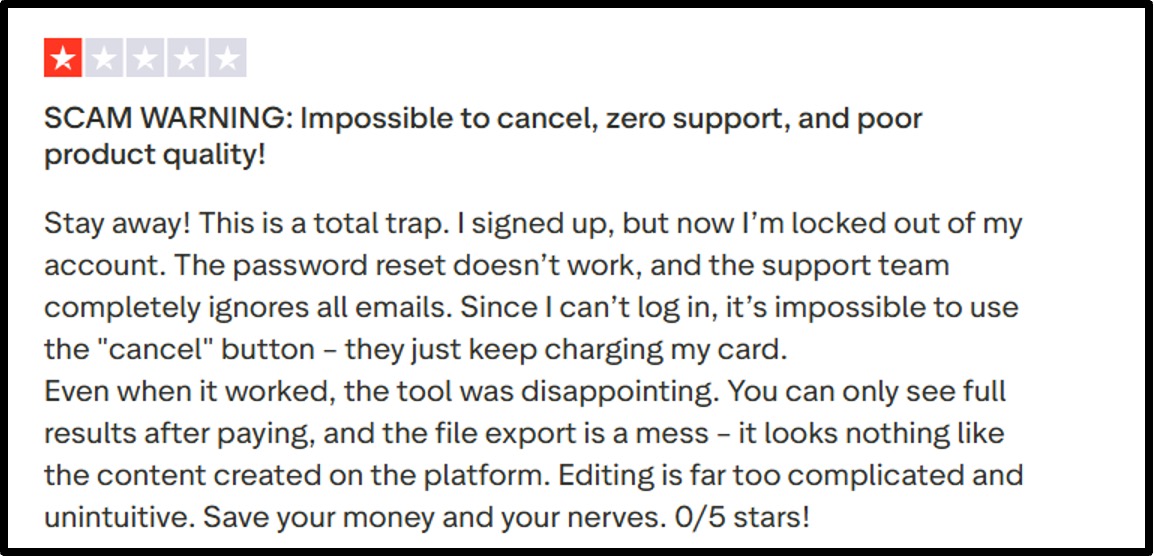
I’ve shared only a few reviews. If you’d like, you can visit these sites individually to see more genuine reviews.
Step-by-Step: “Your All-in-One AI Workspace” Workflow
Genspark AI offers many features, and hence some people may get confused about how to use it. That’s why I’ve listed some steps with screenshots to help understand how to perform basic tasks on this AI tool.
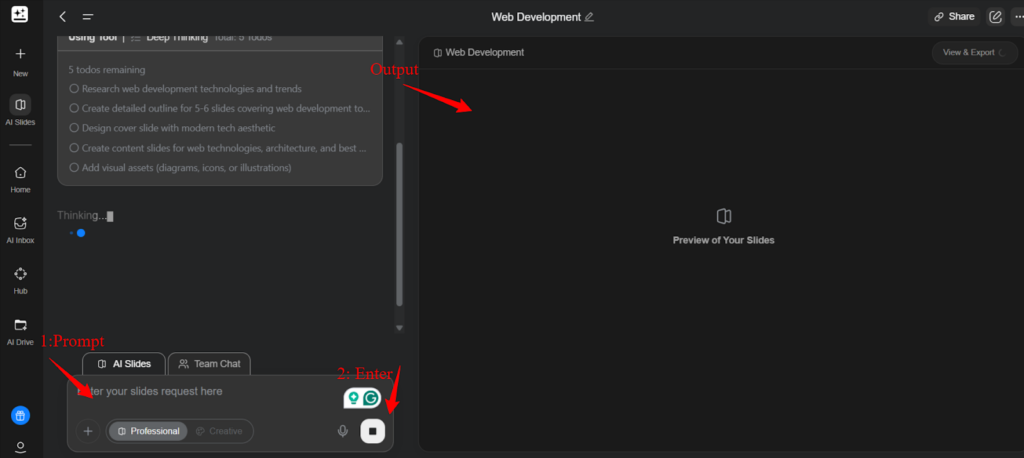
Well, there are a lot of designing tools in this app, so I’ll only list the steps of designing a poster. And you have to follow the same step to create memes, flyers, brochures, coupons, and menus.
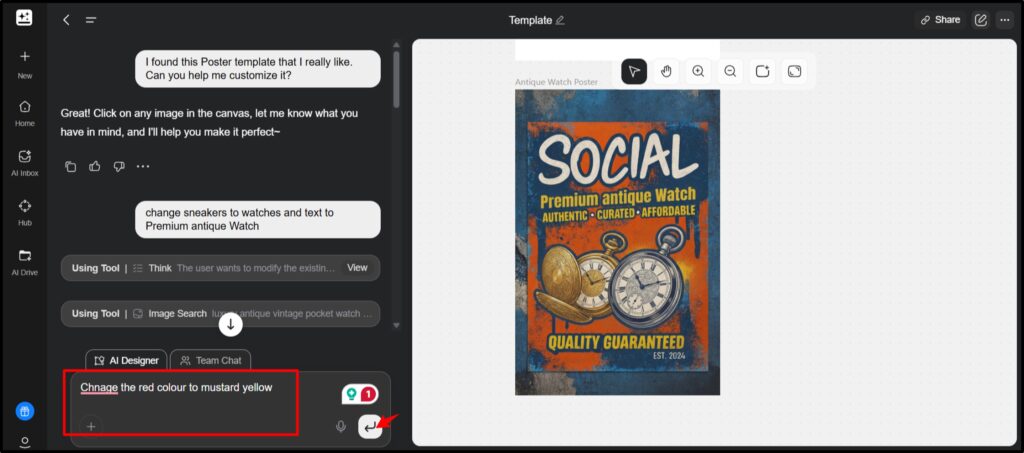
You can follow the same steps and play with other tools as well. If you’re using premium plans, then you can create a full podcast by generating audio and merging it with videos.
Download Genspark AI APK
I’ve found some websites from where you can download Genspark AI so if you’re planning to use this tool then visit these:
Genspark AI Alternatives
To make this genspark ai review 100% reliable, I compared it with some other popular tools that provide all in one workspace for users. For your convenience I’ve attached a table comparing the top features like designer, image & video generator, developer, and offered credits per month.
So if you’re in a hurry, just check this:
| Features | Genspark AI | ChatGPT | Kortix | Lindy |
|---|---|---|---|---|
| Free plan | 100 credits/month | Unlimited credits (GPT 5 mini model) | 100 credits/month | 400 credits/month |
| Paid plan | 12000 credits/month | Based on models | 4000 credits/month | 5000+credits/month |
| AI designer | Sparkpages | Canvas/DALL-E | Canvas mode | Agentic Workflow Designer |
| AI Video | Sora, Gemini | Sora | Slides to video | No video feature |
| AI developer | Websites and native apps | Codex | Open Source | Lindy build |
| AI Slides | Full decks | Basic GPT codes | Templates | Not available |
| AI image | Nano Banana | DALL-E3 | Credit based | No |
FAQ:
Q1: How does Genspark AI Slides work?
A: Genspark AI slides take prompts from the user and then uses Nano Banana model, designer and image editing features to generate slides. It also provides many ready made templates for generating slides as per the user intent.
Q2: Can Genspark AI generate PPT files?
A: Yes, Genspark AI can generate PPT files. You can write the description in the prompt box or select pre-made templates from the AI slides feature. It also supports editing so users can modify the layout, font and colour of the PPT files.
Q3: Does Genspark AI provide API access for developers?
A: No, Genspark AI does not provide API API access for developers. They can only use AI developer for creating simple & full stack websites and building native apps. Developers can integrate their GitHub repository for full stack development as well.
Q4: Is Genspark AI good for developers?
A: Yes, Genspark AI is good for developers who want to boost their productivity as it supports website building, software development and GitHub repository integration. Even beginners can use Genspark for building simple and full stack websites.
Q5: Is there a Genspark AI app for Android or iOS?
A: Yes, there is a Genspark AI app for both Android and iOS. You can download it from Google and Apple Play Store.
Q6: Does GenSpark AI offer better research quality than Perplexity AI?
A: Genspark uses Mixture of Agents whereas, Perplexity uses Sonar and Sonar Pro for research. Therefore, Genspark AI is much better than perplexity in research.
Final Verdict: Who Should Actually Pay?
After doing all the trials and testing, here’s my final take.
Go for the free plan if you just want to create images and designs, as Genspark AI offers 100 credits per day.
With this plan, you can design social media ads, movie posters, business logos, pamphlets, etc., and I believe it’s great for students who want to design posters for free.
If you’re self-employed or have your own startup, you can opt for the paid Plus plan, which offers unlimited credits.
It comes with many advanced features, and you can even create a website for your business and video clips for marketing campaigns. I really liked the image-to-video feature that creates the entire video from the given images so it’s quite useful for filmmakers who want to create professional shots.
And I believe the Pro plan is very expensive compared to its features because it’s not offering anything extra besides storage.
For more information, you can see the screenshots I’ve pasted in this review blog. You can also read real user reviews for help.
My job was simply to share my experience; the final decision is yours.
People also search for: