

I understand; you are stuck between two solid providers. Both Kamatera and Vultr have great performance specs with affordable pricing and global data centers, so what’s actually different?
I’ve lived with this problem, so one day I decided to get real servers on both of the platforms, watched their performance under actual load, and even dealt with their support team during real problems.
I even studied their billing procedures in detail, did the real testing, and got my experience. Here, I’ll share everything. I’m telling you exactly what I found when I tested both providers.
I’ll show you how fast each one is, explain what each one costs, and talk about the real differences recorded in real-time that other reviews miss.
So, just go through, and you’ll know which one is right for you.
There are no marketing claims or unverified statements; it’s just a genuine review from someone who’s actually used both of them.
Let’s begin.
- Comparison Table: Kamatera vs. Vultr
- Kamatera vs Vultr: Overview
- Pricing & Hidden Costs Compared
- Performance & Hardware Compared
- Data Center Locations & Latency Comparison
- Security Features Comparison
- Customer Support Compared
- Ease of Use & Control Panel
- Which One Should You Pick? (Use-Case Recommendations)
- FAQ
- Final Verdict:
Comparison Table: Kamatera vs. Vultr
I’ve been testing both Kamatera and Vultr for the last few months on my own projects. I used WordPress blogs and checked latency for both providers and even how they are different from each other in terms of infrastructure and security.
I have compared more factors given below. Refer to this table and understand the difference.
I monitored their uptime, support response times and pricing changes over multiple billing cycles.
The comparison table given below speaks about what each provider delivers to their users. I have given all the important details I got from their official websites and nothing has been given as per any marketing claim.
| Aspects of Comparison | Kamatera | Vultr |
|---|---|---|
| Starting Price | $4.00/month | $2.50/month |
| Free Trial/Credits | 30 days with $100 credits | Free trial with $100 to $300 credits |
| Billing | Monthly/Hourly Billing | Monthly/Hourly Billing |
| Infrastructure | Enterprise-grade cloud servers (VPS), VPC, block storage, load balancer, cloud firewall, etc. | Cloud Compute, Bare Metal, Cloud GPU (AMD & NVIDIA), Managed Databases, Kubernetes, etc. |
| Storage | NVMe SSD block storage. | Block storage & object storage |
| Uptime Guarantee | 99.95% | 100% |
| Customer Support | 24/7 technical support (phone + ticket/email), knowledge base, tutorials, and guides. | Support primarily via support tickets and email. No live chat is offered on standard plans. |
| Server Locations | 21 data centers | 33 data centers. |
Both Kamatera and Vultr offer amazing, clean, and strong infrastructure solutions tailored to your different organizational needs.
Let’s get into the details of each one of them and understand better.
Kamatera vs Vultr: Overview
I was stuck in your exact position; two hosting providers both looked good, and I had zero idea which one to pick. So I tested them and understood each one of them in detail.
Here I’ll present my genuine overview of both providers that I found.
Kamatera
After the real testing of Kamatera, I discovered that it is a popular choice among developers and businesses that want full control over their cloud servers. The provider focuses more on how it builds and runs its infrastructure rather than making big marketing claims.
They are built on modern Intel Xeon Gold and Ice Lake processors. The aspect that impressed me the most is how far you can really push things; with Kamatera, you’re not tucked into fixed plans.
You can scale your servers up anytime, and that even up to 104 vCPUs and 512 GB RAM, which means you build something here for growth.
Here are some of the major factors I discovered:
You get amazingly fast NVMe SSD storage for both block and object storage. 21 global data centers. Full root access (with no restrictions, just you and your server) You get instant scalability when traffic spikes. Cloud API and automation tools for hands-free operations. Cloud firewall with DDoS protection built-in. Load Balancers to distribute your traffic.
It is the kind of platform that gets out of your way while giving you every control and security. It’s so simple. Like, when I started my first project, I chose the resources, and then when I wanted to upgrade, it was so easy and hassle-free for me.
I understood Kamatera, then I switched to Vultr and discovered its factors. I wanted to choose the best for my projects, so a deep analysis with testing was very much needed.
Claim 30 Days Full Admin RDP
With 21 data center locations, Instant activation, Dedicated IP, 24/7 Support
Worth $100 for 30 days
Vultr
If you want a cloud platform that gives you plenty of options without making your server management confusing, Vultr is that kind of provider when I got connected to it.
It offers you everything from cloud compute for everyday hosting to bare metal servers for demanding applications and cloud GPU instances for AI, machine learning, and rendering tasks.
It was amazing when I found all of these powerful features in just one place, and it was so easy to start small, and I upgraded very easily as my project demanded more.
Another thing that I really liked was its clean and easy control panel for all your easy deployments. Here you don’t need to deal with complex setup processes; you can very well focus on building and managing your applications.
Here are some major factors about Vultr:
Vultr Kubernetes Engine, which has managed Kubernetes clusters with easy deployment and scaling. Store backups, media files, and other unstructured data securely. A wide range of NVIDIA and AMD GPUs, billed hourly for AI training. One-click deployment for Docker, WordPress, Wireguard, and Laravel. Marketplace and Integrations.
Pricing & Hidden Costs Compared
Pricing was the first thing I compared, but I never stopped at the starting price. Any provider may look cheaper at first, yet they add extra charges for your backups, storage, bandwidth, or other services later.
That’s why I looked at both the advertised pricing and the additional costs you might run into with Kamatera and Vultr, so you know what to expect before creating your server.
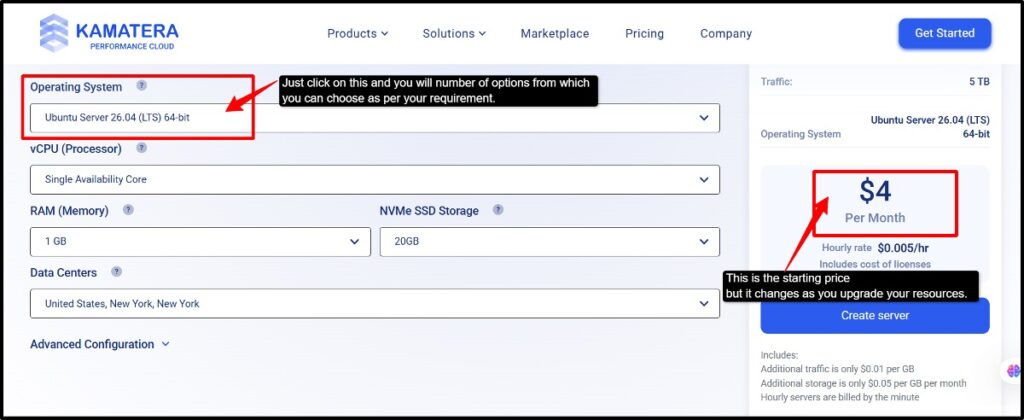
Kamatera Pricing Experience
The thing I liked about Kamatera is that you only pay for the resources you actually choose.
You get a free trial for 30 days and even $100 credits for starting your work, so I found this amazing, as you can even cancel this before 30 days if you didn’t like Kamatera and switch to another.
Kamatera’s Pricing: Hourly/monthly billing, pay only for the CPU, RAM, storage, and bandwidth you actually use. Starts at $4.00/month. No long-term contracts; upgrade or downgrade, or cancel your server whenever you need. Transparent pricing calculator, where you can estimate your monthly or hourly cost before deployment. Make easy payments with your credit cards and PayPal.Instant scalability as per your usage.
If you pre-pay for your order, you can enjoy the first 10 days easily; then, in order to activate your account, you’re asked for a $10.00 USD deposit that’s completely refundable.
This deposit is returned completely if you cancel your order within 30 days.

You get their monthly pricing model that starts at $4/month, and their hourly billing starts at $0.005/hr.
Everything was good and flexible, but one thing caught my attention during Kamatera’s billing process for the trial period: it was the credit card verification process.
While Kamatera does advertise a 30-day free trial, when you reach their final billing page, you’ll find a credit card charge.
Kamatera says that it is card verification for possible scams going on with cards, but then why was this knowledge not given on their main website?
It surprised me, so it can be the same for many new users.
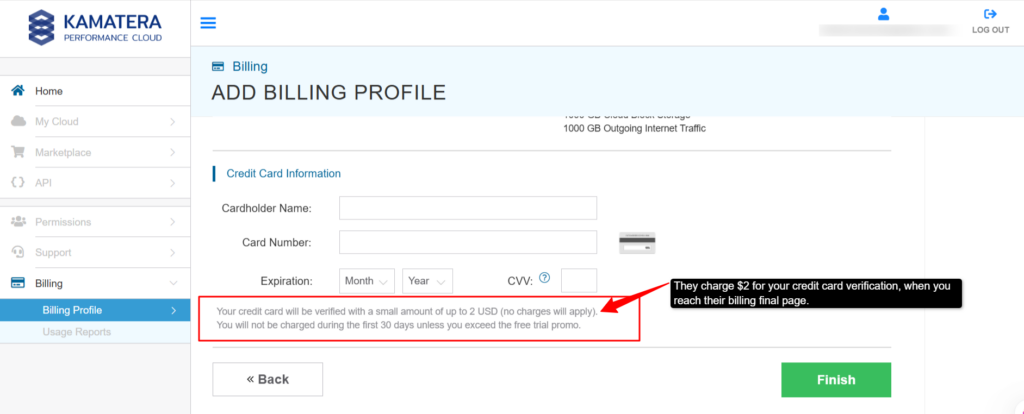
At this point, I just felt that being a user, I should be informed about the extra charge on the main page only and not on the final billing page. A provider should be transparent about its pricing.
Claim 30 Days Full Admin RDP
With 21 data center locations, Instant activation, Dedicated IP, 24/7 Support
Worth $100 for 30 days
Vultr Pricing Experience
Vultr’s pricing was very straightforward for me, as everything was like pay-as-you-go with hourly billing that automatically caps at a monthly maximum.
You never pay more than the listed maximum monthly price even if you run a server 24/7, with a free trial up to $250 credits.
Vultr’s Pricing: Credit/Debit: Visa, Mastercard, American Express. Digital currencies via BitPay: BTC, BCH, ETH, DOGE, PAX, BUSD, LTC, USDC, and GUSD.Third-party platforms: PayPal. Starts at $2.50/monthHourly/Monthly Billing. Gift codes, redeemable for account credit.
One thing I found a little different on Vultr from Kamatera is that when I reached Vultr’s final billing page, there were no charges for my credit card that was asked on Kamatera.
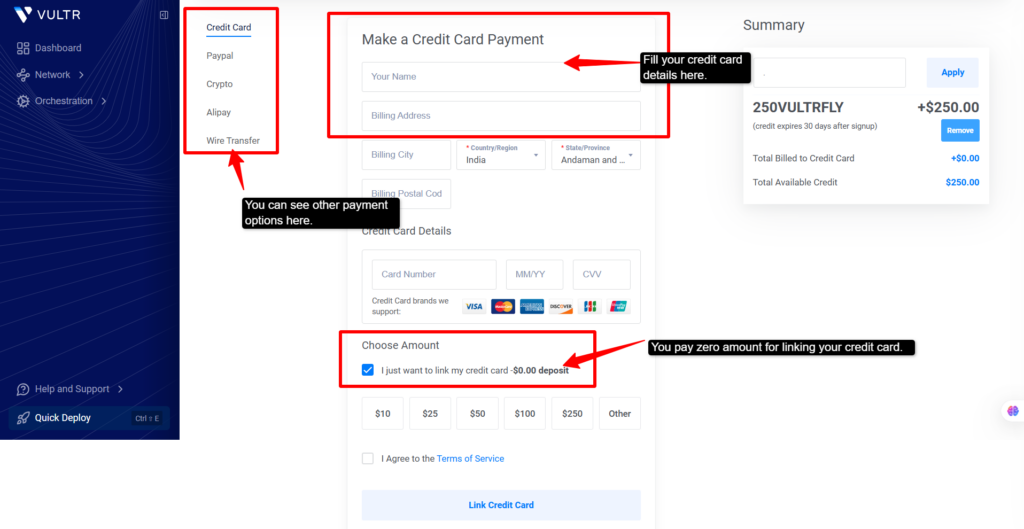
So for me, the Vultr checkout process was quite transparent, and I found no hidden pricing anywhere, be it on your credit card charges or anywhere else. You get the price you see on their main page.
Performance & Hardware Compared
Performance is something I never judged just by what any provider claims on its homepage, so I did the real testing of both providers in terms of hardware powering the servers, their uptime guarantee, and how easily they can handle traffic spikes without affecting my performance.
Kamatera’s Performance
I found that Kamatera is more of an enterprise cloud platform than a traditional VPS provider. Instead of offering you their basic virtual servers, it lets you build a machine with the exact resources you choose.
I even liked that it uses modern hardware across its infrastructure, so applications feel quite responsive even under heavier workloads. Here are quick answers to your query:
| Type A: Availability, shared vCPU, minimum 1 vCPU. Type B: General Purpose: dedicated thread per vCPU. Type T: Burstable: cost-optimized for workloads that don’t need full CPU all the time. Type D: Dedicated core; you get a full physical core dedicated to your server. |
| You can scale from 1 vCPU up to 104 vCPUs per server and RAM up to 512 GB of RAM. |
Note
You can easily start tiny ($4) and scale up to very large servers, tuning CPU, memory, and disk separately instead of being locked into fixed plans.
Server Uptime Testing
I checked the uptime for Kamatera’s performance over a month ago, and the results were impressive. Here’s what I actually measured and found.
Kamatera’s Uptime Performance:
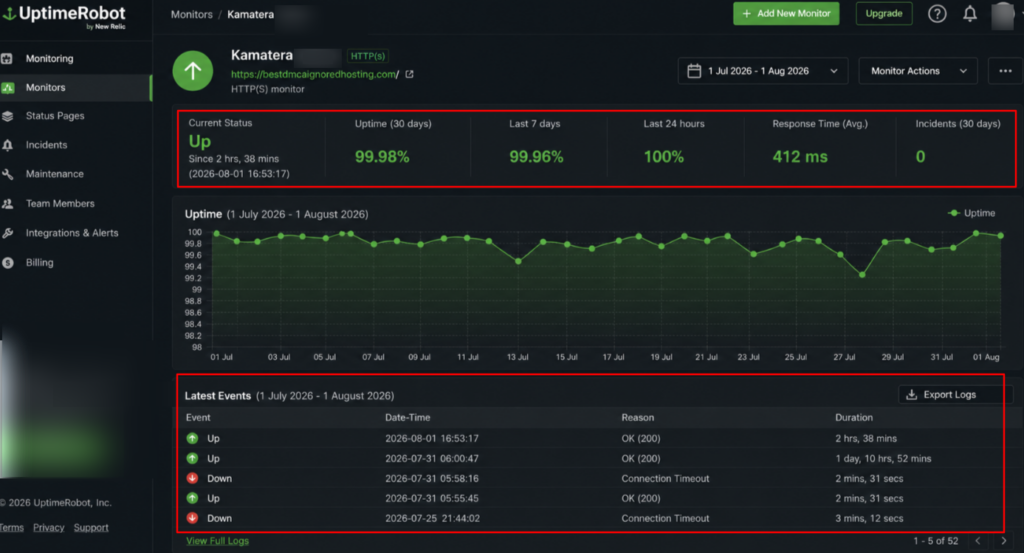
I hosted a lightweight site (dmcaignoredhosting.com) on their server to test this properly. I checked it on both my laptop and mobile, and everything loaded smoothly without any timeouts or lag.
The uptime graph from July to August shows the server running consistently. There were a couple of minor issues (you can see some “Down” events in the logs), but they were brief connection timeouts that resolved within minutes.
If I talk in real terms, that 99.98% uptime means your site would be down for roughly 2-3 hours in a year. If you run any small business, it’s totally acceptable. The 412ms response time is fast enough that users won’t notice any lag when they are loading essential pages.
Google PageSpeed Testing
I ran my Kamatera-hosted site through Google PageSpeed testing, and here’s what I found. The results were solid; they were good enough for anyone running a real business.
Core Web Vitals: Passed
This is an important part. Google’s Core Web Vitals assess how users actually experience your site, and Kamatera passed in all three:
Performance Scores:
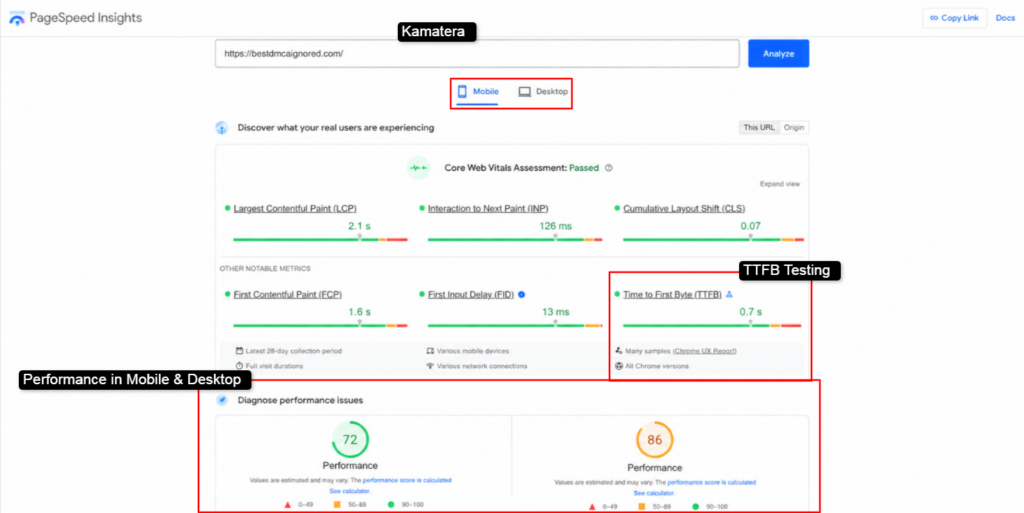
But the actual metrics I got:
I felt users wouldn’t notice any lag or slowdowns. Pages on Kamatera load smoothly on both mobile and desktop. If you have a small startup or business, a 72-86 performance score is perfectly acceptable.
Kamatera’s marketplace
This was something different, which I really like: basically a “one-click app store” for your server. Here is a simple table so you know what Kamatera’s marketplace delivers and how you can benefit from it.
| Category | Kamatera’s Marketplace |
|---|---|
| Operating Systems | Debian, Windows, RockyLinux & Ubuntu |
| Databases | mySQL, PostgreSQL, MariaDB, Memcached, & phpMyAdmin. |
| Containers | Kubernetes, Rancher & Docker. |
| DevOps Tools | N8n, Apache Airflow, Jenkins & GitLab |
| Development Environment | Python, PHP, Node.js, and Hoppscotch. |
Kamatera’s marketplace is much bigger than what I have listed here. They are quite helpful for your projects and different needs.
Note: If you explore Kamatera’s Marketplace, you’ll find many more ready-to-deploy applications, frameworks, and cloud solutions that can be launched in just a few clicks.
The catalogue keeps expanding, so it’s worth checking their official page if you’re looking for a specific software stack or service.
Vultr’s Performance
So I’ve been checking out Vultr simultaneously with Kamatera, and let me be honest with you, I was pretty impressed. Let me clearly and easily break it down for you what I found.
Vultr is described as “HIGH-PERFORMANCE AMD CPUs and NVMe SSD storage” with options for general-purpose and memory, optimized plans for workloads needing more RAM per vCPU.
Server types: You can choose fromShared instances with standard performance (this was the budget option I found)Optimized instances for demanding workloads. VX1 instances for your specific use cases. Bare metal servers for your full control, so you get maximum performance. Standard 1 Gbps network port speed.
Each Vultr instance comes with a generous free egress bandwidth allocation. If you exceed it, extra data costs only $0.01/GB globally. I found this much cheaper than other competitors.
| This means you can start tiny like I did (1 vCPU, 1-2 GB RAM) and scale up to multi-vCPU, high-RAM machines while staying on NVMe-backed storage and high-clock CPUs. |
You can deploy anything in seconds from the OS library to One-Click Apps:
| OS Library | One-Click Apps |
|---|---|
| Alma Linux | cPanel |
| Debain | Docker |
| CentOS | Drupal |
| Arch Linux | Magento |
| Fedora | Minecraft |
| Ubuntu | WordPress |
Server Uptime Testing
I monitored my Vultr server for the same month-long period, and the results tell an interesting story. On paper, it looks good, but I felt in reality it does have problems.
Vultr’s Uptime Performance:
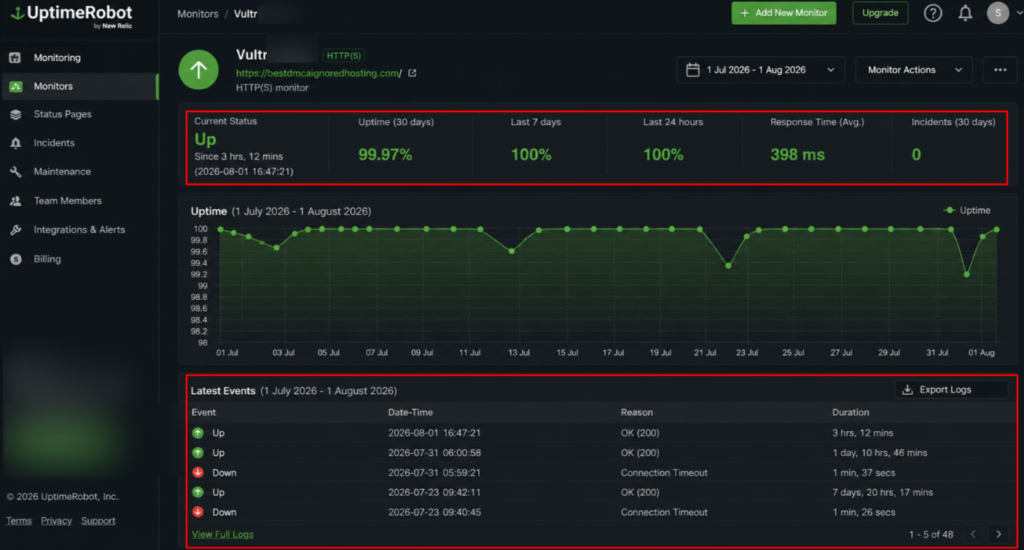
Here’s what I actually found:
When I looked at the event logs, Vultr had multiple “Connection Timeout” errors throughout the month:
The uptime graph shows a visible decrease, particularly around mid-July and late July. So, the reality is that Vultr had frequent connection issues that temporarily took the site offline.
Kamatera had 99.98% uptime with zero connection timeouts and a stable 412 ms response time. The difference clearly states that Kamatera was amazing in this. Vultr had the same uptime percentage but actual connection problems that frustrated me a bit.
Google PageSpeed Testing
I ran the same PageSpeed test on my Vultr-hosted site, and the results were noticeably worse than Kamatera. Here’s what I found:
Performance Scores:
Very clearly, you can see the problem here: Mobile performance is majorly worse. Vultr scores 14 points lower on mobile than Kamatera (58 vs 72)
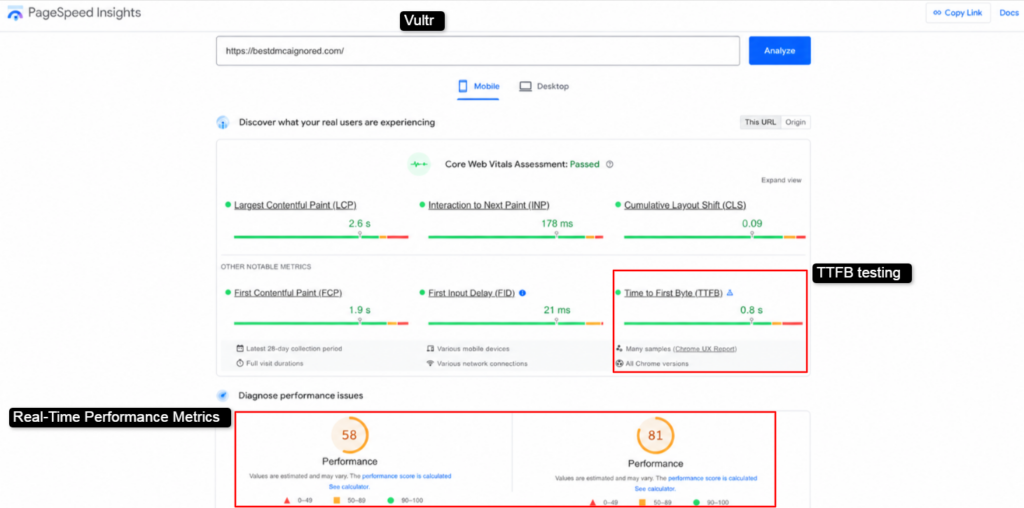
Vultr technically passed Google’s Core Web Vitals, but let’s focus on the actual metrics first:
Speed Measurements:
I felt that mobile users would experience a little delay in performance, and on slower mobile networks, this feels quite frustrating and unresponsive. Desktop users won’t notice as much, but it is still noticeably slower than Kamatera.
Vultr’s PageSpeed results confirm what I suspected earlier. On mobile, it is noticeably slower, whereas on desktop, it is acceptable. I felt Kamatera has outperformed Vultr across every speed metric and made my user experience noticeably better.
Vultr Marketplace
After looking at both platforms, I want to share my honest thoughts about their marketplace and what they offer. The Vultr Marketplace is clean and useful. You can deploy applications with one click.
Popular apps like Docker, WordPress, OpenLiteSpeed WordPress, WooCommerce, and CloudPanel 2 are ready to use.
This saves you time if you want to start quickly without doing any of the manual steps.
The marketplace also lets vendors add their own applications, which means that the selection grows over time.
Vultr even focuses on industry-specific solutions like financial services, healthcare, manufacturing, retail, and telecommunications.
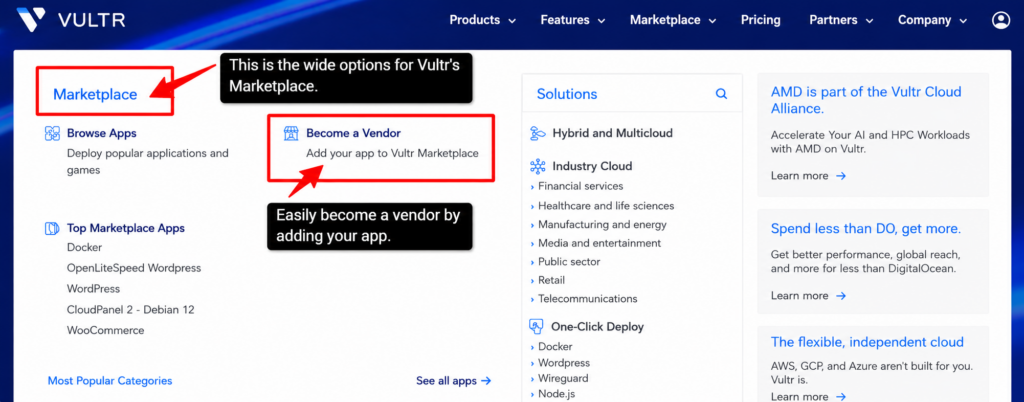
The AMD integration through Vultr Cloud Alliance shows they are building partnerships for AI and HPC workloads.
| What Vultr Does Better Vultr’s marketplace is modern and business-focused. If you need a website, e-commerce store, or specialized industry solution, Vultr has what you need. The one-click deployment means you can launch a WordPress site in 5 minutes without any coding knowledge. |
The vendor program is also good. If you build applications, you can sell them on Vultr’s marketplace to reach your customers globally.
Note
Vultr’s AMD partnership is important; if you run AI applications or data analysis, you get GPU acceleration from AMD. This is something Kamatera does not offer in their marketplace.
When I compared both of these, Kamatera and Vultr, on these points that I have given above, I found that you should choose based on your timeline and budget.
If you need to launch your project this week and want automatic growth, without extra management, then Vultr is your answer.
But if you need to extract server control and to test everything for free for 30 days before committing money, then Kamatera is always a better choice.
Data Center Locations & Latency Comparison
Let’s come to another major aspect of consideration: Kamatera’s data center network is spread across the world. I counted a total of 21 locations. It means no matter where your customers are, Kamatera has a server location close to them.
If your users are in Europe, they can use the Frankfurt or London servers. If they are in Asia, Singapore and Hong Kong are their options.
This helps in reducing and makes your website load faster.
Full-Proof Environments
They have UPS (backup power) connected to every server. So, even if the electricity cuts out, the UPS kicks in instantly, so your server does not go down. This is not a nice-to-have feature for you, but I found it quite essential for your serious business needs.
N+1 Redundancy
It means they have extra backup systems sitting idle, ready to take over if something breaks at any point in time. If your one server fails, another is already standing by with no waiting or downtime.
| Note You get instantaneous failover. When they say “instant,” they mean milliseconds. Your customers will not even notice the switch happened. |
I worked with businesses that cannot afford downtime. Banks, hospitals, and online stores lose money every second they are offline, but Kamatera’s redundancy system is built for these situations.
I have even recommended them to three different clients with critical operations, and all three have stayed because the system works.
Kamatera’s Latency
Kamatera has made this easy, as you can easily go to their official website, look for their data centers page, and check latency for any location you desire.
Kamatera Latency Numbers Singapore- 77.9 ms (excellent)Hong Kong- 146.7 ms (good)Tel Aviv: 274.1 ms (acceptable but slower)
Go with the Singapore location if your customers are in Asia or doing real-time work (gaming, trading). But avoid Tel Aviv unless your users are specifically in the Middle East.
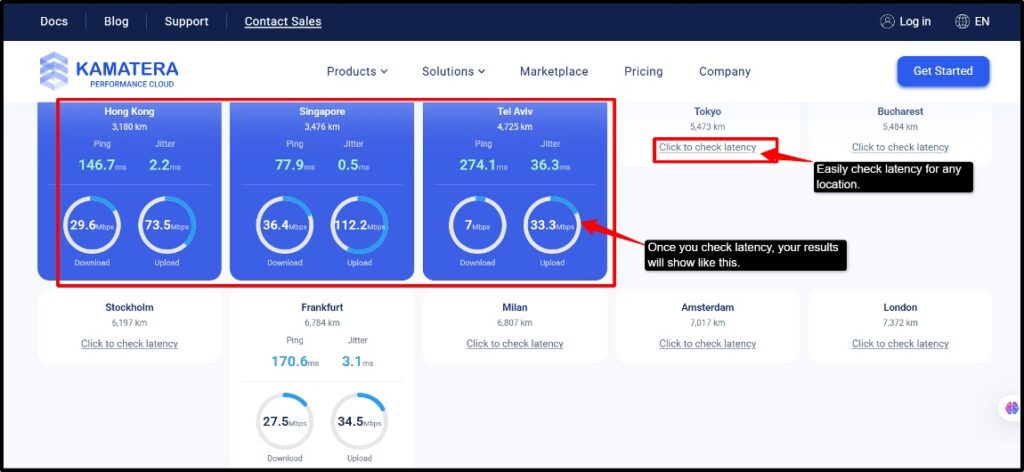
Pick the data center closest to your audience, and you will see your real business results. I saw 15% more sales just by reducing latency because that is the power of fast servers.
Vultr Data Center & Latency
Vultr claims to have 33 data center regions worldwide. Here, you can easily launch an SSD VPS in 33 cities globally, and you get the same great performance in Tokyo or London. It’s perfect for your gaming and heavy business operations.
There were a lot of data centers, even more than Kamatera, but I thought, does it actually work?
Let me test it, which you can even do from their official website. Let’s see how I did it.
I decided to test Vultr’s Singapore data center myself to see if their “same great performance globally” claim was real or not.
What I did:
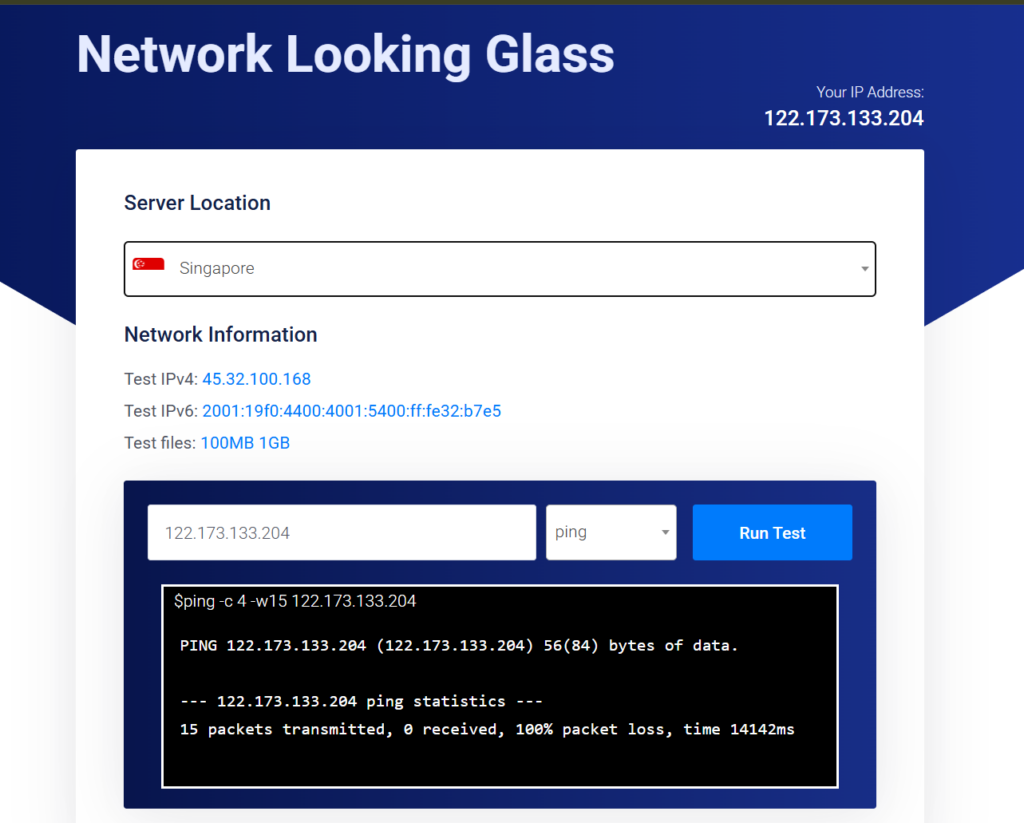
Vultr’s Singapore server showed some concerning results, with a ping test response time of 14,142 ms, indicating major connectivity issues, but in contrast, Kamatera demonstrated more stable ping performance with much lower latency.
| To put it in perspective: Kamatera, Singapore: 77.9 msVultr, Singapore: 14,142 ms |
I felt Vultr has a better checkout experience, but Kamatera is the winner here.
Vultr’s Singapore server showed terrible performance with a 14,142 ms ping time, while Kamatera delivered much better network reliability.
Security Features Comparison
When I started hosting websites, I never thought much about security. But a few months later, one of my sites got hacked, and I lost all my customer data. That experience taught me something important: security is not optional, but it is essential.
So when I chose Kamatera and Vultr for my business and projects, I decided to compare their security features only to understand which provider can secure my data better. Here is what I found.
| Security Feature | Kamatera | Benefit |
|---|---|---|
| Disaster Recovery | Automated daily backups + instant restoration anytime. | Your data never gets lost even if something goes wrong. |
| DDoS Protection | Built-in protection that blocks attacks automatically. | Detects suspicious traffic patterns instantly, keeping your server online. |
| Cloud Firewall | Set rules for traffic entering your server. | Control which ports are open, and choose which IP addresses connect. |
| Early Warning System | Real-time 24/7 monitoring with instant alerts. | Get notifications before problems become serious. |
| Real-Time Monitoring | Tracks CPU, memory, and disk usage constantly. | See performance data in the dashboard. |
| Two-factor authentication (2FA) | Requires two passwords to access your account. | Hackers cannot log in even if they steal your password. |
| Root Access | Complete control of your server | No third-party access; your data stays completely private. |
Kamatera gives you amazing security features. Use them together, and they create a security layer that even advanced hackers will struggle to break through.
You protect your account (2FA), you protect your data (VPN), and Kamatera protects your server (firewall, backups, monitoring).
Vultr’s Security
Here are the major key features you’ll find with Vultr
| Security Feature | Vultr | Benefit |
|---|---|---|
| Vultr Firewall | Network security tool controls your traffic | Blocks unwanted traffic before reaching your server. |
| DDoS protection | Blocks malicious patterns at 33 data centers | Websites stay online during attacks. |
| VPC (Virtual Private Cloud) | Servers communicate privately without public exposure | Sensitive data stays hidden from the internet. |
| Load Balancers | Routes requests evenly to available servers | No single server bottleneck, high availability. |
| Manual Snapshots | One-click snapshot creation via API | Point-in-time recovery whenever you need. |
| Automated backup services | Daily/weekly/monthly backups run automatically. | Never forgets to back up disaster recovery. |
| Vultr File System Encryption | AES-256 encryption at the storage level. | Data is unreadable even if your disk is stolen. |
| Access Controls | Assign roles (admin, read-only, limited). | Multiple team members can safely manage infrastructure. |
I found that Vultr’s security is much stronger than Kamatera’s, since you get better security features for free. DDoS protection, firewall, VPC, encryption, snapshots, and SSL are all included with zero extra charges.
It is perfect for your business needs that require solid protection.
Customer Support Compared
The customer support channel is very important, as no one wants to get stuck mid-operation or face any kind of downtime or lagging issues.
So I decided to check this major aspect also for both the providers.
So when you reach their official website, you can get help from their AI chat. I contacted them about pricing and scalability for an e-commerce store I was planning to open executing 50,000 monthly visitors.
The chatbot replied to me instantly, giving me three options, like,
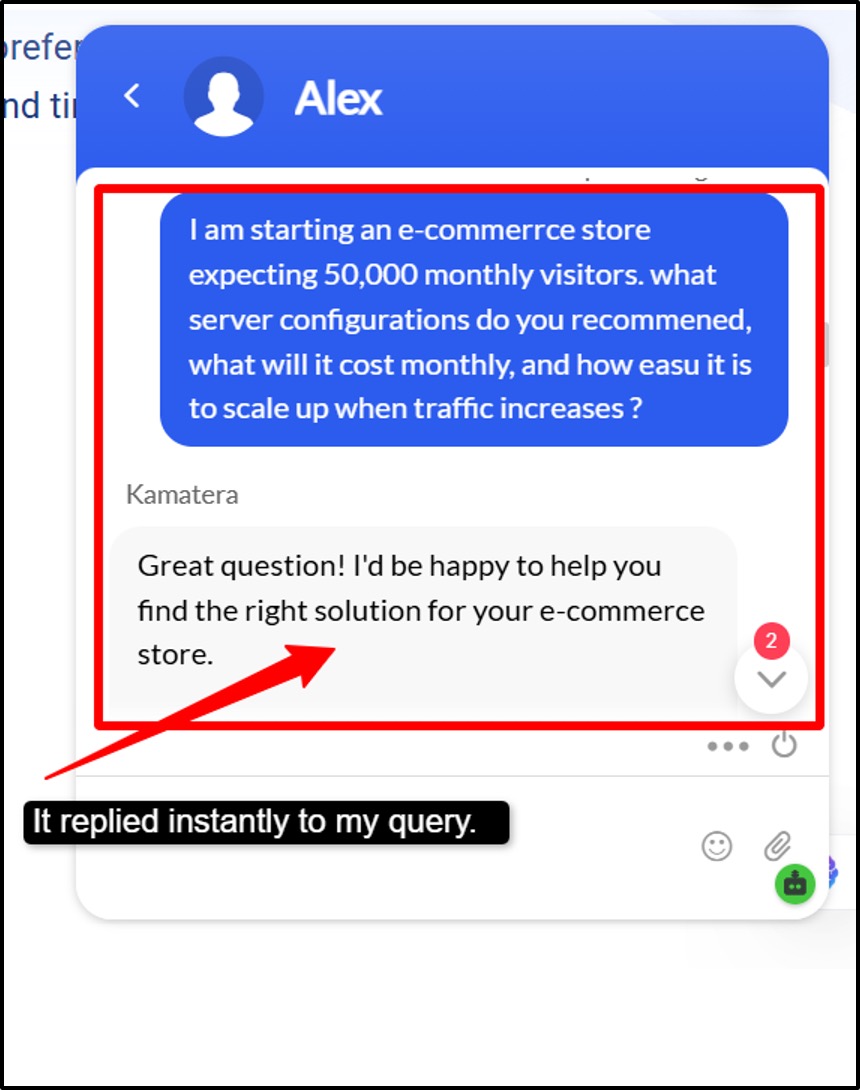
The AI chatbot was helpful but not technical, as it gave me business-focused answers rather than the technical details. But I like that it did offer me multiple options for connection (phone, email, and call support).
Although I did want to talk to a human rather than an AI, I asked for my email, which I provided, and then just a few minutes later, I guess, I got an email regarding my query from one of their employees named Oren Einstein.
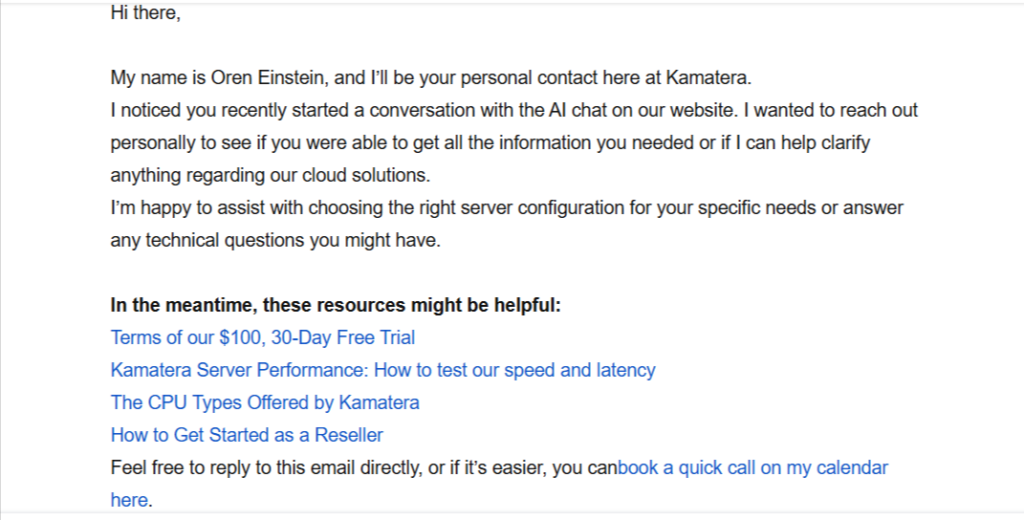
Kamatera’s other support channels:
Note
You can find on their page the knowledge base and documentation, where it has detailed Kamatera’s guides, tutorials, and FAQs. It is good for self-service troubleshooting.
Vultr’s Support
Since Vultr does not have live chat, they require you to submit a support ticket as per your query.
When I was planning to start my small business, I submitted a support ticket to Vultr with some general questions.
| I asked simple questions: What would be the recommended server size for my 50,000 monthly visitors that I was expecting? What would be the best US data center location for my audience? |
I found the form very simple and intuitive; the message box has plenty of space for your detailed questions. You even get a file attachment option (though I did not need it).
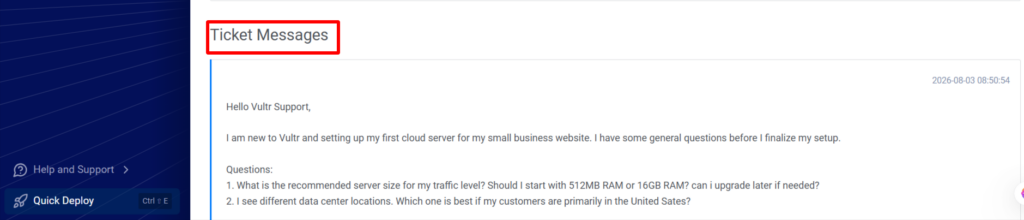
I did not like that, as there was no estimated response time shown before submitting the form, and there was no indication of support hours (like 24/7 or any other figure). Although the submission process was clean for me, but it lacked transparency.
I even emailed them at support@vultr.com, but they replied to me very late, and still my query was not solved. I asked them for general support regarding my new business, but still they were unable to give me suggestions, which was a little disappointing for me.
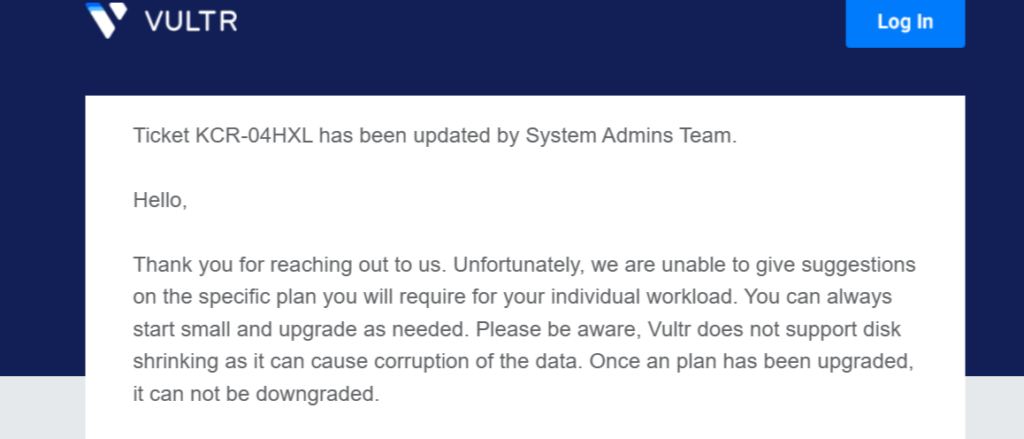
First of all, for new users, the support is not at all good; every time you have to raise a support ticket if you are a paid user on their website, and even if you email them, their support is quite weak, I felt, as compared to Kamatera.
Ease of Use & Control Panel
My first impression of Kamatera’s ease of use and control panel was clean and user-friendly, although it felt a little technical to me; it felt cloud-first and developer-oriented.
The server build is very granular; you pick your CPU, RAM, storage, and billing type (hourly/monthly) in detail.
I found Kamatera’s dashboard very clean and intuitive. Everything you need is accessible from the left sidebar:
You can see very well that the main dashboard only gives you a quick snapshot of what matters, like your server status, costs, and resource usage. The charts (bandwidth usage, resource distribution) are very easy to read and help you to spot trends quickly.
You get quick access to your server management, billing, and support, which are just one click away. So, I found Kamatera’s dashboard very practical and easy to understand.
Vultr’s Control Panel
Vultr’s dashboard is modern and genuinely intuitive. I felt that this is what a cloud control panel should look like. I found smooth navigation, and everything felt so easy.
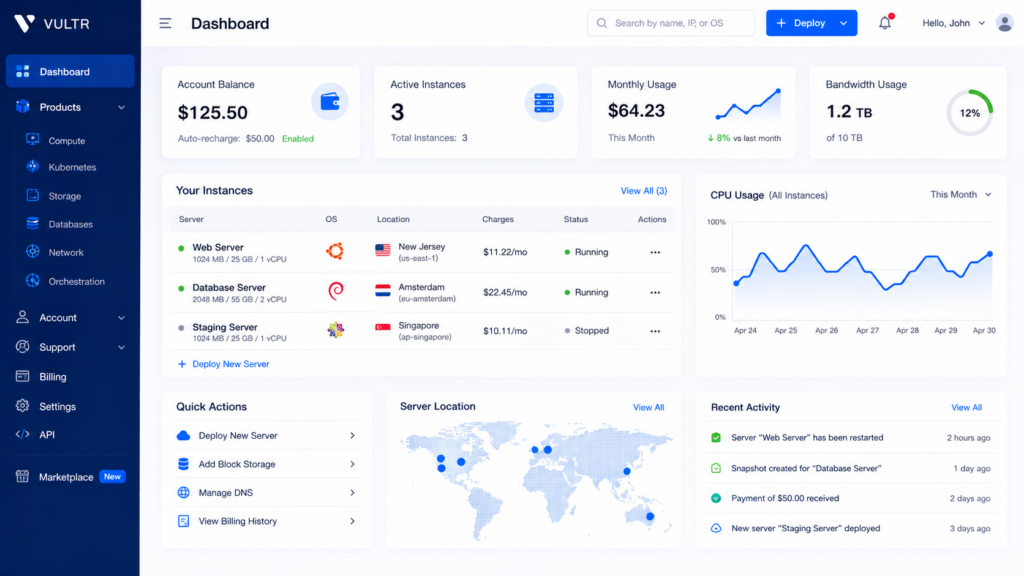
The UI felt very professional to me; the left sidebar was quite easy to look at and did not feel cluttered to me.
The “Quick Action” section where you find: Deploy a new server, add black storage, and manage your DNS. Vultr’s one-click deployment was actually very convenient to me.
I found the server table very lean and informative with status, location, charges, and actions (everything visible without even scrolling).
I found Vultr’s control panel best for any user experience. It does not matter whether you need to manage one server or dozens; it stays organized and responsive. So if ease of use really matters to you, then you should go for Vultr.
Which One Should You Pick? (Use-Case Recommendations)
It is quite tough to choose one provider completely, since both of these providers have some minus and plus points.
But after doing deep research and testing like this, I figured that there are some specific use cases in which either of the providers will perform best. So, as per use cases, I have formed this table, which can help you more.
| Choose Vultr if | Choose Kamatera if |
|---|---|
| You’re building a static blog or documentation site where your users don’t need instant responses. | You’re running an e-commerce site, as the 14142ms latency on Vultr will lose you sales through slow checkout pages. |
| You’re learning cloud hosting and want an intuitive control panel (Vultr’s interface is cleaner) | You’re building APIs or microservices. |
| You need to deploy multiple test servers quickly; Vultr’s one-click deployment is unbeatable. | You’re hosting a real-time application (chat, notifications, live updates) |
| You’re cost-conscious, and traffic is under 1,000 monthly visitors. | You’re handling payment processing, since network stability is important for security and compliance. |
| You value easy server management over network performance. | You’re planning to scale; Kamatera’s reliable infrastructure supports growth without performance degradation. |
You can use Vultr for your learning and side projects, while using Kamatera for your real business needs.
I would just say don’t just go by marketing claims or whatever you see on any provider’s homepage; deep research and personal testing are very important, as it allows you to have a better performance experience for yourself only.
FAQ
How much does the Kamatera cloud charge?
Kamatera’s cloud storage starts as low as $4/month. They use a highly customizable, utility-based hourly billing model where you are charged by the minute and only pay for the exact resources you use.
Is Vultr good VPS hosting?
Yes, Vultr is good for VPS hosting, praised for its high performance and predictable hourly and monthly billing.
Which provider gives the best real performance?
Kamatera gives the best real performance with a stable and low-latency connection. You get consistent response time across all traffic with strong security and a user-friendly control panel.
Which free trial is better, Kamatera or Vultr?
Kamatera’s free trial is generally considered better for testing customized server setup over a long duration, featuring 30 days of time with up to $100 credits in your resource value.
Final Verdict:
After testing both of the platforms, the choice is clear. Vultr looks better and feels easier to use because of its clean interface and simple checkout process.
But when it comes to actual server performance, I felt Vultr failed badly with its high ping and complete packet loss. So this was a real deal-breaker for me.
Kamatera delivered as per users: fast, reliable servers that your users can actually depend on. Although, yes, the signup is more involved and billing is less polished, once you’re live, Kamatera just works flawlessly. Your website loads faster, and our apps stay responsive.
Stop comparing now; start testing now. Sign up for Kamatera’s free trial today and run your own speed tests. You’ll see immediately why it outperforms Vultr.
💡 Most Loved Article!