
Okay, so let me just be honest with you.
I am not really a tech person. Numbers confuse me, and anything involving spreadsheets or coding usually stresses me out. Working with data has never been my favourite part of any of my workflows. Most of the time, I find myself stuck trying to understand unorganized sheets and figuring out which formulas to use, which honestly takes way more time than it should.
That’s exactly why I decided to try Julius AI. I wanted to see if it could actually make things easier instead of just sounding good on paper.
But honestly? I was kind of surprised.
You just upload your data and ask questions like you’re texting a friend. It gives you answers, graphs, summaries, everything, without even making things complicated. There is no need to deal with confusing steps or technical knowledge. It will simply deliver what you are looking for in a way that makes sense.
Obviously, I didn’t expect perfection. But it genuinely made things easier for me. So this is just me sharing my real and honest experience with Julius AI so you can decide if it’s worth trying for you or not.
- What is Julius AI?
- Julius AI allows you to
- Why You Can Trust This Julius AI Review
- Who Is Julius AI Designed For?
- Advanced Features (Use Cases)
- Pricing & Billing Scandals
- Billing Scandals
- Personal Experience and User Experience
- User Experience
- How to Get Started With Julius AI: Step-by-Step Guide
- Julius AI vs. Alternatives — Side-by-Side Comparison
- FAQ
- Final Verdict: Is Julius AI Worth Using?
What is Julius AI?
Julius AI is known to be an artificial intelligence-powered data analysis tool that lets you work with data just by asking questions in simple language. You don’t need to deal with complex formulas or coding; you can easily upload your data and just ask questions like you would in a conversation. It will quickly give you clear answers, charts, and insights, making the data analysis faster and much easier, especially for beginners.
Julius AI allows you to
One of the best things about it is how clearly it presents results. Instead of just showing numbers, it will create clean visuals, highlight key trends, and explain what’s actually happening in your data. This makes it easier to understand patterns and make better decisions without making mistakes.
Why You Can Trust This Julius AI Review
I have given this review based on actual, practical use of Julius AI rather than only surface-level study or duplicated features, you may fully trust it. I have researched the tool in detail, and then I have decided to share my useful insights with you all. I have majorly focused on how it actually performs in everyday situations, what feels smooth, and what might slow down your work.
Does it actually save time and effort? This is the real question I was finding answers for. This review aims to give you a clear, honest, unbiased perspective so you can decide if it truly fits your needs.
Who Is Julius AI Designed For?
Julius AI has been designed for a wide range of users who need to work with data but want to do it faster and more easily. It is built for anyone who wants to turn data into clear insights quickly. No matter if you are a beginner or a professional. I have given below a clear and concise table for all kinds of users, and how this tool is going to be your helper.
| User Type | How Julius AI Helps |
|---|---|
| Students | It helps them analyze arguments and research data. And create quick summaries and visuals for projects. |
| Business Owners | It helps them to track performance, identify trends, and support faster decision-making without needing a data team. |
| Marketers | Julius AI helps in analyzing campaign data and customer behaviour, and generates easy-to-understand reports. |
| Researchers | For them, it simplifies large datasets, highlights patterns, and speeds up the analysis work. |
| Beginners | It makes the data easy to understand with clear insights and visuals without confusion. |
| Data Professionals | Saves time by automating repetitive analysis and quick data exploration. |
No matter your background or level of experience, Julius AI adapts to your needs and simplifies the way you work with data. It helps you to focus on the process and more on the insights, making it a practical tool for anyone looking to save time.
Advanced Features (Use Cases)
Now that you have a clear idea of what Julius AI is and who it’s designed for. It’s time to look beyond the basic overview. While it may feel simple on the surface, the real value comes from its advanced features that quietly handle the complex issues. These features are what make it more than just a basic data tool.
Let’s explore five of its most powerful and advanced features and how they actually make a difference in real use.
Data Science: Advanced Data Exploration
With Julius. AI working on data science tasks feels much faster. You can easily upload large datasets and instantly explore patterns, correlations, and trends without manually digging through everything. It will help you to quickly understand what is going on in your data, which is usually the most time-consuming part.
It will help you identify relationships between variables, detect outliers, and understand distributions in seconds.
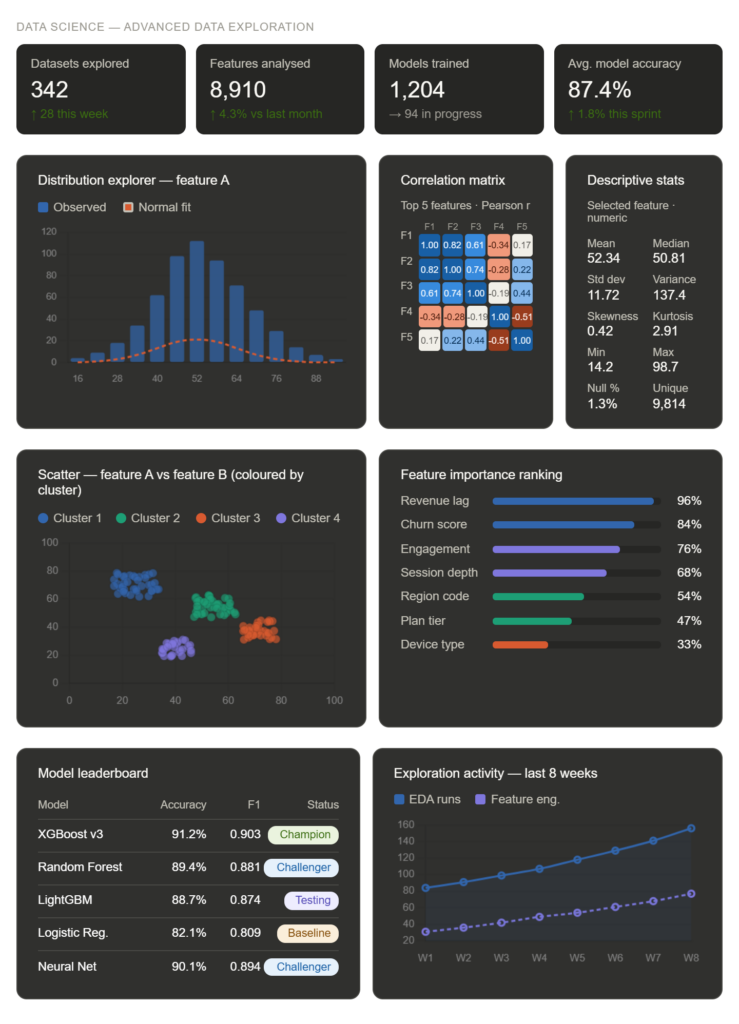
What I found useful is how quickly you can test different ideas, like checking correlations or segmenting data, without even going back and forth between tools. It basically speeds up the entire “exploration phase,” which normally takes hours or even days.
Product: Real User Behaviour & Feature Performance
For all of the product teams, making decisions based on real user data is quite tough, but the data is usually scattered and messy. Here, Julius AI will help you to bring everything together, like the user activity, feature usage, and feedback, and turn it into something understandable.
One of the most helpful things here is how easily you can identify user behaviour patterns. For example, you can quickly see which features users are using the most, how frequently they return, and at what point they stop engaging.
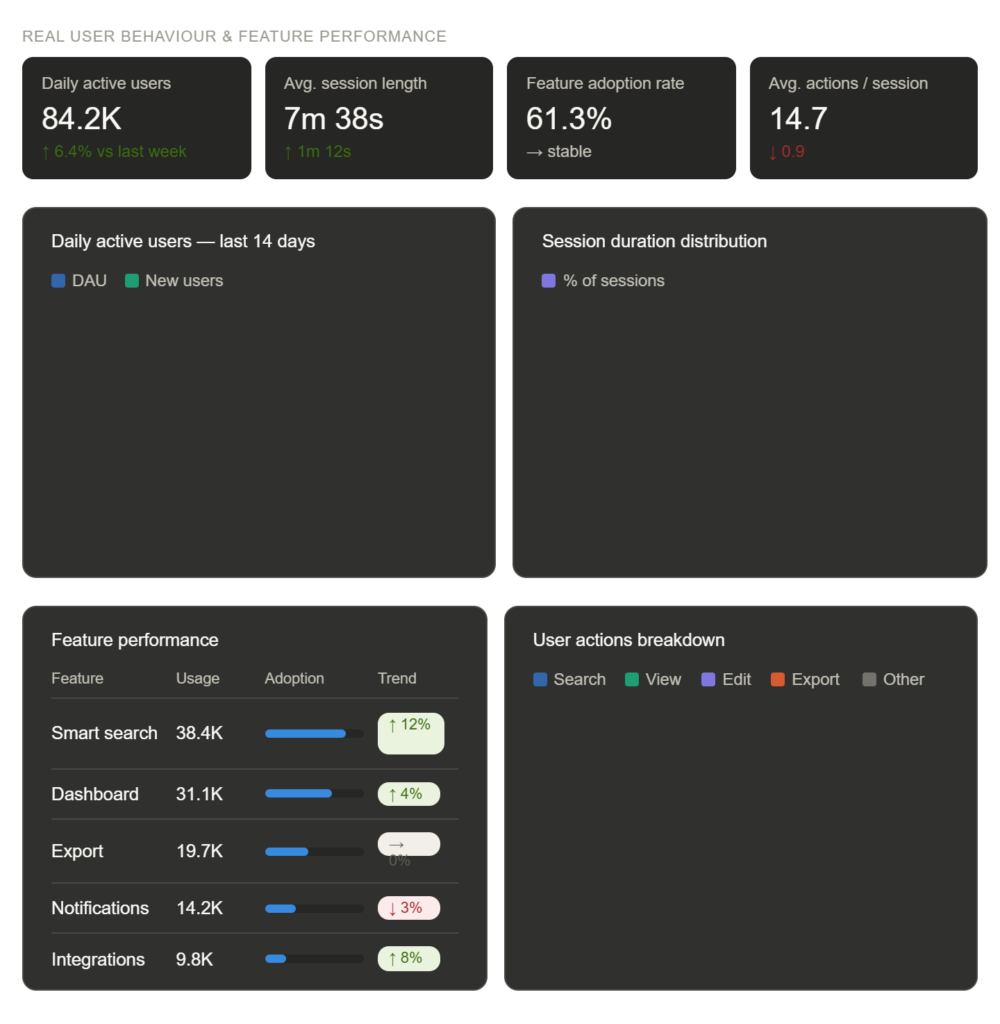
It also helps in the feature performance analysis. It allows you to understand and detect which feature is successful so you can directly compare the engagement levels, usage frequency, and user responses. This is especially very useful when you are testing any new feature or updates, so you can instantly see if they are improving the user experience or not.
Scientific Research: Handling Complex Data
Research data is rarely clean or in a perfect structure, and that is where things usually get frustrating. With this tool, you can work with large, complex datasets without spending hours preparing them. This is where Julius AI becomes genuinely useful.
The tool helps in organizing the data, making it easier to explore different variables, compare the results, and understand the overall structure. This will save you a major amount of time in the early stages of research.
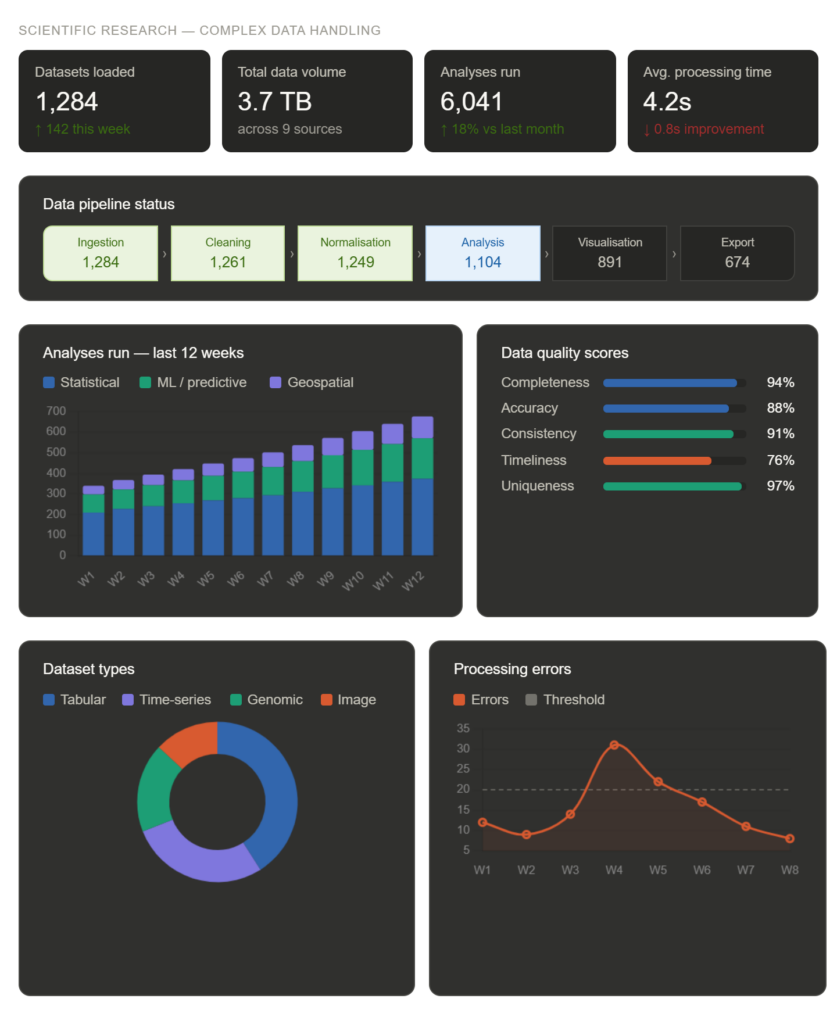
It will also help in identifying patterns, trends, and relationships that might not be immediately visible. It presents you with the insights through clear visuals and explanations, making the complex findings easier to interpret. Even when the data has some missing or inconsistent values, it manages to work around those issues and still provides meaningful outputs.
Finance: Forecasting & Data-Driven Planning
Handling financial data is not just about tracking numbers; it is about understanding where your money is going and what to expect in the future. Working with Julius AI here comes out as a very practical choice.
You can upload financial data like expenses, revenue, or transaction records, and it quickly organizes everything into a clear format. Instead of manually sorting through spreadsheets, you get a structured view of your finances, making it easier to track performance and identify patterns.
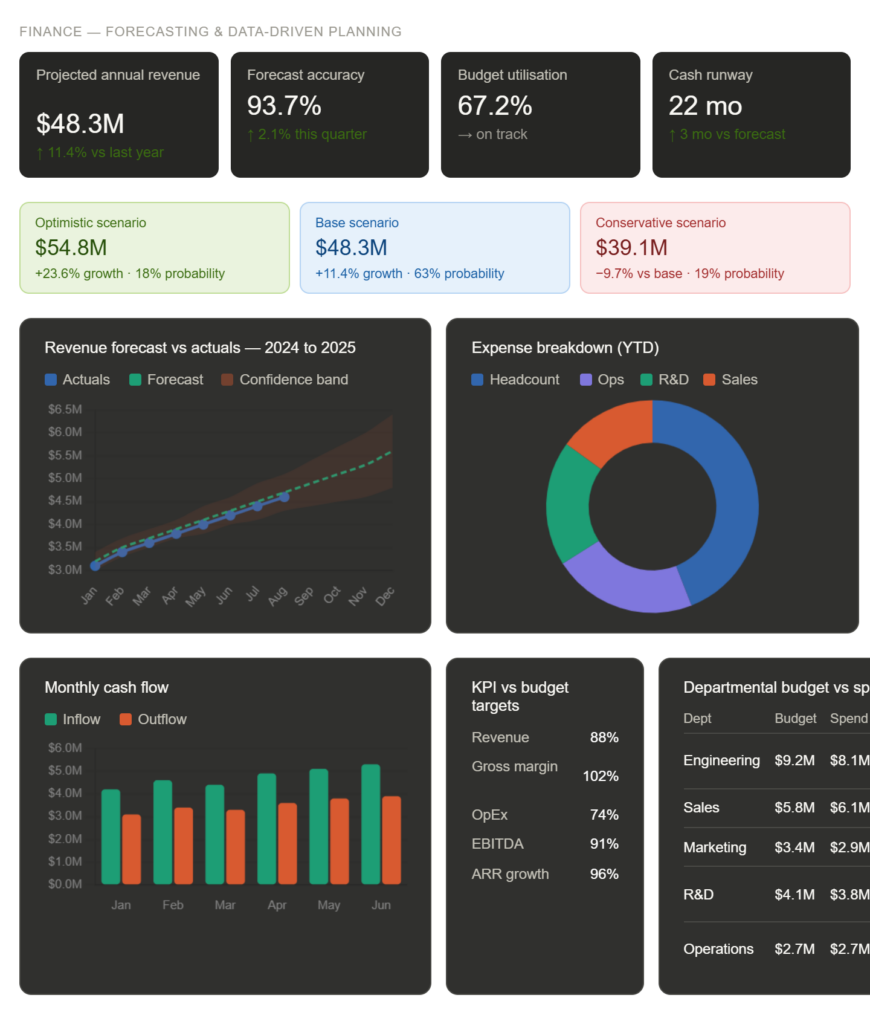
What makes it powerful is its ability to go beyond the basic analysis. It will help you to spot trends over time, compare different financial periods, and even generate forecasts based on past data. This is especially useful for budgeting and planning, so you can get a clear idea of future expenses or revenue.
Education: Simplifying Learning & Data Interpretations.
When it comes to learning, especially subjects that involve data, the biggest challenge is not just accessing information but actually understanding it. This is where Julius AI will help you. Students can easily upload datasets for their assignments or projects and instantly get structured outputs like charts, summaries, and explanations.
You don’t need to spend hours trying to organize or interpret the raw data and waste your learning time. This makes it especially useful for subjects like statistics, economics, and research-based studies where data interpretation is the key.
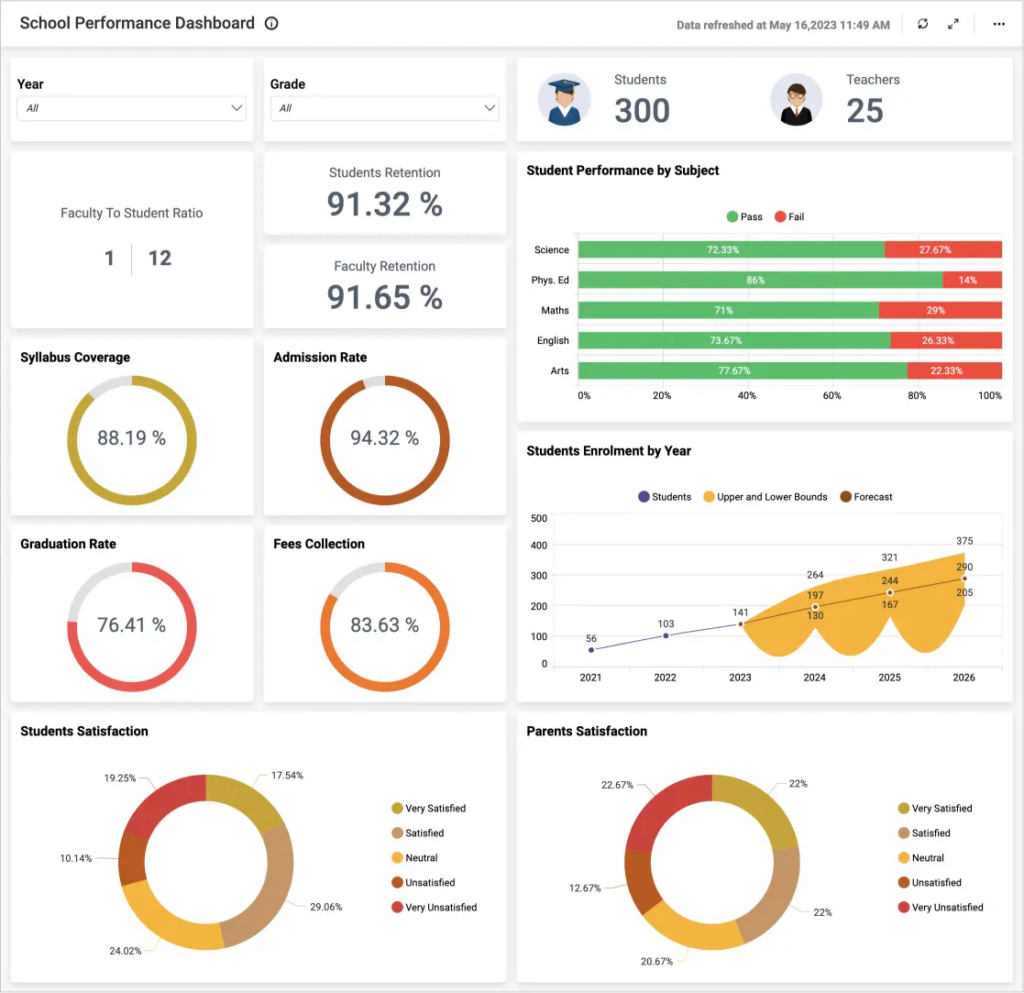
Another important advantage is how it improves clarity. Instead of just numbers, it breaks down the results into simple insights that are much easier to understand. For educators, it can also be used as a technical support tool, helping them to explain complex data concepts through visual and clear interpretations.
Now, further let’s move on to the billing part, on how you can start your journey with a hassle-free payment experience.
Pricing & Billing Scandals
Now, let’s understand Julius AI in more detail by understanding its pricing, so I will break it down for you.
| Plan | Price | Credits/Month | Key Features |
|---|---|---|---|
| Free | $0/month | 100 credits | Access to notebooks, basic file storage formats, Google Drive data connector, and 2 GB RAM. |
| Plus | $16/month (billed annually) | 2000 credits | Everything in Free + access to Plus models, unlimited file formats, unlimited charts, email/community support, 1 seat included. |
| Pro | $33/month (billed annually) | 4000 credits | Everything in Plus + access to Pro models, unlimited charts & storage formats, expanded context window, 32 GB RAM, priority email support. |
| Business | $375/month (billed annually) | 45,000 credits | Everything in Pro + 10 seats included, advanced data connectors (Postgres, BigQuery, Snowflake), no table limits, custom agent, Slack integration, and scheduled reports. |
Now, let’s find out what some of the exciting offers running for Julius AI:
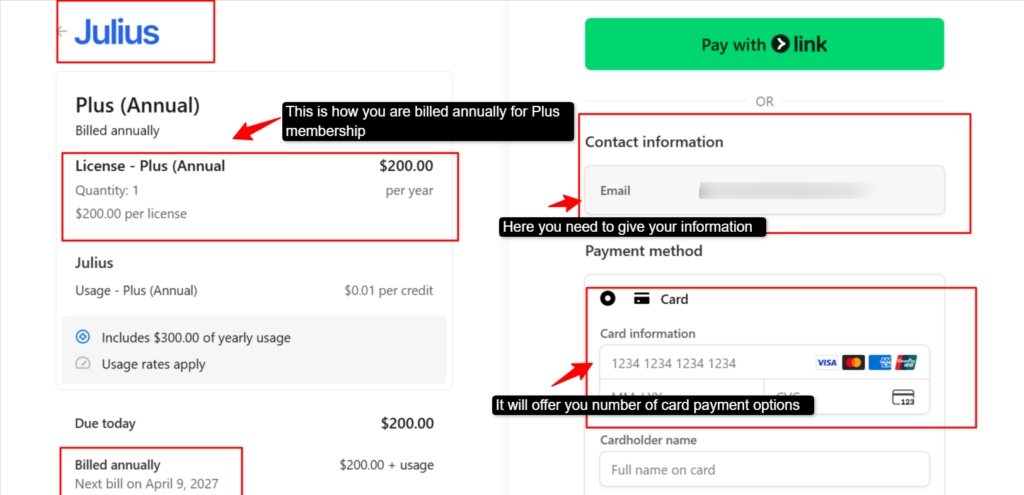
See, the above clearly shows how the yearly plans have been billed and shows you the multiple options to make the payment. You can use the card or the bank option
I would highly recommend that a good way to get started with Julius AI is by trying out their free plan first. It will give you enough features to understand how the platform works. You can explore basic data analytics, test its interface, and see how comfortable it becomes for you.
Billing Scandals
While using Julius AI, my overall experience was quite smooth in terms of features and usability, but one area that raised some concern was the billing system. I noticed that a few things around subscriptions and charges were not clear, and after exploring,
I figured that the actual prices were hidden. I found that other users had also shared similar experiences regarding hidden billing or confusion in pricing.
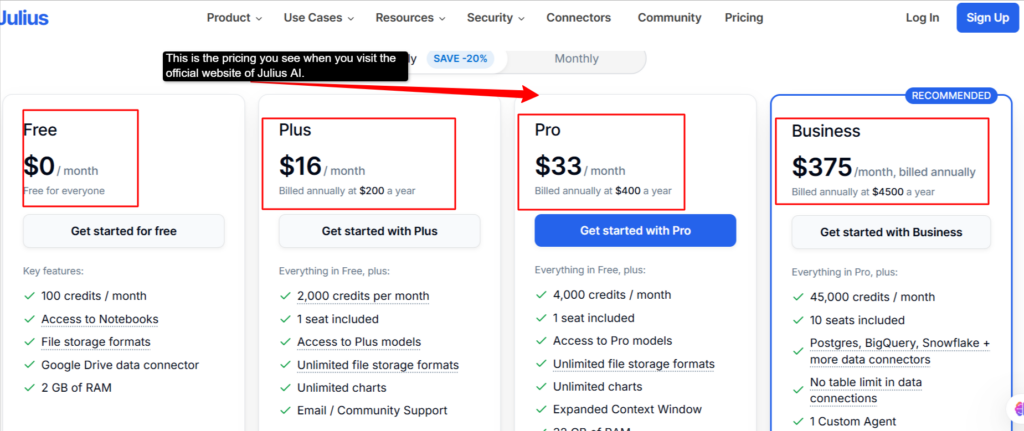
See above; I have attached a screenshot showing these many prices when you visit the official website of Julius AI. The free plan remains the same, but for the paid plans, when you click on any of the paid plans, you are taken to the next pricing page, where the prices are different with an add-on plan.
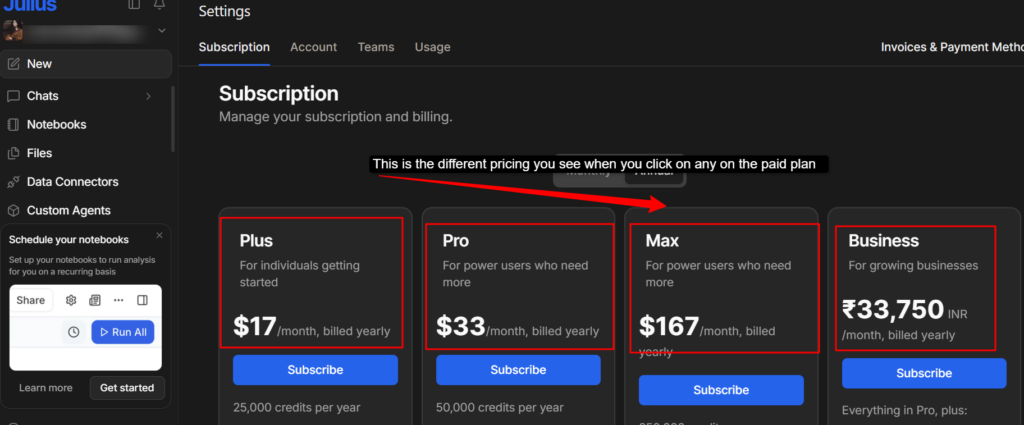
See, this is the confusion I was talking about. When I clicked on the Plus paid plan, it took me to another page where I saw new pricing plans like the Plus changes to $17/month, Pro remain the same, but here is a new subscription plan, Max, which was not mentioned on the website platform, as you can see in the previous screenshot that I have attached.
So, in short, Julius AI lacks transparency when it comes to their billing plans. But once you start using it, relying on it more, or you need advanced capabilities or more features, you can easily upgrade to one of the paid plans, as it does help in your work.
Personal Experience and User Experience
If I tell you honestly, using Julius AI never felt like adopting a new tool, and it felt more like I was upgrading. What stood out to me right away was how efficiently it handled all of my raw datasets. Normally, I used to spend a good amount of time clearing and structuring data before even starting the analysis, but here, a lot of that effort was reduced significantly.
As someone like me who has been working tirelessly with data across different use cases, I found the depth of insights particularly impressive. It wasn’t just generating the charts; it was more about clarity. The platform very well highlighted trends, correlations, and key takeaways in a way that actually supported decision-making.
The best part for me has been how much time it has saved while still maintaining the accuracy and flexibility. Working with data has always been a part of my workflow, but the most time-consuming part was cleaning and organizing it. After using Julius AI, that process became much faster and easier for me.
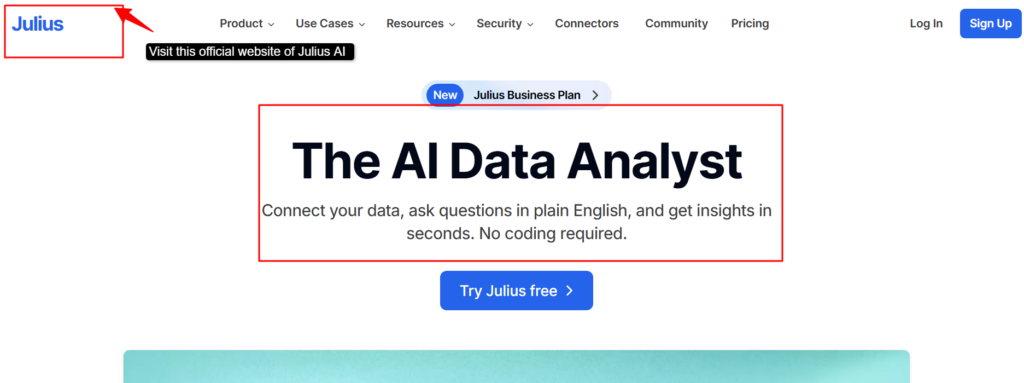
Another thing I appreciated was how consistent and flexible it felt across different types of data. I didn’t have to worry about formats or adjustments; the tool handled everything smoothly.
I personally found one thing very helpful while using this platform, which was how well it handled deeper analysis when I needed more than just basic insights. I’ll give you a real example. I was working with a larger dataset, and I was able to quickly compare different segments and even get simple forecasts without even switching to any other tool.
So, talking as an expert user of Julius AI, it will not only make your workflow efficient by reducing effort and time. But it will also help you to get more focused on the insights with better decision-making. No matter what concern you have for using Julius AI, it will help you in all cases and allow you a smooth user experience. Now, let’s see what others say about Julius AI.
User Experience
Now I wanna tell you and show you what others say about Julius AI so that you get a better understanding and trust this genuine review.
All the reviews that I have mentioned are genuine, honest and come totally from unbiased opinions. Many people have been using this tool in real-time and reviewing it.

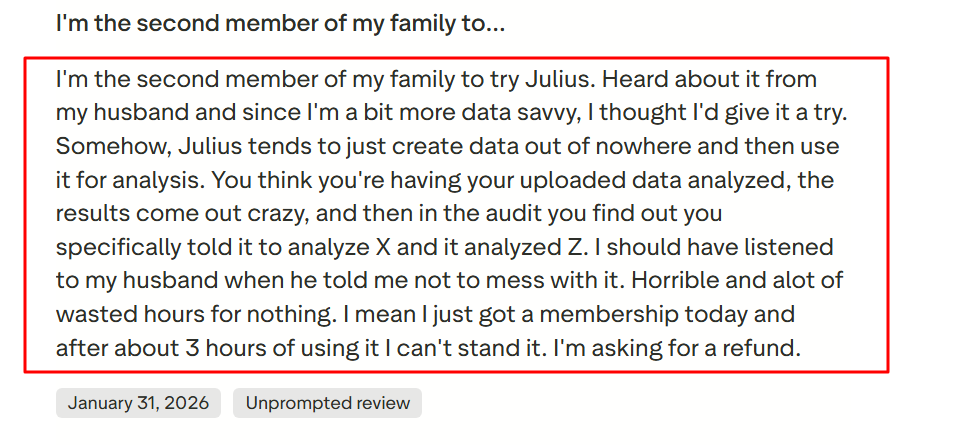
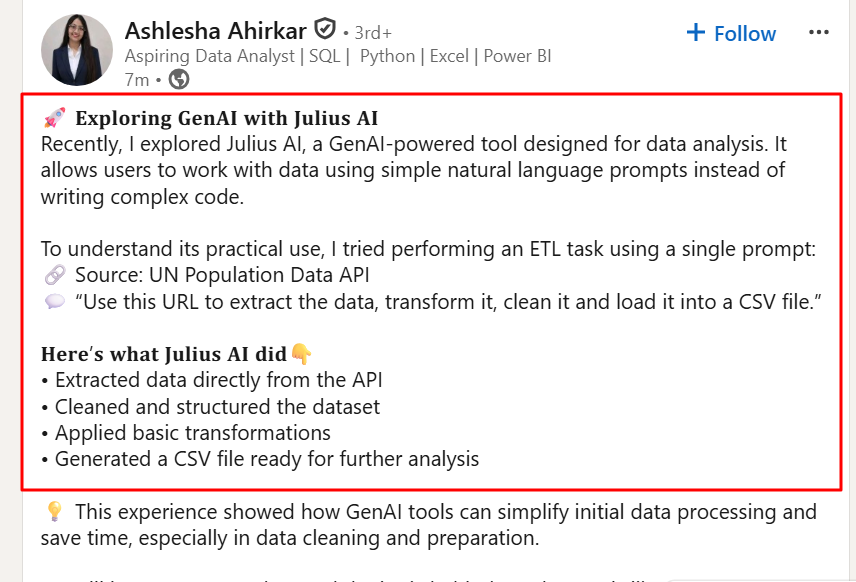
Altogether, the user experience with Julius AI shows that it is a helpful tool for simplifying data analysis, especially for those who need to work with complex coding. While it may have some limitations, it still stands out for its ease of use and ability to quickly turn data into meaningful insights.
How to Get Started With Julius AI: Step-by-Step Guide
Now, here I will tell you the steps you need to follow in order to use the Julius AI platform. Just go through these steps and have a smooth user experience:
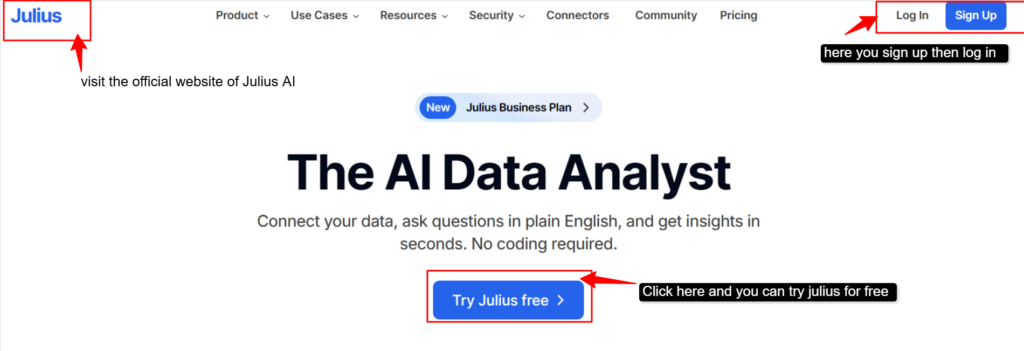
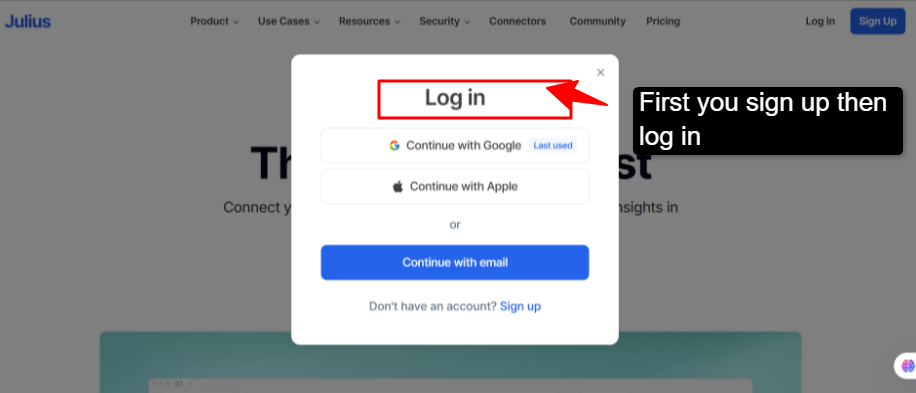
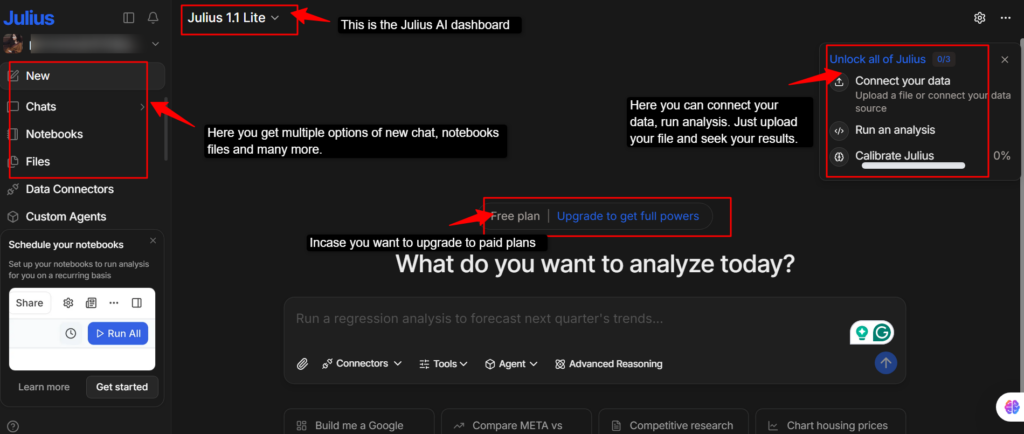
Now, by following these many steps, you will be able to use Julius AI very easily and make your work life easy, just like it has made mine.
Julius AI vs. Alternatives — Side-by-Side Comparison
Don’t worry if you have problems using this website; I am here to help you with the alternatives. Above, I have mentioned everything about Julius AI. Now, here I will tell you about the closest and best alternatives to the Julius AI tool.
camelAI
camelAI is known to be one of the closest alternatives to Julius AI, especially if you like chat-based data analysis. It will let you ask questions in plain English and instantly turn them into SQL queries, charts, and insights, so you do not need any coding knowledge to work with data.
It stands out because it can connect directly to live databases and tools like Excel or CRMs. This helps you create real-time dashboards and reports within seconds. It is built for both individuals and teams, making data analysis quicker, more collaborative, and easier to access without needing help from technical experts.
Best use: camelAI is best used for quickly analyzing data without coding. You just ask questions in plain English and get instant insights, charts, and summaries. It’s especially useful for creating real-time dashboards and reports.
Hex
Hex is another close alternative to Julius AI. It is a modern, all-in-one data analytics platform that combines coding (SQL, Python) with no-code tools and AI assistance in a single workspace. It will allow users to analyze data, build dashboards, and create interactive reports while collaborating with teams in real-time, making it much more powerful than traditional notebooks or BI tools.
The standing feature of Hex is its AI integration, where you can ask questions in plain English, generate code, build charts, and even create full analysis automatically. It has been introduced for both technical users and non-technical teams, helping everyone work on the same data and turn insights into better reports.
Best use: The best use of Hex is combining SQL, Python, and AI to perform deep data analysis in one collaborative workspace. It is perfect for teams, automating their workflow and sharing insights in a structured, professional way.
Deepnote
Deepnote is a cloud-based data workspace designed for collaborative data analysis, combining notebooks, coding (Python, SQL, R), and AI all in one platform. It will easily allow users to explore data and build their visualisations, making the platform very powerful.
Other USPs of this platform are its capabilities and seamless workflow, where you can ask questions and generate code, along with turning the complete analysis into shareable apps or reports. It is useful for teams who want to move from raw data to insights quickly without worrying about setup or infrastructure.
Best use: DeepNote is for real-time collaborative data analytics and coding, allowing teams to build insights, dashboards, and models together in one place.
Now, for your better understanding before selecting the platform, I will give a clear, concise table so that you can pick right and not regret it later. Refer to this table before making your final choice.
| Category | Julius AI | camelAI | Hex | Deepnote |
|---|---|---|---|---|
| Pricing | Free + Starts at $16/month | Free + Paid plans coming soon. | Free + Starts at $36 editor/month | Free + Starts at $39/ month |
| Key Features | No code analysis, auto charts, scheduled reports | Live DB connection, chat queries, dashboards. | Data apps.notebooks, collaboration, scheduling | Real-time collaboration, version control, and integrations. |
| Ease of Use | Very beginner-friendly | No code + Chat UI | Needs SQL/Python | Coding Required |
| Best for | Non-technical Users, business insights. | Real-time dashboards + teams | Data teams & analysts | Data scientists & Engineers |
| Cons | Limited deep analysis, struggles with large datasets. | Still evolving, fewer advanced dev features | Expensive + compute costs + technical learning | Costly per use + not beginner- friendly |
Refer to this table and understand each platform in detail, and pick what fits your needs the best.
FAQ
Can I use Julius AI for large datasets?
Yes, Julius AI can handle moderately large datasets and works well for most day-to-day analysis tasks like Excel files, reports, and business data. However, when it comes to very large or complex datasets (like millions of rows or real-time data pipelines), it may slow down or face limitations. In such cases, more advanced tools like Hex or Deepnote are better suited as they are built for heavy data processing and scalability.
How to Cancel Julius AI Subscription?
Cancelling your Julius AI subscription is simple and can be done directly from your account dashboard. Go to your profile or settings section,>> go to your billing or subscription >> Click on “Cancel Subscription”. Once cancelled, your plan will remain active until the end of the billing cycle, and you won’t be charged again after that.
Is Julius better than ChatGPT?
Julius AI and ChatGPT serve different purposes, so one is not strictly “better” than the other. Julius AI is specifically designed for data analysis; it can read files, generate charts, and provide structured insights quickly. On the other hand, ChatGPT is more versatile and better for writing, brainstorming, coding help, and general queries. If your focus is data, Julius is more efficient; for everything else, ChatGPT is more flexible.
What file formats does Julius AI support?
Julius AI supports commonly used structured data formats such as CSV and Excel (XLS/XLSX), which are widely used for business and analytical tasks. It may also support formats like JSON, depending on the use case.
Final Verdict: Is Julius AI Worth Using?
Frankly speaking, after using Julius AI and looking at everything it offers, I’d say that it is worth trying, but only if it matches your needs. If you are someone who works with data but doesn’t want to get into coding, this tool feels like a shortcut.
Just upload your file, ask questions in simple language, and it gives you the charts or insights you desire to seek. That ease of use has been one of the remarkable options for me.
It has saved a lot of time on basic analysis and makes the data feel less overwhelming. But at the same time, I would not completely rely on it for deep or complex work, as sometimes it could misinterpret data or struggle with large datasets. You can even use the other three alternatives that I have mentioned if Julius Ai doesn’t stand right for you.
So my final take on this is simple: Julius AI is great as a support tool, not a replacement for real analysis skills.
People also search for: