Have you ever wished your meetings could run better and more smoothly without any background noise? This is where Krisp AI review will stand out for you. After using Krisp.AI for a while, I can honestly tell you that it is one of those helpful tools that will quietly handle the noise problem without you changing the settings every time.
What is it that you can like about Krisp AI?
What really stands out about the Krisp AI platform is how effortless it feels to use. Attending meetings has become very easy, and you don’t have to worry about remembering your previous meeting discussions, as it generates AI meeting notes for you, making it easy and better. I have tested it many times in different situations, and it has never disappointed me.
What if your meetings were always crystal clear? With Krisp.AI, background noise is removed instantly while your voice stays sharp and connected. It will record, summarize, and transcribe all of your calls, so you can focus on the conversation, not chaos. Krisp AI is like clearer calls with automatic meeting notes and less stress during conversations.
Krisp.AI is a platform that can multitask and filter out many distractions without compromising your voice. With time, I even started appreciating its additional features, like the automatic notes and transcriptions. It has made my professional life so much easier and more manageable, allowing me to attend back-to-back meetings without ignoring the small details.
- What is Krisp AI?
- Advanced Features (Use Cases)
- Integrations & Platform Compatibility
- Pricing & Billing Scandals
- Personal Experience and User Experience
- Krisp AI Review User Experience
- How to Use Krisp AI Step-by-Step Guide
- Download Krisp APK / Google Extension
- What is the alternative to Krisp noise suppression?
- FAQ
- Final Verdict: Is Krisp AI Worth Using?
What is Krisp AI?
Krisp AI is known to be a very simple tool that will make your online calls and meetings better and more professional. Simply, it will remove any kind of background noise, like typing, traffic, and people talking in your surroundings, so your voice is heard very clearly by your members, delivering a better experience.
Krisp AI is an AI-powered platform that works like your personal audio cleaner. It uses their AI technology to remove all the unnecessary noises in the background in real time, so you sound clear on all platforms like Google Meet, Teams, Zoom, or any other meeting app.
Krisp AI is not just about noise cancellation; it can easily filter out all the other unnecessary voices in the room or in the background; it will record meetings for you, make transcripts and summaries, so you don’t take much time to make your notes. People working remotely need to attend tons of meetings, so if you are one then for you, Krisp AI is an amazing option.
Let’s move further in this blog so that I can guide you better on Krisp AI and how it can make your professional life easy, just like it has made mine.
Advanced Features (Use Cases)
What is the best part about Krisp AI?
Most of the noise filtering will happen right on your device in order to make your conversations private and secure. It has been helping professionals and different teams to reduce noise and capture meaningful data. It will enhance your meeting experience with all features running on the same AI voice engine.
I will now tell you some of the advanced features of Krisp AI that will make your understanding better for this platform:
AI Noise Cancellation
This is not like the basic sound suppression feature; it is Krisp AI’s top-tier AI noise cancellation, as this platform easily analyzes and removes the unnecessary background noise like cars, dogs barking, and fans or typing.
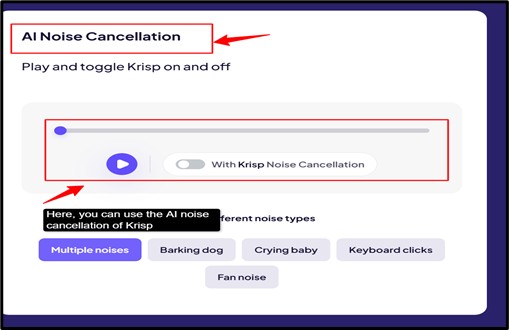
It even removes the echo of all of the other voices in the room so that only the main person who is speaking, only his or her voice, is being heard. It works in real-time with all of the conferencing apps like Google Meet, Slack, Teams, and Zoom.
Live Transcription
Even if you are in the middle of a meeting, you can also transcribe during a meeting. It will show you the real-time subtitles or the transcripts. The speaker, the way he is speaking in your meeting, there will be running live transcripts for better understanding for the members present in the meeting.
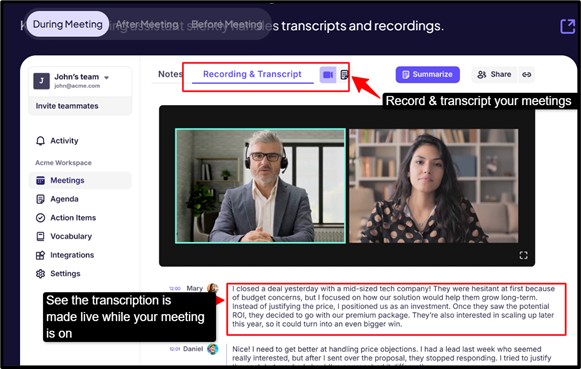
It becomes very engaging and perfect for the storytelling that goes on before and after the script. It will help you with easy transcriptions along with multilingual support. So understanding the meeting becomes very easy.
Accent Conversion
Krisp’s Accent Conversion is an AI-powered feature that has been designed to enhance the clarity in spoken English during real-time calls by easily neutralizing the different accent variations that sometimes could lead to misunderstandings. You don’t need to change what you want to say; instead, this feature will reshape your speech sounds so listeners can easily understand you. It is very helpful in global teams and customer-facing roles.
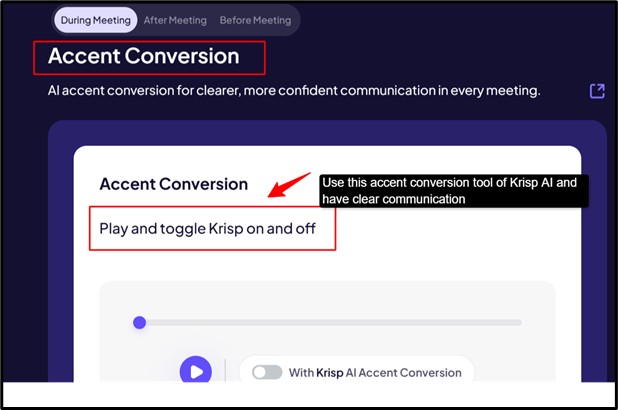
It works by analyzing your speech in real time, and gently it will adjust the pronunciation patterns so that your accent becomes easier to follow for the other English listeners. It will not erase your identity or your voice, but it will retain your natural voice and rhythm.
AI Meeting Notes
Krisp AI meeting notes is the one feature that records automatically and transcribes your meetings. It even summarizes your meetings, be it online calls or in-person conversations. It easily captures the spoken content in real time and turns it into a searchable text transcript, so you don’t have to take manual notes while talking.
It happens after the end of the meeting. Once your meeting ends, then the Krisp AI generates the organized meeting notes with important discussion points, action items, and decisions.
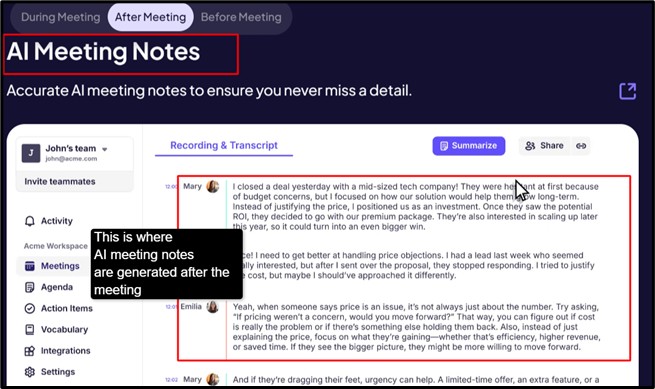
Once your meeting ends, then the Krisp AI generates the organized meeting notes with important discussion points, action items, and decisions. This feature works across the major conferencing tools like Zoom, Microsoft Teams, Slack, and Google Meet, and it will even handle offline meetings or different voice recordings you can upload.
Action Items
Action items in Krisp AI are automatically generated tasks from your meetings. It is basically a very smart way to make a list that is made by the AI after a complete analysis of your conversation or meetings. You don’t need to manually keep noting “ who has to do what.” Here, Krisp listens to your discussions and identifies responsibilities and then makes them into clear and structured tasks.
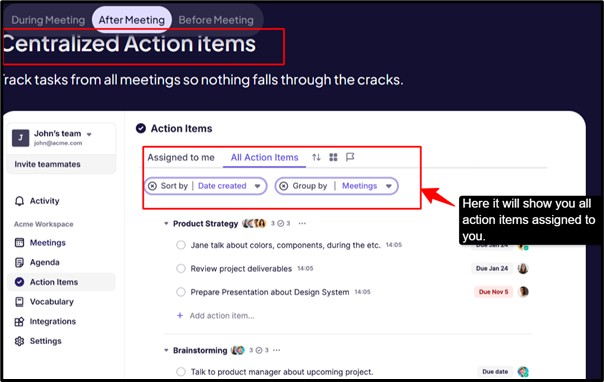
These action items are not random; they are actually present as they are tied to the actual decisions and commitments that are made during the meetings, so that you don’t miss anything important.
Now, let’s move forward and see what kinds of integrations are supported by Krisp and how it is compatible with other applications.
Integrations & Platform Compatibility
One of the most powerful and biggest strengths of Krisp AI is that it does not lock you into just one platform; instead, it works well with everything you use. It acts like a top layer that sits on your applications, with improved audio, and adds different AI features everywhere.
It works with almost any kind of calling app as a virtual microphone and speaker, appearing like “Krisp Microphone” or “Krisp Speaker. “You can even easily show the screenshots or the logos of Zoom, Microsoft Teams, and Slack. Krisp AI even works with native integrations like Google Calendar, Outlook, and other CRM or business tools like HubSpot and Pipedrive.
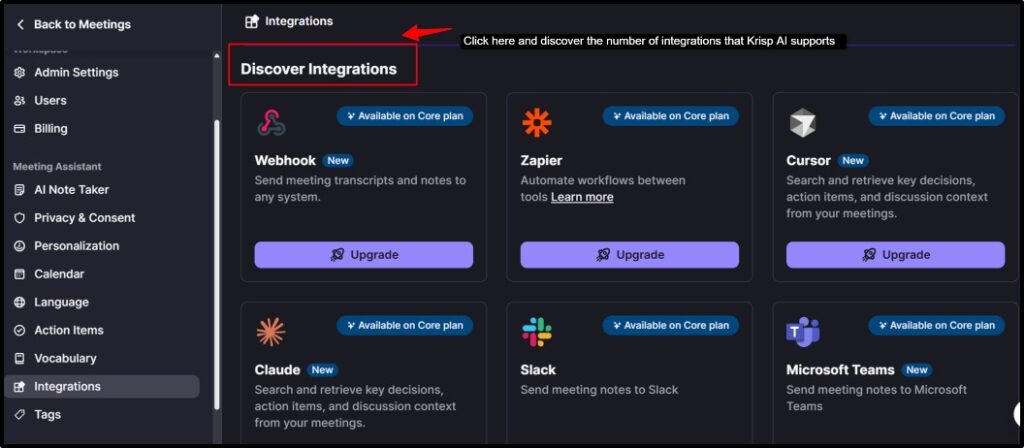
You can connect Krisp AI with more than 8000 apps, so this is where you understand how powerful it is. Krisp AI. Krisp AI works on several devices or systems, like desktop support, mobile support, and browsers.
I have given clear and concise Krisp AI integrations and platform compatibility below, understand this to understand Krisp AI better.
| Category | Compatible Apps |
|---|---|
| Video Conferencing | Zoom, Microsoft Teams, Google Meet, Webex, BlueJeans, GoToMeeting |
| Communication | Slack, Discord, Skype, WhatsApp Desktop, Telegram |
| CRM & Sales | Salesforce (Advanced plan), HubSpot, ConnectWise |
| Operating Systems | Windows 10/11, macOS 10.14+, Linux (Ubuntu), iOS, Android |
| Automation Tools | Connects via Zapier (8000+ apps), Notion, Asana, ClickUp, Google Docs |
| Desktop Compatibility | Windows, macOS, Linux |
| Browser Support | Chrome, Edge, Firefox |
| Hardware Requirement | Runs on CPU (no GPU needed) |
Pricing & Billing Scandals
Now, let’s understand Krisp AI in more detail by understanding its pricing, so I will break it down for you.
| Plan#1 (Free) | Plan #2 (Core) | Plan #3 (Advanced) | Plan #4 (Enterprise) |
|---|---|---|---|
| Price: $0/m | Price: $8.00/m | Price: $15/mo. | Price: Custom Pricing |
| Basic features: 7-day free trial, unlimited transcription, unlimited noise cancellation, & unlimited audio & video recording. | Basic features: Multilingual transcript, AI chat & 5 GB Storage | Basic features: Unlimited accent conversion, advanced integrations & 50 GB Storage | Basic features: Super admin role, dedicated account manager, usage analytics reports & unlimited storage. |
Now, let’s see below some of the exciting offers that are running for you.
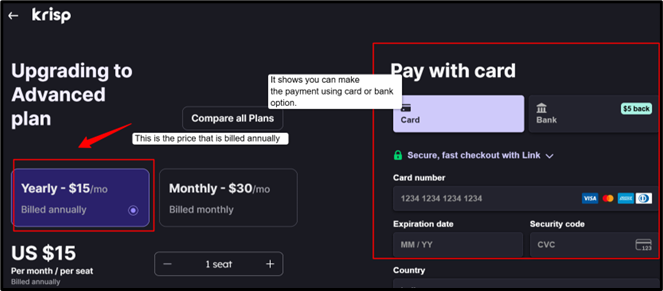
See, the above clearly shows how the yearly plans has been billed and showing you the multiple options to make the payment. You can use the card or the bank option
These were some of the pricing options you could try when using Krisp AI. There is a FREE TRIAL FOR 7 DAYS that will allow you to use all of their premium features with no risk. So it is a great platform for professionals, especially for people who are working remotely.
Personal Experience and User Experience
Frankly speaking, my professional life was very tough earlier when I had to attend so many meetings one after the other, and it created so much chaos for me that I was unable to work properly, but then switching to Krisp AI has completely changed my professional life, and now I can attend as many meetings hassle-free.
Once I started using it, I realised how much background noise actually disturbs your calls, along with typing sounds and fan noise.
The first thing that really attracted me was the feature of noise cancellation. It’s just a one-click feature, and the difference is instant and satisfactory. I have tried multiple times turning it off and on during my meetings, and it genuinely felt like I was shifting from a noisy place to a quiet room. So using Krisp AI was totally worth it.
The other thing that was impressive about Krisp AI was how easy it was to use. You don’t need complex plugins or connect to complicated integrations. You just need to use the “Krisp Mic” in your meeting app, and it will work easily with everything, like Google Meet, Teams, or all of it.
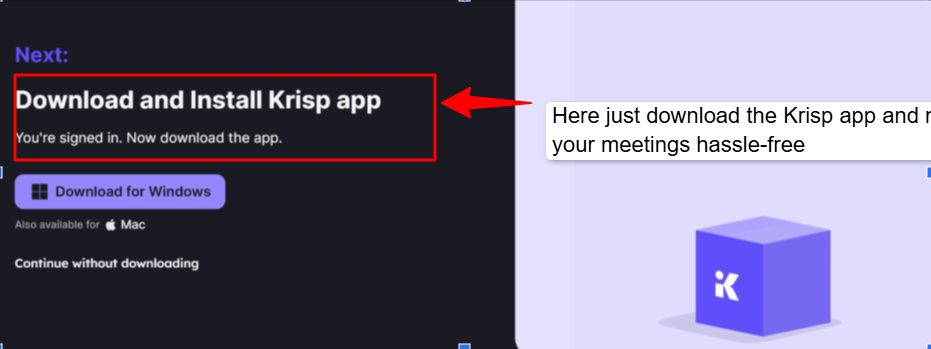
Now, if I talk about the AI features like the transcription and summaries, they are very helpful for you. Honestly, I would not call them mind-blowing because they are amazing in terms of saving your time and effort, but sometimes the summaries that are created by their AI sound very basic. Still, I would say for regular meetings it is more than enough.
Taking like an expert, I would say one thing you can even experience is that it uses a bit of system power, like if you are using an old laptop, you might feel that it will lag a little, especially if you are attending a long meeting. But for decent systems, it can run smoothly.
Overall, if you are also someone who spends a lot of time on calls or meetings, Krisp AI is definitely worth trying for you. It makes your meeting clearer, more productive, and honestly a lot less stressful.
Krisp AI Review User Experience
Now, let’s see what others say about Krisp AI, and how it has been helping them to make their professional life easy.
All the reviews that I’ll be mentioning below are from completely trusted and unbiased opinions, people reviewing Krisp AI in real time from secured third party websites.
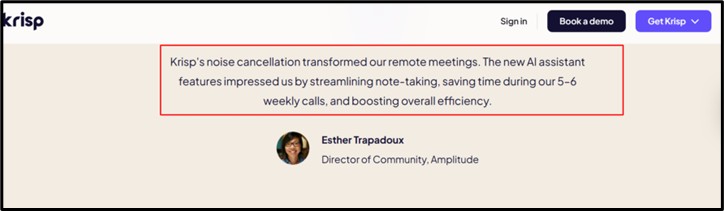
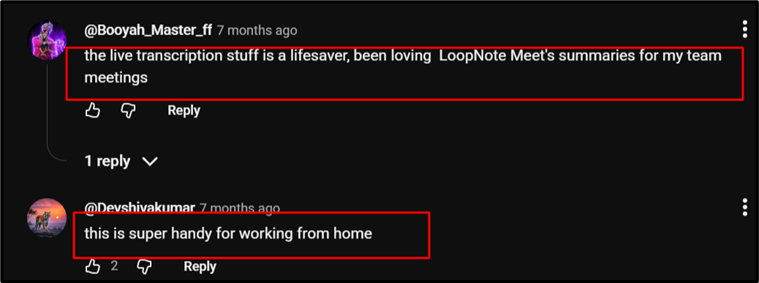
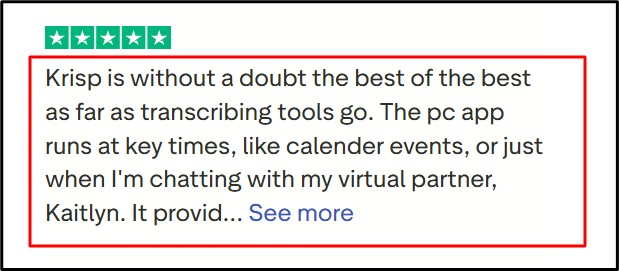
Attending meetings has become very easy with Krisp AI, and because of its end number of features. People working remotely have benefited greatly from Krisp AI as they need to attend a lot of meetings, along with the streamlining of notes.
How to Use Krisp AI Step-by-Step Guide
Now, here I will tell you the steps you need to follow in order to use the Krisp AI platform. Just go through these steps and have a smooth user experience:
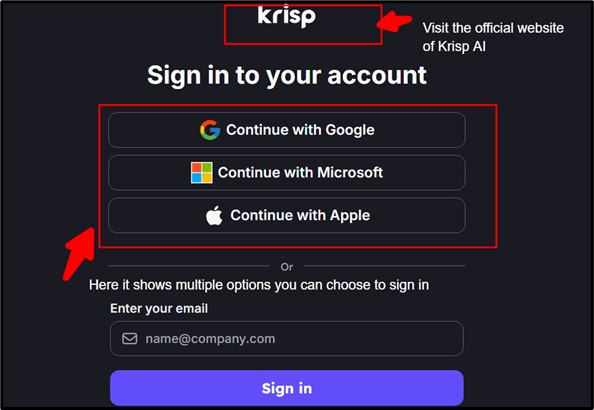
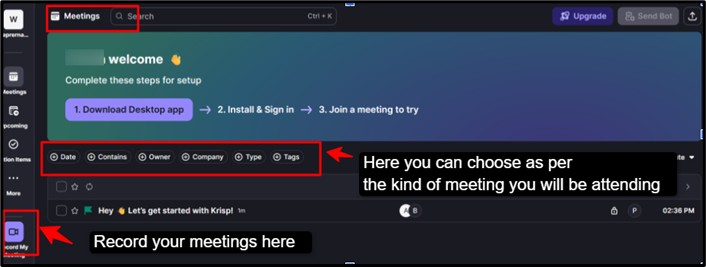
Now, by following all of these steps that I have mentioned above for Krisp AI, you can learn and understand how a tool can upgrade your level of communication very effectively and professionally.
Download Krisp APK / Google Extension
Getting started with Krisp is easier than you think; you just need to download and go for it.
If you prefer using it on your mobile, you can download the Krisp APK and install it directly on your Android device. It will allow you to experience noise cancellation on calls even when you are on the go, making it very useful for remote kind of work, meetings, or even for online classes in noisy environments.
If you are a browser user, then the Google Chrome extension is a very quick and lightweight option. It works seamlessly with platforms like Google Meet, helping you to enable noise cancellation without even the need to install full desktop software, making it perfect and easy to go for a fast and hassle-free setup.
What is the alternative to Krisp noise suppression?
Don’t worry if you have problems using this website; I am here to help you with the alternatives. Above, I have mentioned everything about Krisp AI. Now, here I will tell you about the closest and best alternatives to the Krisp AI tool.
| On what basis | Krisp AI | NVIDIA RTX Voice/ NVIDIA Broadcast | Fireflies.ai | Crystal Sound |
|---|---|---|---|---|
| Primary Function | Noise cancel + notes | Audio/video enhancement | Meeting transcription | Audio enhancement + recording |
| AI Features | Noise suppression, summaries | Noise + video AI effects | Transcription, analytics | Noise cancellation, voice isolation |
| Platform | Windows, Mac | Windows (RTX GPU) | Cloud + desktop | Windows, Mac, Linux |
| Real-time work | Excellent for calls | Best for streaming | Limited (post-call focus) | Great for calls & recording |
Alternatives 1
NVIDIA RTX Voice/ NVIDIA Broadcast
It is considered one of the closest Krisp AI alternatives for pure and complete noise suppression. It is completely free to use if you have compatible hardware. It is an AI- powered platform that offers noise cancellation developed by NVIDIA that will successfully remove the unnecessary background noise using the real-time GPU processing.
It has a real-time audio feature with video enhancement. It works like your virtual microphone, so it easily integrates with Zoom, Google Meet, and Teams. You can easily turn any setup into a “home studio-like environment” for streaming and calls.
Best use: This platform is considered the best use for streamers and gamers. Users with the NVIDIA GPU and even people who want free and powerful noise suppression.
Alternatives 2
Fireflies.ai
Fireflies.ai is more of an AI meeting assistant, rather than just a noise suppression tool. It can easily record meetings, create an endless number of transcriptions, and even create summaries and streamlining of notes for you automatically. You can automatically join the meetings and record the conversations. It is cloud-based, and it does not use your system resources heavily.
This platform will offer an advanced level of analytics, such as speaker talk time. It can easily integrate with tools like Zoom, Google Meet, CRM platforms, and Slack. Fireflies.ai even enables you to search the meeting history for easy reference later.
Best use: It is considered best for professional teams for their meetings. It is good for sales calls, interviews, and collaboration. If you are someone who wants automation plus better insights, not just clean audio, then Fireflies.ai is the best option.
Alternatives 3
CrystalSound
CrystalSound is a platform that combines bi-directional noise suppression, which means your voice plus others. It has amazing features like meeting recordings, transcription, and even tone analysis for different types of conversations. It is known to be the closest and all-around alternative to Krisp AI, with both functions of noise cancellation and AI-powered meeting features.
It easily removes the possible distractions during calls, recordings, and audio. It works with multiple platforms like desktop, mobile, and browser. It is an optimal choice for professional kind of communication and collaboration.
Best use: It is best for teams working remotely and professionals. Managing daily client calls and business meetings. It is best for users who want all-in-one audio, along with the AI productivity tool.
I have mentioned everything important regarding Krisp AI and the alternative that you can use, but for better understanding and clarity, I have given this table to make it clearer about these platforms.
FAQ
Is Krisp a one-time payment?
No, Krisp AI is not a one-time payment tool. It works on the subscription model. You can choose a monthly or yearly package, and then payments are auto-renewed after every billing cycle. There is also a free plan, but it comes with limited usage.
How many devices can use Krisp?
You can easily use Krisp AI on multiple devices, but not simultaneously on many devices with one account. You can install and log in on multiple devices, like a laptop, a desktop, or a mobile. But there w can only be one active session/device at a time per account. If you log in on another device, then it may log you out of the previous one.
How to get Krisp noise suppression on OBS?
Install and open Krisp AI >> download and install Krisp AI >> open the app and log in >> enable the noise cancellation >> Open OBS studio >> Go to Settings >> Audio >> Under Mic/Auxiliary audio >> select Krisp Microphone. Then you can easily speak into your mic and test the audio, check your audio levels in OBS.
Does Krisp use CPU or GPU?
Krisp manually uses CPU but not GPU. Krisp processes the audio locally on your device using the CPU power, but it is not GPU-dependent. There are some optimizations that may use the hardware acceleration on modern systems, but the CPU does the main work.
Does Krisp integrate with Zoom, Google Meet, Microsoft Teams, and Slack?
Yes, Krisp integrates with Zoom, Google Meet, Microsoft Teams, and Slack. Krisp does not need any complex plugins; it basically works at the audio level, so it automatically fits into almost any calling or meeting app.
Which languages does Krisp support for transcription?
Krisp AI supports transcription in 16 languages – English, Spanish, French, German, Russian, Italian, Dutch, Polish, Portuguese, Hindi, Czech, Korean, Ukrainian, Danish, Swedish, and Norwegian. It covers the major global languages.
Final Verdict: Is Krisp AI Worth Using?
Krisp AI is like a magic mute button for your environment, clearing out all the unnecessary noise like barking of dogs, fans, or people in real-time. It keeps your voice natural and human-like, so the person on the other end hears you clearly, not the chaos around you. You use Zoom, Teams, or Google Meet, Krisp AI integrates seamlessly and works across most of the platforms without the need for special hardware.
Beyond noise cancellation, Krisp AI also adds its smart features like meeting summaries, action items, and transcriptions. Although it won’t replace the complete AI assistant, it gives you a professional side, ensuring your every call is clear.
Of course, no tool is perfect. The free version has daily limits, and extremely noisy environments can still challenge it. But for most of the real-world situations, Krisp AI will deliver amazingly clear and natural audio.
If you want your conversation to sound as crisp as your ideas, then Krisp AI is absolutely worth it, making meetings, calls, and recordings feel effortless and professional every time.
People also search for: