To create a CS2 server, you’ll need to purchase a VPS from a reliable hosting provider, create a new game server account on Steam, copy the token number, access the server game panel, and create a CS2 instance.
You do not have to worry at all! It’s not as difficult as it seems. We’ve explained the whole process of creating and setting up a Counter-Strike 2 server in this blog very well.
Counter-Strike 2 is a popular first-person shooter multiplayer game. This new version has smooth graphics, more mods, and realistic smoke grenades to help you track your opponents better and win matches. This game is more intense than the older CS: GO version, that’s why a normal hosting service can’t handle it.
The only solution is a CS2 server hosting. These servers use high-end processors, DDR4/5 RAM, a firewall and NVMe storage, so the game doesn’t lag no matter how long your multiplayer session is or how many mods you install.
So if you’re interested in learning how to create a CS2 server step-by-step, read this blog till the end.
Below, we have mentioned the setup process for a CS2 VPS server, and it is extremely simple. Even newbies can complete it quickly by following the step-by-step instructions. You can even set up a CS2 dedicated server to play the game, but the process is quite technical and requires advanced configuration. That’s why we recommend you go for a CS2 VPS setup instead, as it takes less time and delivers a smooth, lag-free gameplay experience.
But before that, let’s discuss why a server is best for CS2
Why is a server a good idea for CS2?
There are huge differences between the latest CS2 game and older versions like CS: GO. Normal hosting and home setups can’t handle the changing dynamics, graphics, and physics of the new version of Counter-Strike because they lack high-speed processors, RAM, and sufficient storage.
Let’s take a closer look at this
Volumetric explosions
The new CS2 game features three-dimensional explosions or smoke, which weren’t present in older versions. Now, to calculate the data for these explosions, gamers need high bandwidth, which a local server can’t provide and even if it tries to, it will crash.
A server, on the other hand, has high bandwidth (up to 100), which calculates the volume of smoke grenades so players can move smoothly.
More accurate shooting
One thing you might have noticed while playing the game is that when you press the key to shoot your enemy, the bullet doesn’t fire quickly. This happens because of tick rates, as the engine checks the data 64 times before making the actual move.
But the CS2 version runs at sub tick rates ( at 32 ticks) that only a high-speed CPU can process, so that your bullet hits the enemy within a few milliseconds.
Realistic environment
Game creators are now focusing on realistic gameplay to enhance the gaming experience. For this, they’re using PBR (Physically Based Rendering) materials to make water, soil, and grass appear real.
However, a basic server setup doesn’t render them exactly as they actually appear on the screen. But servers use GPUs to make graphics look clearer, so players can track enemies by their shadows
Match structure
In the old CS: GO game, players had to play a total of 16 rounds to defeat their opponent, and it took 1-1.5 hours, which made the game boring. However, in the new CS2 game, you only have to play 13 rounds to win the match. These rounds are much more intense and fast, finishing in just 30-35 minutes.
Normal hosting can lag during these matches, but servers can process real-time data using DDR5 RAM and processors.
So, from the above explanation, you must have understood that a server is necessary for maintaining accuracy and speed in the game. Now, let’s head to its requirements.
Requirements for a Counter-Strike 2 server
Here are the requirements for a Counter-Strike 2 server for both Windows and Linux users:
For Windows:
For Linux:
These requirements mentioned above are highly recommended if you want to play CS2 game lag-free and with high FPS, enjoying the gameplay with your gaming community.
How to Create a Counter-Strike 2 Server
Now, let’s learn how to set up a Counter-Strike 2 Server! Although Counter-Strike was first released in 1999, it’s still popular among gamers because of its realistic shooting experience.
And if you also want to enjoy this game to the fullest, then follow the steps given below because we’ve told you the easiest way to set up the CS2 server.
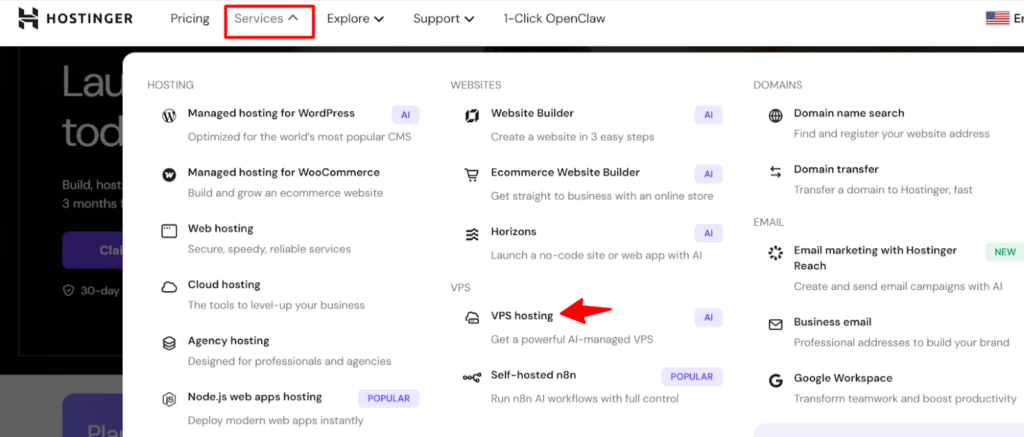
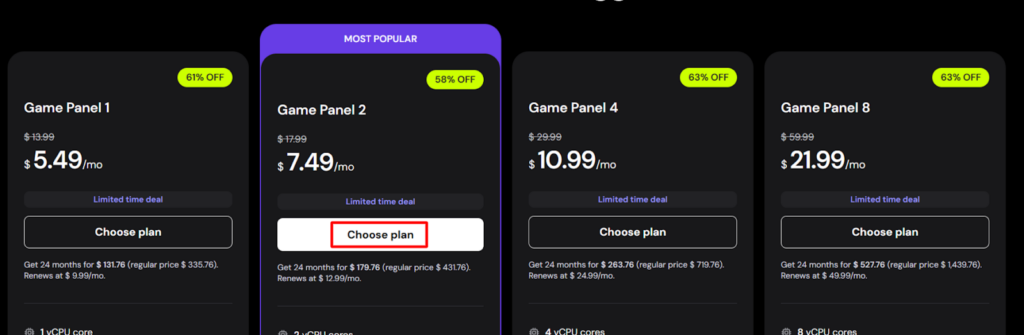
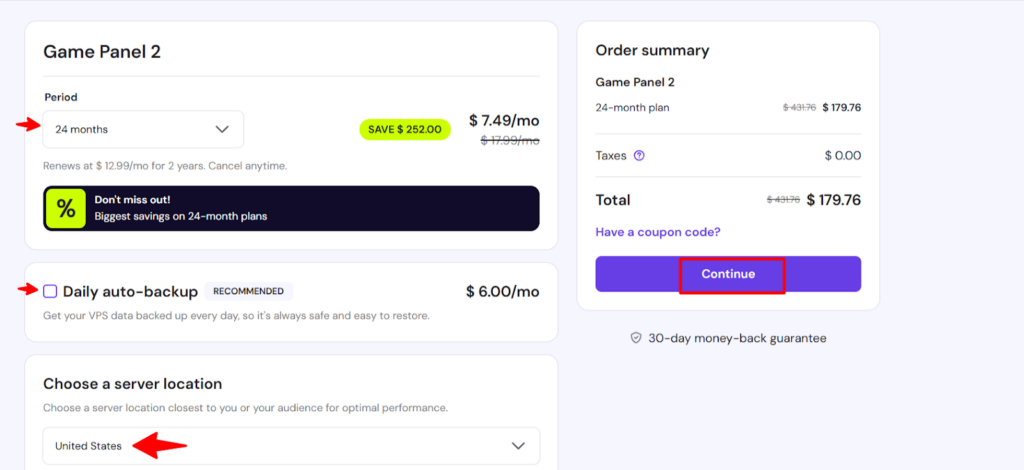
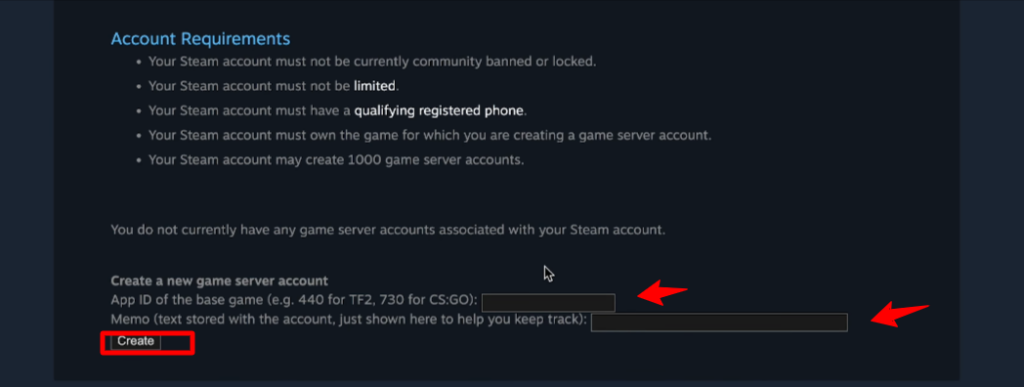
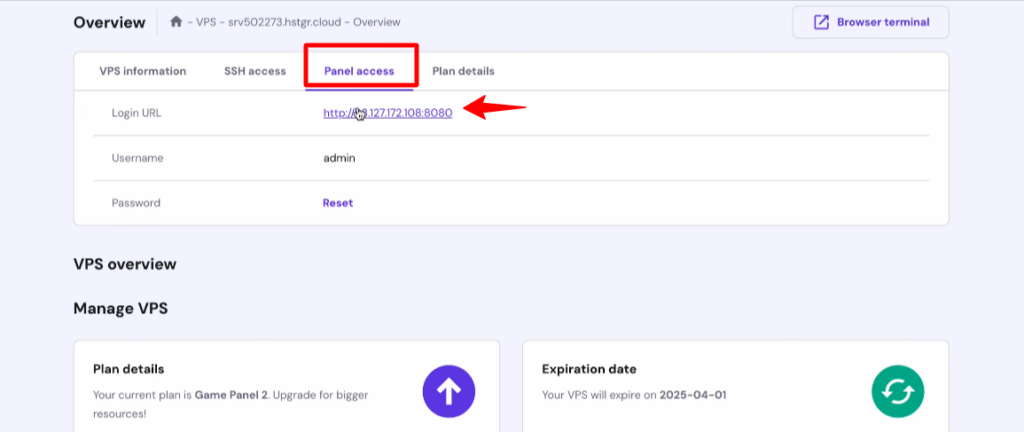
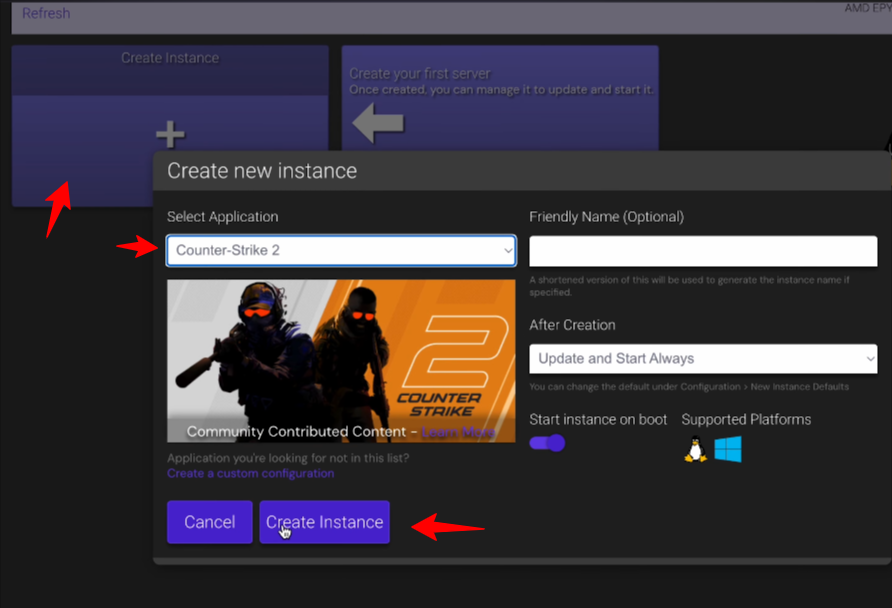
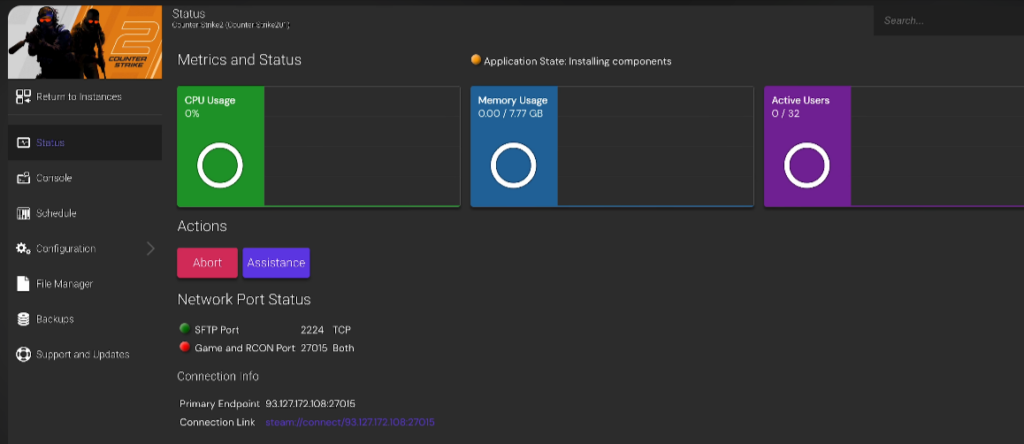
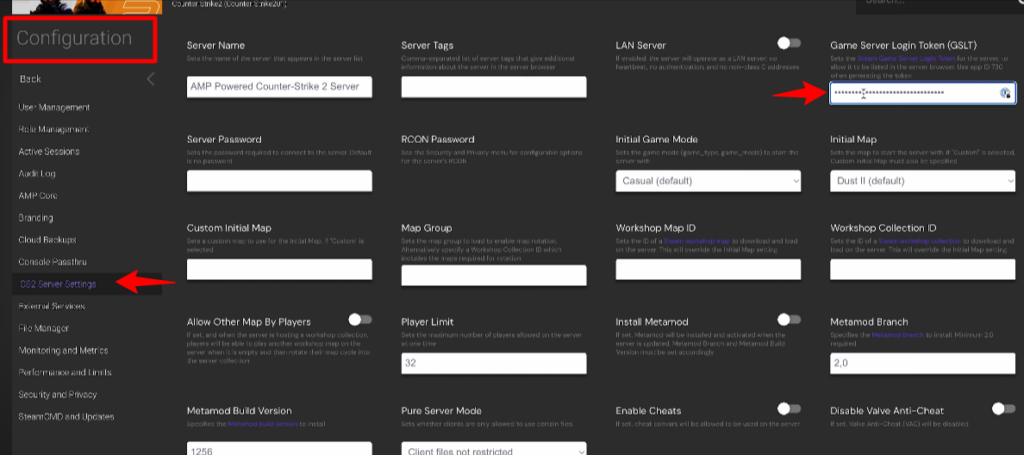
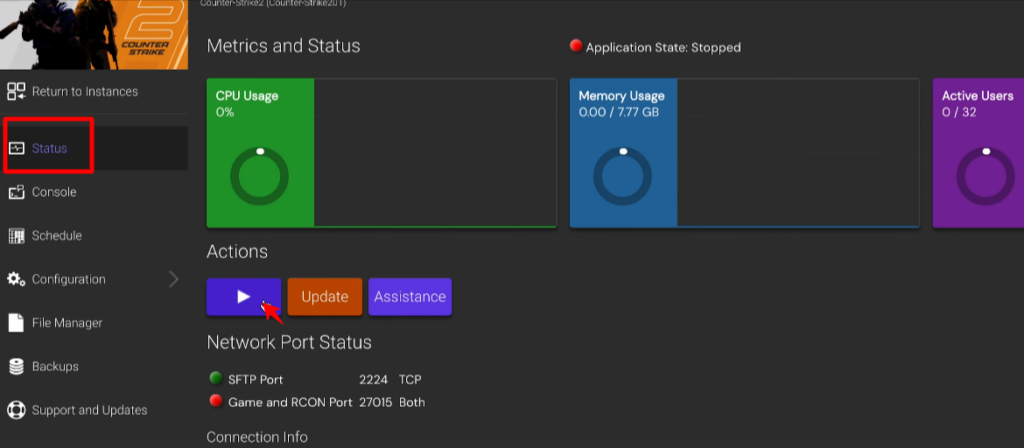
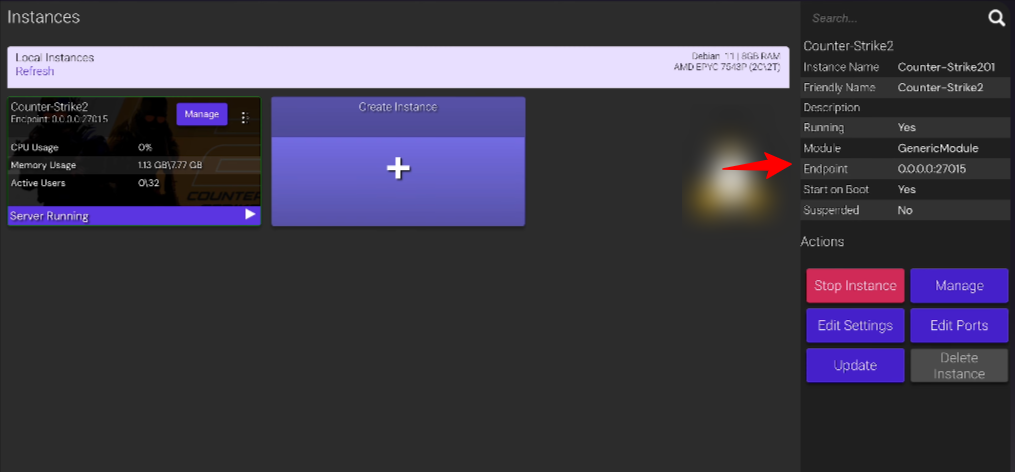
That’s all you have to do to set up a Counter-Strike 2 server. We’ve also listed the steps by which you can change server settings.
Conclusion
Gamers face a lot of problems when setting up a server, especially newbie CS 2 gamers. This wastes a lot of time and makes them unable to focus on their game.
Yes, it’s true that Counter-Strike 2 is very popular in the gaming community because it provides a realistic combat experience. But playing it on a normal hosting setup or home setups makes it frustrating as they can’t handle its graphics and high-speed changes.
That’s why many CS2 players and game streamers are turning to CS2 server hosting, as it offers high-speed processors, unlimited storage, and bandwidth, ensuring a lag-free gaming experience even during multiplayer sessions.
However, the difficult server setup process can be really boring and tiring.
That’s why we’ve listed the easiest manual method to set up a Counter-Strike 2 server. We’ve also covered the steps to modify CS2 game settings so you can set player limits, change the map and game mode, and even install mods.
Now, scroll up and read this blog till the end if you want to enjoy Counter-Strike 2!
Frequently Asked Questions
Q1: Is CS2 free to host on a dedicated server?
A: Yes, CS2 is free to host on a dedicated server. You only need to purchase a dedicated VPS to run this game smoothly.
Q2: What is the best OS for a CS2 dedicated server?
A: The best OS for a CS2 dedicated server is Windows R and Ubuntu 20.04 for Linux users.
Q3: Can I install mods or custom maps on a CS2 server?
A: Yes, you can install mods or custom maps on a CS2 server. For this, you’ll need to open your server game panel >> select configuration >> and choose server settings.
Q4: How to make a private lobby in Counter-Strike 2?
A: To create a private lobby in Counter Strike 2, open CS2 game >> and click Play >> then select Matchmaking >> and choose Private Matchmaking >> now, click Create Private Matchmaking Pool >> and copy the 6 digit code. Send this code to your friends so they can click Join Pool to join the game.
How to add CS2 server by IP?
To add a CS2 server using its IP address, first,
- Open Counter-Strike 2 >> go to the Play menu.
- Then, click on the Community Server Browser option >> then open the Favorites tab.
- From there,please click Add Server
- Enter the server’s IP address along with its port number.
Once added, the server will appear in your favorites list, and you can connect to it anytime by selecting it and clicking Join Server.
How many players can a CS2 server handle?
The number of players a CS2 server can handle totally depends on the server configuration, hardware resources and game mode. Normally, the server supports 10 players (5v5), while community servers can support 20, 32, or even more players.
Can I run multiple CS2 servers on one VPS?
Yes! You can run multiple CS2 servers on a single VPS, provided the VPS has enough CPU, RAM and bandwidth. Each server instance requires its own port number and consumes system resources. Since CS2 is CPU-intensive, especially at higher tick rates, you must ensure your VPS has strong single-core performance and enough available memory.
💡Recommended Game Server Hosting